> ## Documentation Index
> Fetch the complete documentation index at: https://docs.befailproof.ai/llms.txt
> Use this file to discover all available pages before exploring further.
# Keys and permissions
> Create scoped API keys for machines, automation, and operators.
API keys belong to an organization and carry explicit permissions. Use separate keys for agent ingestion, policy delivery, evaluators, CI automation, and administrative scripts.
## Create and rotate a key
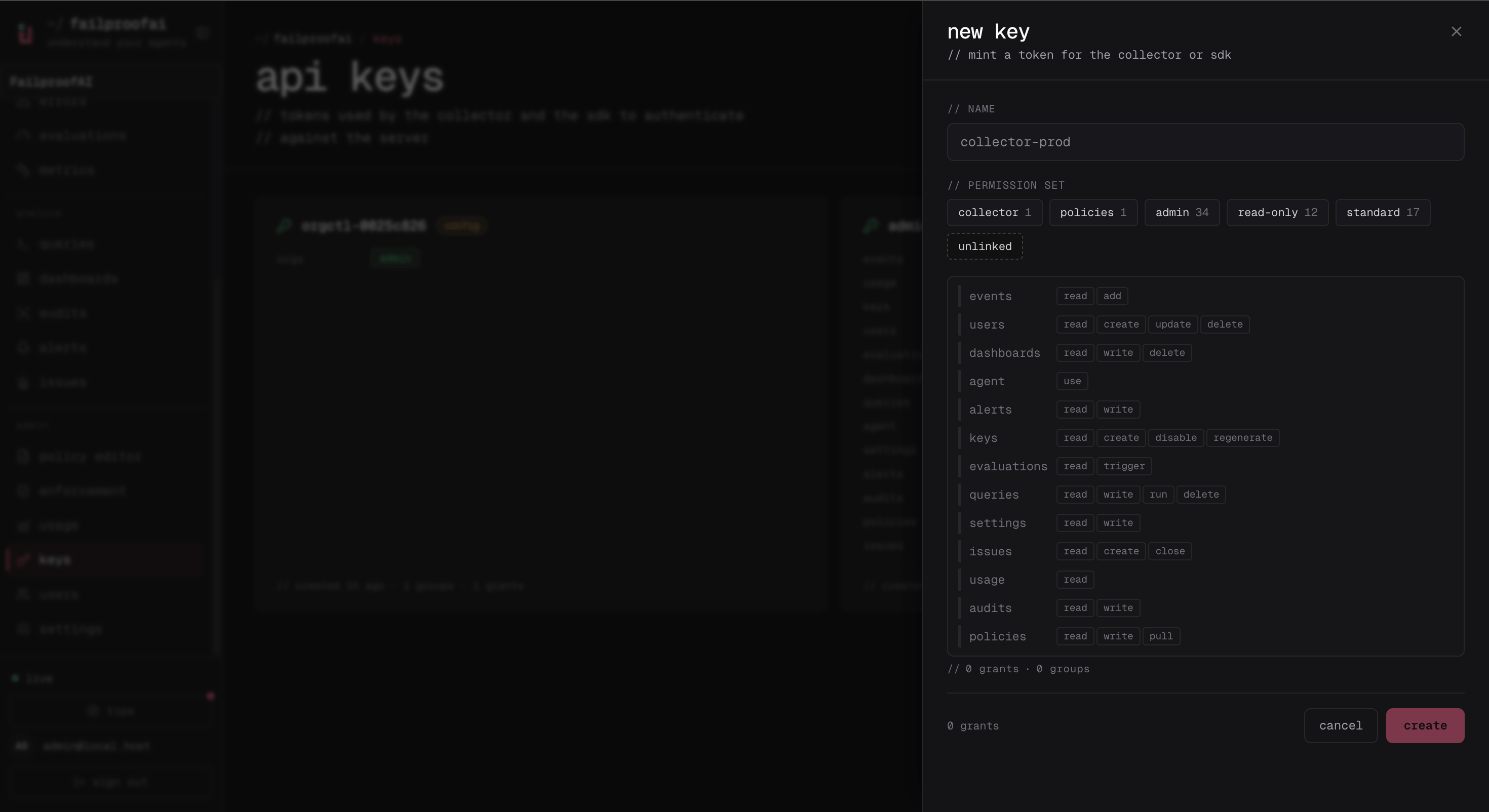
1. Go to **Administration → Keys**, select **new key**, and enter a workload name.
2. Choose a permission set and adjust individual permissions only when the preset is insufficient.
3. Create the key and copy its one-time secret immediately.
4. Open the key later to update grants, disable it, or regenerate the secret.
The creation drawer is where you choose the narrowest grants required by the workload.
 After creation, the Keys page shows the persistent metadata and management actions. The one-time secret is not shown again.
 Use this list to review grants regularly and disable keys that no longer map to an active workload.
```bash theme={null}
fp keys create production-agents \
--add events:add \
--add policies:pull
fp keys show production-agents
fp keys update production-agents --add events:read
fp keys regenerate production-agents --yes
fp keys disable production-agents
```
Redirect or capture create/regenerate output securely; the secret is returned once.
The two permissions required by a connected Failproof AI machine are independent:
* `events:add` sends events and session data.
* `policies:pull` retrieves assigned policy deployments.
Key secrets are shown when created or regenerated. Store them in a secret manager and rotate them without reusing an operator's interactive credentials.
## Permission catalog
| Area | Permissions |
| ----------- | -------------------------------------------------------------------------------------------------- |
| Events | `events:add`, `events:read` |
| Keys | `keys:create`, `keys:read`, `keys:disable`, `keys:regenerate`; `keys:update` is human-session only |
| Users | `users:create`, `users:read`, `users:update`, `users:delete` |
| Evaluations | `evaluations:read`, `evaluations:trigger` |
| Dashboards | `dashboards:read`, `dashboards:write`, `dashboards:delete` |
| Queries | `queries:read`, `queries:write`, `queries:delete`, `queries:run` |
| Assistant | `agent:use` |
| Settings | `settings:read`, `settings:write` |
| Alerts | `alerts:read`, `alerts:write` |
| Issues | `issues:read`, `issues:create`, `issues:close` |
| Audits | `audits:read`, `audits:write` |
| Policies | `policies:read`, `policies:write`, `policies:pull` |
| Usage | `usage:read` |
`orgs:admin` is reserved for the instance operator and cannot be granted to an organization key or ordinary member. Retired `incidents:*` and `alerts:ack` tokens are accepted for compatibility and normalize to current `issues:*` permissions.
Builtin permission sets are `read-only`, `standard`, and `admin`. `standard` adds evaluation triggering, query execution, issue response, and assistant use to read permissions. Key creation strips human-only grants even when a permission set contains them.
Instance-scoped keys can select an organization with the `X-AgentEye-Org` header. Set it explicitly on multi-organization deployments; omission may select the default organization.
Use this list to review grants regularly and disable keys that no longer map to an active workload.
```bash theme={null}
fp keys create production-agents \
--add events:add \
--add policies:pull
fp keys show production-agents
fp keys update production-agents --add events:read
fp keys regenerate production-agents --yes
fp keys disable production-agents
```
Redirect or capture create/regenerate output securely; the secret is returned once.
The two permissions required by a connected Failproof AI machine are independent:
* `events:add` sends events and session data.
* `policies:pull` retrieves assigned policy deployments.
Key secrets are shown when created or regenerated. Store them in a secret manager and rotate them without reusing an operator's interactive credentials.
## Permission catalog
| Area | Permissions |
| ----------- | -------------------------------------------------------------------------------------------------- |
| Events | `events:add`, `events:read` |
| Keys | `keys:create`, `keys:read`, `keys:disable`, `keys:regenerate`; `keys:update` is human-session only |
| Users | `users:create`, `users:read`, `users:update`, `users:delete` |
| Evaluations | `evaluations:read`, `evaluations:trigger` |
| Dashboards | `dashboards:read`, `dashboards:write`, `dashboards:delete` |
| Queries | `queries:read`, `queries:write`, `queries:delete`, `queries:run` |
| Assistant | `agent:use` |
| Settings | `settings:read`, `settings:write` |
| Alerts | `alerts:read`, `alerts:write` |
| Issues | `issues:read`, `issues:create`, `issues:close` |
| Audits | `audits:read`, `audits:write` |
| Policies | `policies:read`, `policies:write`, `policies:pull` |
| Usage | `usage:read` |
`orgs:admin` is reserved for the instance operator and cannot be granted to an organization key or ordinary member. Retired `incidents:*` and `alerts:ack` tokens are accepted for compatibility and normalize to current `issues:*` permissions.
Builtin permission sets are `read-only`, `standard`, and `admin`. `standard` adds evaluation triggering, query execution, issue response, and assistant use to read permissions. Key creation strips human-only grants even when a permission set contains them.
Instance-scoped keys can select an organization with the `X-AgentEye-Org` header. Set it explicitly on multi-organization deployments; omission may select the default organization.