> ## Documentation Index
> Fetch the complete documentation index at: https://docs.befailproof.ai/llms.txt
> Use this file to discover all available pages before exploring further.
# Agent context
> Tell audits what each agent must do, produce, and never do.
Agent context tells audits what each agent exists to do, what it must produce, and what it must never do. Failproof AI stores this context as one agent contract per agent.
Agent context belongs to the organization, not to one audit. You write it once per agent, and every model-backed audit whose scope includes that agent uses it.
## Add agent context
1. Go to **Analyze → audits**, select **agents**, and choose the agent ID reported by its sessions.
2. Select **add content** or **edit**.
3. Describe what the agent is for, what it must produce, what “done” means, how often it should run, and what it must never do.
4. Save the context, then return to the audit form and confirm the selected agent is shown as covered.
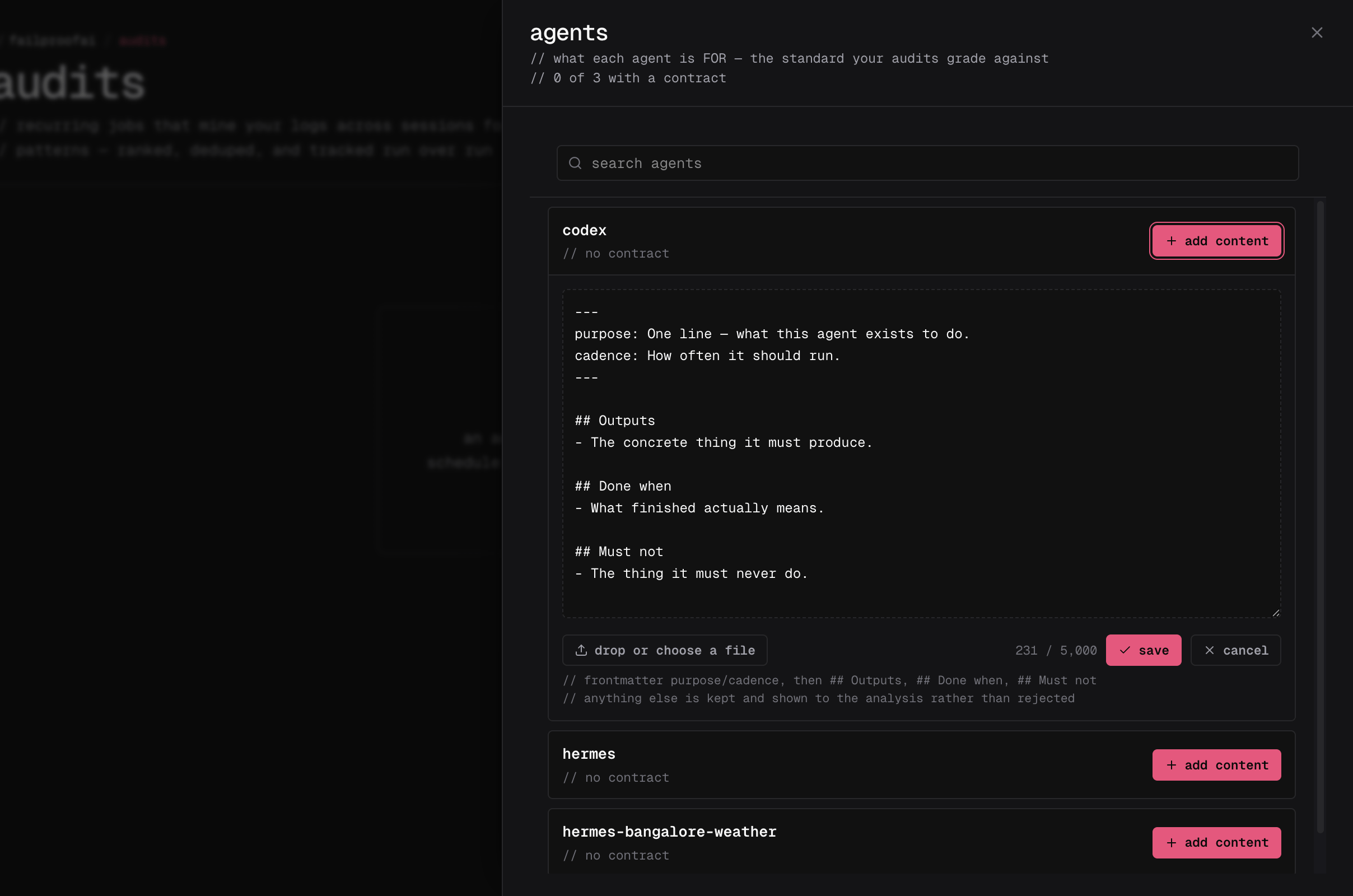 You can also add or edit agent context from the **agents** drawer while creating or editing an audit. It saves independently and is immediately available to every applicable audit.
The Cloud CLI does not yet expose contract commands. Use the public API with a key carrying `audits:read` and `audits:write`:
```bash theme={null}
curl -X POST "https://app.befailproof.ai/v1/audits/contracts" \
-H "Authorization: Bearer $FAILPROOFAI_KEY" \
-H "Content-Type: application/json" \
-d '{
"agent_id": "nightly-reconciler",
"enabled": true,
"body": "# Purpose\nReconcile yesterday’s payouts.\n\n## Outputs\nPublish a signed summary.\n\n## Must not\nNever modify ledger entries."
}'
```
List contracts with `GET /v1/audits/contracts`; retrieve one contract with `GET /v1/audits/contracts/{id}`. Updating with `PUT` is a full replacement and requires both `agent_id` and `body`.
## Write useful context
Keep the context under 5,000 characters and make it testable. Useful context normally contains:
* **Purpose:** why the agent exists
* **Outputs:** artifacts or actions it must produce
* **Done when:** the condition that makes a run successful
* **Cadence:** how often or when it should run
* **Must not:** actions and outcomes that are always unacceptable
```markdown theme={null}
---
agent: nightly-reconciler
purpose: Reconcile yesterday's payouts and publish a signed summary.
cadence: Once daily after 02:00 UTC. Never more than once.
---
## Outputs
- A signed reconciliation summary in the finance channel.
## Done when
- Every payout is matched or explicitly flagged.
## Must not
- Modify ledger entries. Report discrepancies instead.
```
Agent context states expected behavior; it cannot tell the analysis what conclusion to reach or restrict which evidence it examines. Agents without context are audited normally, but Failproof AI cannot judge their behavior against organization-specific intent.
## Pause or change agent context
* Pause agent context when audits should temporarily ignore it. Pausing is reversible.
* Edit the context when the agent's responsibility changes. The new text applies to future runs.
* Check **last matched** when a running agent never appears to use its context. This usually means its agent ID does not match telemetry.
* Delete through the API only when the text must be permanently destroyed. The dashboard intentionally offers pause instead of delete.
Every audit run stores the exact agent-context snapshot it used. Editing, pausing, or deleting the current contract resource does not rewrite the basis of earlier findings.
Reading contracts requires `audits:read`. Creating, editing, pausing, or deleting them requires `audits:write`.
You can also add or edit agent context from the **agents** drawer while creating or editing an audit. It saves independently and is immediately available to every applicable audit.
The Cloud CLI does not yet expose contract commands. Use the public API with a key carrying `audits:read` and `audits:write`:
```bash theme={null}
curl -X POST "https://app.befailproof.ai/v1/audits/contracts" \
-H "Authorization: Bearer $FAILPROOFAI_KEY" \
-H "Content-Type: application/json" \
-d '{
"agent_id": "nightly-reconciler",
"enabled": true,
"body": "# Purpose\nReconcile yesterday’s payouts.\n\n## Outputs\nPublish a signed summary.\n\n## Must not\nNever modify ledger entries."
}'
```
List contracts with `GET /v1/audits/contracts`; retrieve one contract with `GET /v1/audits/contracts/{id}`. Updating with `PUT` is a full replacement and requires both `agent_id` and `body`.
## Write useful context
Keep the context under 5,000 characters and make it testable. Useful context normally contains:
* **Purpose:** why the agent exists
* **Outputs:** artifacts or actions it must produce
* **Done when:** the condition that makes a run successful
* **Cadence:** how often or when it should run
* **Must not:** actions and outcomes that are always unacceptable
```markdown theme={null}
---
agent: nightly-reconciler
purpose: Reconcile yesterday's payouts and publish a signed summary.
cadence: Once daily after 02:00 UTC. Never more than once.
---
## Outputs
- A signed reconciliation summary in the finance channel.
## Done when
- Every payout is matched or explicitly flagged.
## Must not
- Modify ledger entries. Report discrepancies instead.
```
Agent context states expected behavior; it cannot tell the analysis what conclusion to reach or restrict which evidence it examines. Agents without context are audited normally, but Failproof AI cannot judge their behavior against organization-specific intent.
## Pause or change agent context
* Pause agent context when audits should temporarily ignore it. Pausing is reversible.
* Edit the context when the agent's responsibility changes. The new text applies to future runs.
* Check **last matched** when a running agent never appears to use its context. This usually means its agent ID does not match telemetry.
* Delete through the API only when the text must be permanently destroyed. The dashboard intentionally offers pause instead of delete.
Every audit run stores the exact agent-context snapshot it used. Editing, pausing, or deleting the current contract resource does not rewrite the basis of earlier findings.
Reading contracts requires `audits:read`. Creating, editing, pausing, or deleting them requires `audits:write`.