> ## Documentation Index
> Fetch the complete documentation index at: https://docs.befailproof.ai/llms.txt
> Use this file to discover all available pages before exploring further.
# Findings and issues
> Turn audit evidence into owned, trackable remediation work.
A finding is the audit's evidence-backed statement about a failure. An issue is the durable workflow for responding to it.
## Triage and assign the work
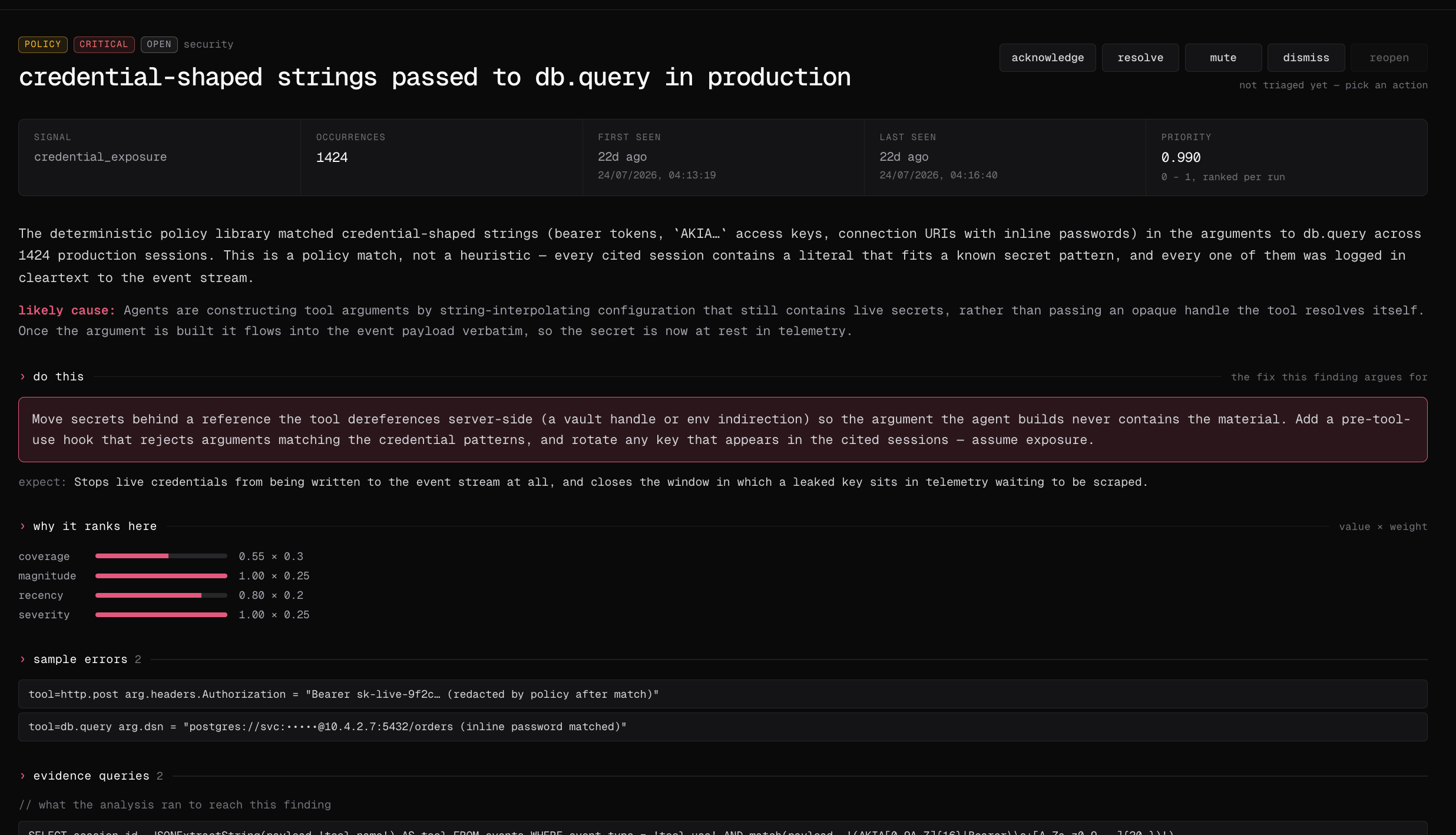
1. Open **Analyze → Audits**, choose a completed run, and select a finding to inspect its analysis, recommendation, sessions, and evidence queries.
2. Acknowledge, assign, dismiss, mute, resolve, or reopen the finding after checking its evidence.
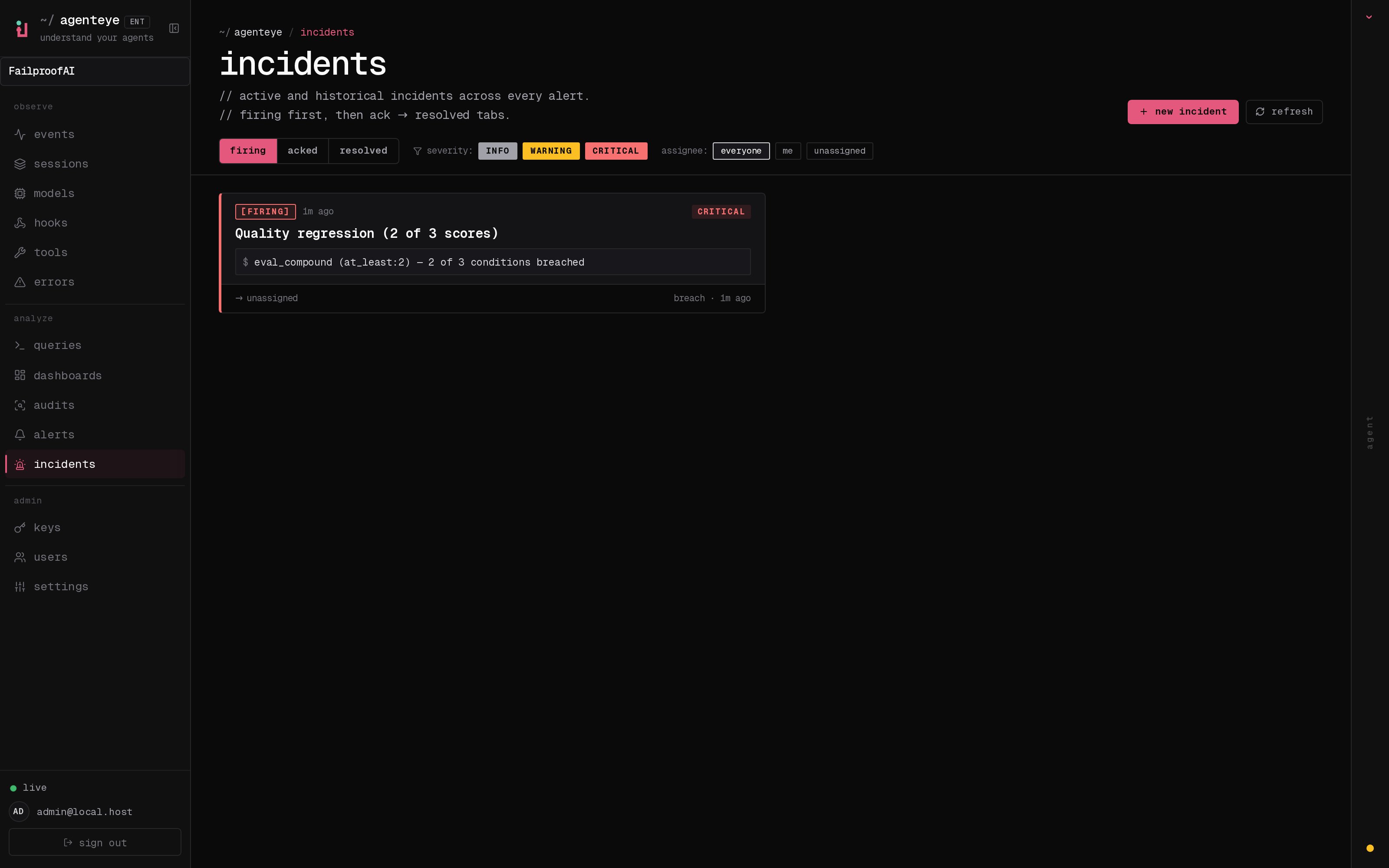
3. Go to **Analyze → Issues** and filter the durable inbox by status, severity, or assignee.
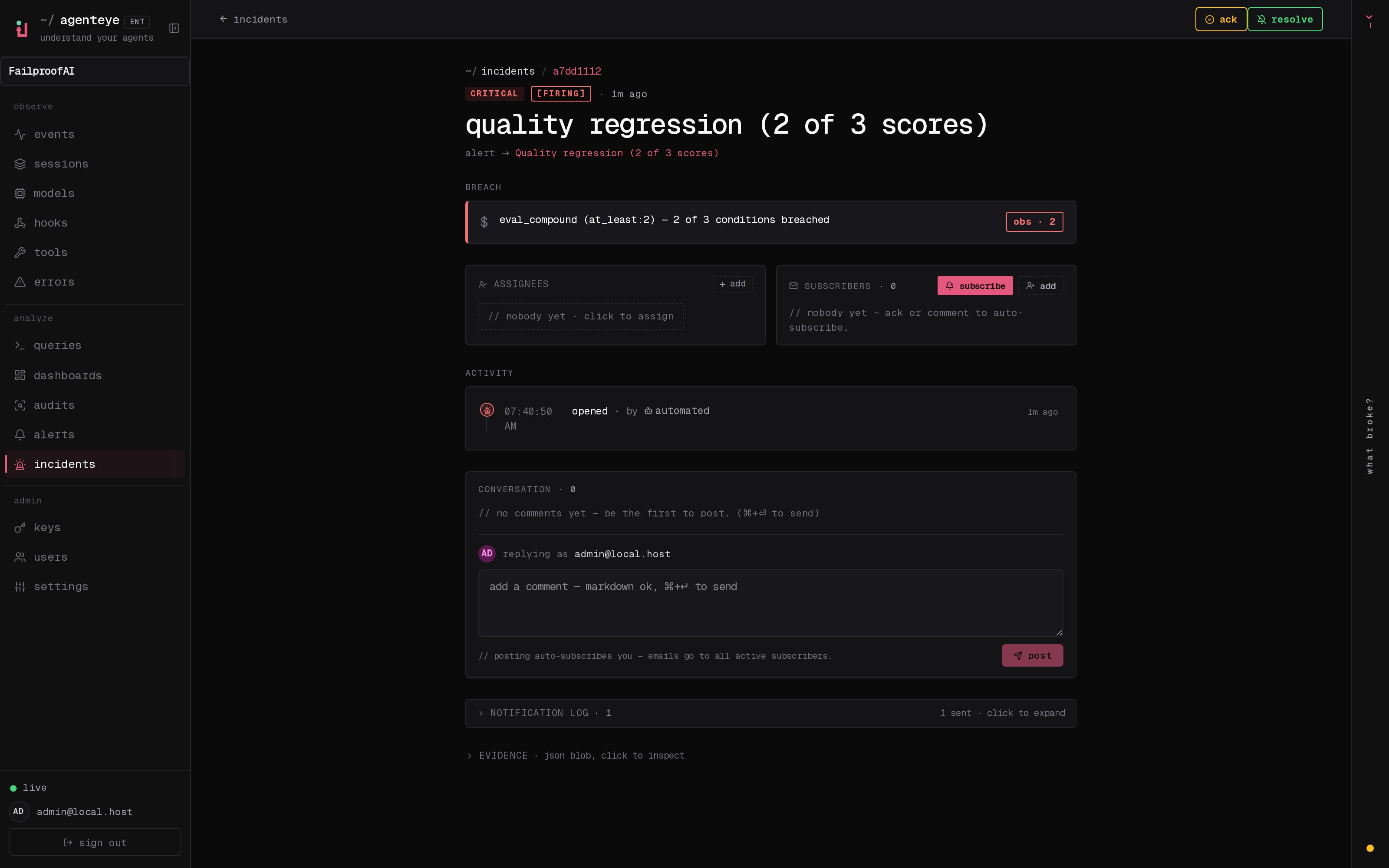
4. Open the issue to assign it, add comments or subscribers, and resolve it after the fix is verified.
Start with the finding summary. Confirm that the failure description, recommended response, severity, and ranking agree with the sessions you expected the audit to examine.
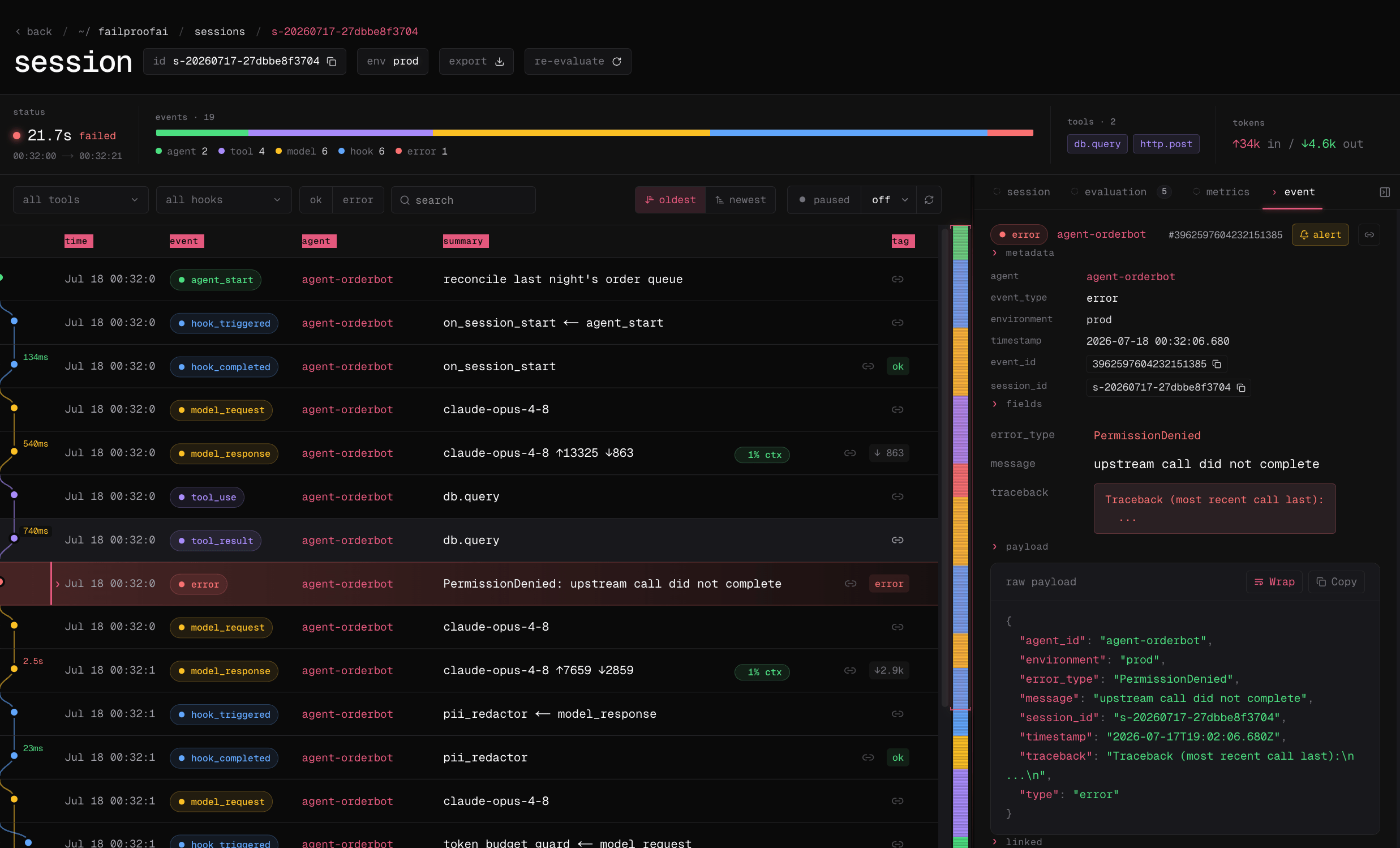
 Next, open an affected session rather than deciding from the summary alone. The linked trace should show the exact event and payload that support the finding.
 After verifying the evidence, use Issues to give the response an owner and track it independently of future audit runs.
 Open the issue to record investigation notes, notify subscribers, and preserve the response history. Resolve it only after the remediation is deployed and verified.
 ```bash theme={null}
fp audits findings --audit checkout-reliability --status open
fp audits finding
fp audits ack --reason "owner assigned"
fp audits assign --to engineer@example.com
fp issues list
fp issues show
fp issues assign --assignee engineer@example.com
fp issues comment-add --body "policy is in observe mode"
fp issues resolve --yes
```
Use `fp issues subscribe `, `fp issues unsubscribe `, and `fp issues subscribers ` to manage watchers.
See the [Cloud CLI audit and issue reference](/reference/cloud-cli#audits) for audit findings and [`fp issues`](/reference/cloud-cli#issues) for issue management.
## Review a finding
Confirm that it contains:
* A stable failure mode, not only a one-off title
* Severity and operational impact
* Affected session IDs or supporting queries
* Enough context to reproduce the behavior
* A proposed response that matches the evidence
## Use an issue to manage the response
Create or link an issue when the finding needs assignment, discussion, status changes, comments, or subscribers. Issues can also represent alert incidents and manually reported problems, which is why they live under audit response rather than in the primary navigation.
Resolve the issue when remediation is deployed and verified. Resolve the finding when the failure mode has been addressed for the audit population. Those moments may differ.
## Turn an issue into a policy draft
1. Open the issue and verify its finding, cited sessions, root cause, and recommendation.
2. Select **generate policy** and review the candidacy result and proposed enforcement intent. A **no policy** result means the behavior may require an alert, workflow change, or human response instead.
3. Select **write this policy**, then review and test the generated source in **Admin → policy editor** before selecting **publish version**. Use **open the editor anyway** when you disagree with the candidacy check.
4. Go to **Admin → enforcement**, deploy the version in **observe** mode, and verify its decisions under **Observe → policy** before enforcing it.
The issue title, finding description, root cause, recommendation, and candidacy intent help compose the draft. Nothing is published or deployed automatically.
Use the CLI to inspect the evidence before opening the issue in the dashboard:
```bash theme={null}
fp issues show
fp audits finding
fp events --session-id --full --all
```
Policy candidacy, Cloud publication, and fleet deployment are dashboard workflows. Use `failproofai policies --install --custom ` when you want to validate equivalent policy source locally first.
Convert a confirmed, repeatable action pattern into a policy version.
```bash theme={null}
fp audits findings --audit checkout-reliability --status open
fp audits finding
fp audits ack --reason "owner assigned"
fp audits assign --to engineer@example.com
fp issues list
fp issues show
fp issues assign --assignee engineer@example.com
fp issues comment-add --body "policy is in observe mode"
fp issues resolve --yes
```
Use `fp issues subscribe `, `fp issues unsubscribe `, and `fp issues subscribers ` to manage watchers.
See the [Cloud CLI audit and issue reference](/reference/cloud-cli#audits) for audit findings and [`fp issues`](/reference/cloud-cli#issues) for issue management.
## Review a finding
Confirm that it contains:
* A stable failure mode, not only a one-off title
* Severity and operational impact
* Affected session IDs or supporting queries
* Enough context to reproduce the behavior
* A proposed response that matches the evidence
## Use an issue to manage the response
Create or link an issue when the finding needs assignment, discussion, status changes, comments, or subscribers. Issues can also represent alert incidents and manually reported problems, which is why they live under audit response rather than in the primary navigation.
Resolve the issue when remediation is deployed and verified. Resolve the finding when the failure mode has been addressed for the audit population. Those moments may differ.
## Turn an issue into a policy draft
1. Open the issue and verify its finding, cited sessions, root cause, and recommendation.
2. Select **generate policy** and review the candidacy result and proposed enforcement intent. A **no policy** result means the behavior may require an alert, workflow change, or human response instead.
3. Select **write this policy**, then review and test the generated source in **Admin → policy editor** before selecting **publish version**. Use **open the editor anyway** when you disagree with the candidacy check.
4. Go to **Admin → enforcement**, deploy the version in **observe** mode, and verify its decisions under **Observe → policy** before enforcing it.
The issue title, finding description, root cause, recommendation, and candidacy intent help compose the draft. Nothing is published or deployed automatically.
Use the CLI to inspect the evidence before opening the issue in the dashboard:
```bash theme={null}
fp issues show
fp audits finding
fp events --session-id --full --all
```
Policy candidacy, Cloud publication, and fleet deployment are dashboard workflows. Use `failproofai policies --install --custom ` when you want to validate equivalent policy source locally first.
Convert a confirmed, repeatable action pattern into a policy version.