> ## Documentation Index
> Fetch the complete documentation index at: https://docs.befailproof.ai/llms.txt
> Use this file to discover all available pages before exploring further.
# Run and review an audit
> Run an audit, verify its coverage, and inspect the resulting findings.
Run an audit after its goal and population are specific enough that another operator would know what a valid finding looks like.
## Run and inspect it
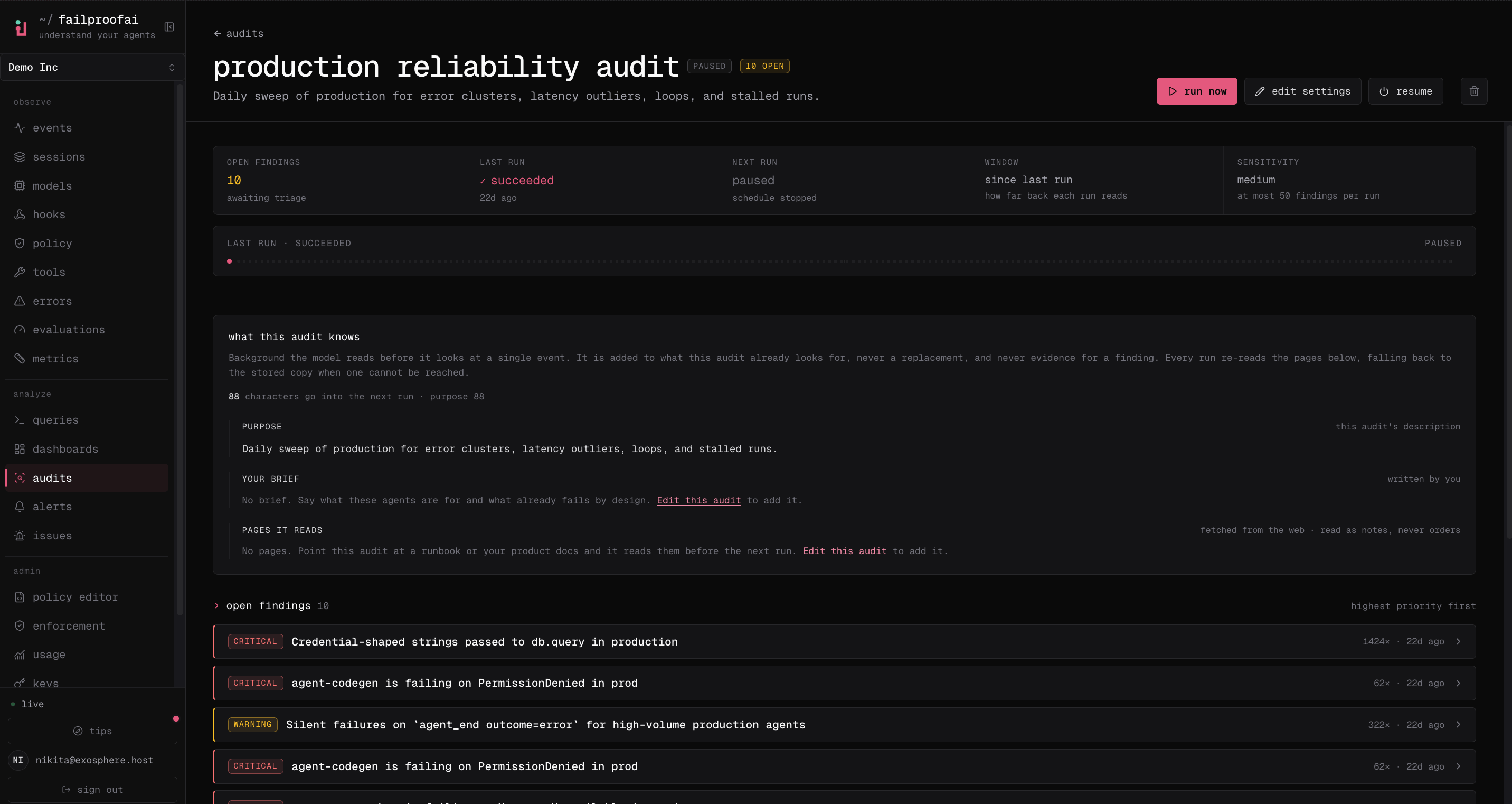
1. Go to **Analyze → Audits**, open the audit, and select **run now**. A queued response means the dispatcher will start it shortly.
2. Open the new run to review its status, window, duration, finding counts, and report.
3. Select an evidence session to open the exact trace.
4. Return to the audit page to edit settings, disable the schedule, or inspect older runs.
 ```bash theme={null}
fp audits run checkout-reliability
fp audits runs checkout-reliability --limit 10
fp --json audits runs checkout-reliability
fp audits findings --audit checkout-reliability
```
See the [`fp audits` reference](/reference/cloud-cli#audits) for run history, findings, and triage commands.
## Before you run
* Confirm sessions exist in the selected time window.
* Verify the environment and agent filters.
* Check that reference context is current.
* Make sure the goal describes a failure mode, not a desired conclusion.
## Review the run
Start with run status, session coverage, and whether model analysis ran. Then inspect each finding's severity, description, evidence sessions, supporting queries, and suggested prevention path.
Use finding status to acknowledge, mute, dismiss, resolve, reopen, or assign work. Preserve the evidence even when the finding is dismissed; it explains why the decision was made.
## Interpret an empty or delayed run
| Run condition | What it means | What to do |
| ------------------------------------------------- | ------------------------------------------------------------------------------------------------------------------------------------------------------------------------------------------------------------ | ---------------------------------------------------------------------------------------------------------------------------------------- |
| Analysis ran and produced zero findings | The selected evidence did not support a finding at the configured sensitivity. | Confirm the scope contains representative sessions, then treat the result as healthy unless the goal or context was too vague. |
| Model analysis was skipped or failed | The run completes with zero findings, but it did not perform the agentic investigation. The deterministic credential and PII scan still reports match counts in run statistics but does not create findings. | Fix the analysis service or configuration and rerun. Do not interpret the empty result as evidence that the population is healthy. |
| Model analysis is disabled | The run succeeds with zero findings. The deterministic scan does not replace model analysis or open findings. | Enable model analysis or disable the audit rather than relying on an audit that cannot produce findings. |
| No analysis capacity is immediately available | The audit remains queued and retries instead of skipping the population. | Wait for capacity or spread audit anchors. Self-hosted operators should scale the audit-agent replicas and matching dispatcher capacity. |
| Capacity remains unavailable for the retry window | The run gives up with zero findings and sends a failure notification when email delivery is available. | Check whether the audit fleet is saturated or repeatedly restarting. |
When analysis does not run, `since_last` audits keep that unanalysed window open for the next successful run. Existing findings are not retired because a skipped analysis is not evidence that the failure disappeared.
## Understand failure notifications
A failed run or failed model-analysis step uses the audit's email recipients. If the audit has no email channel, Failproof AI falls back to the organization's `alerts.email_default_recipients` setting so a silently broken audit still has an escalation path.
Email must be enabled for the organization and SMTP must be configured. Otherwise the failure is logged but no email can be delivered. Run failures do not move the audit's fixed schedule anchor.
Every run also stores the exact [agent context](/audits/agent-contracts) used for each agent as a contract snapshot. Later edits do not change the evidence standard recorded with an earlier run.
Do not deploy a blocking policy directly from an unverified finding. Open the cited traces and confirm the rule separates unsafe behavior from legitimate work.
```bash theme={null}
fp audits run checkout-reliability
fp audits runs checkout-reliability --limit 10
fp --json audits runs checkout-reliability
fp audits findings --audit checkout-reliability
```
See the [`fp audits` reference](/reference/cloud-cli#audits) for run history, findings, and triage commands.
## Before you run
* Confirm sessions exist in the selected time window.
* Verify the environment and agent filters.
* Check that reference context is current.
* Make sure the goal describes a failure mode, not a desired conclusion.
## Review the run
Start with run status, session coverage, and whether model analysis ran. Then inspect each finding's severity, description, evidence sessions, supporting queries, and suggested prevention path.
Use finding status to acknowledge, mute, dismiss, resolve, reopen, or assign work. Preserve the evidence even when the finding is dismissed; it explains why the decision was made.
## Interpret an empty or delayed run
| Run condition | What it means | What to do |
| ------------------------------------------------- | ------------------------------------------------------------------------------------------------------------------------------------------------------------------------------------------------------------ | ---------------------------------------------------------------------------------------------------------------------------------------- |
| Analysis ran and produced zero findings | The selected evidence did not support a finding at the configured sensitivity. | Confirm the scope contains representative sessions, then treat the result as healthy unless the goal or context was too vague. |
| Model analysis was skipped or failed | The run completes with zero findings, but it did not perform the agentic investigation. The deterministic credential and PII scan still reports match counts in run statistics but does not create findings. | Fix the analysis service or configuration and rerun. Do not interpret the empty result as evidence that the population is healthy. |
| Model analysis is disabled | The run succeeds with zero findings. The deterministic scan does not replace model analysis or open findings. | Enable model analysis or disable the audit rather than relying on an audit that cannot produce findings. |
| No analysis capacity is immediately available | The audit remains queued and retries instead of skipping the population. | Wait for capacity or spread audit anchors. Self-hosted operators should scale the audit-agent replicas and matching dispatcher capacity. |
| Capacity remains unavailable for the retry window | The run gives up with zero findings and sends a failure notification when email delivery is available. | Check whether the audit fleet is saturated or repeatedly restarting. |
When analysis does not run, `since_last` audits keep that unanalysed window open for the next successful run. Existing findings are not retired because a skipped analysis is not evidence that the failure disappeared.
## Understand failure notifications
A failed run or failed model-analysis step uses the audit's email recipients. If the audit has no email channel, Failproof AI falls back to the organization's `alerts.email_default_recipients` setting so a silently broken audit still has an escalation path.
Email must be enabled for the organization and SMTP must be configured. Otherwise the failure is logged but no email can be delivered. Run failures do not move the audit's fixed schedule anchor.
Every run also stores the exact [agent context](/audits/agent-contracts) used for each agent as a contract snapshot. Later edits do not change the evidence standard recorded with an earlier run.
Do not deploy a blocking policy directly from an unverified finding. Open the cited traces and confirm the rule separates unsafe behavior from legitimate work.