> ## Documentation Index
> Fetch the complete documentation index at: https://docs.befailproof.ai/llms.txt
> Use this file to discover all available pages before exploring further.
# Agent context
> audits को बताएं कि प्रत्येक agent को क्या करना है, क्या produce करना है, और कभी नहीं करना है।
Agent context audits को बताता है कि प्रत्येक agent क्यों मौजूद है, उसे क्या produce करना चाहिए, और उसे कभी नहीं करना चाहिए। Failproof AI इस context को प्रत्येक agent के लिए एक agent contract के रूप में store करता है।
Agent context organization का है, किसी एक audit का नहीं। आप इसे प्रत्येक agent के लिए एक बार लिखते हैं, और हर model-backed audit जिसके scope में वह agent है, इसका उपयोग करता है।
## Agent context जोड़ें
1. **Analyze → audits** पर जाएं, **agents** चुनें, और agent ID चुनें जो इसके sessions द्वारा रिपोर्ट किया जाता है।
2. **add content** या **edit** चुनें।
3. बताएं कि agent किसके लिए है, इसे क्या produce करना चाहिए, done होने का मतलब क्या है, यह कितनी बार चलना चाहिए, और इसे कभी नहीं करना चाहिए।
4. Context को save करें, फिर audit form पर वापस जाएं और confirm करें कि चयनित agent को covered के रूप में दिखाया जा रहा है।
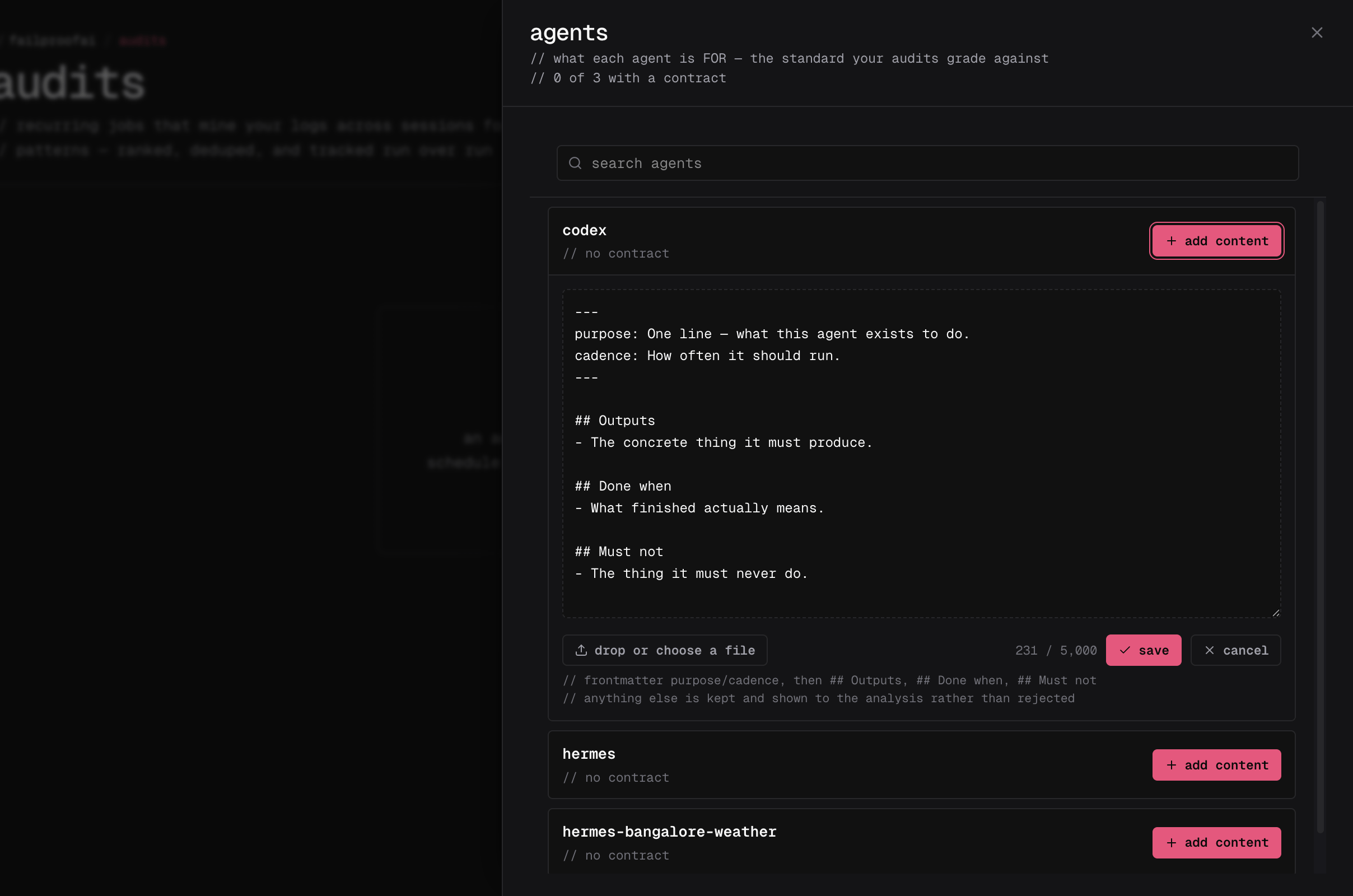 आप audit बनाते या edit करते समय **agents** drawer से भी agent context को जोड़ या edit कर सकते हैं। यह independently save होता है और तुरंत हर applicable audit के लिए उपलब्ध होता है।
Cloud CLI अभी तक contract commands को expose नहीं करता है। `audits:read` और `audits:write` वाली key के साथ public API का उपयोग करें:
```bash theme={null}
curl -X POST "https://app.befailproof.ai/v1/audits/contracts" \
-H "Authorization: Bearer $FAILPROOFAI_KEY" \
-H "Content-Type: application/json" \
-d '{
"agent_id": "nightly-reconciler",
"enabled": true,
"body": "# Purpose\nReconcile yesterday's payouts.\n\n## Outputs\nPublish a signed summary.\n\n## Must not\nNever modify ledger entries."
}'
```
`GET /v1/audits/contracts` के साथ contracts को list करें; एक contract को `GET /v1/audits/contracts/{id}` से प्राप्त करें। `PUT` के साथ update पूर्ण replacement है और `agent_id` और `body` दोनों की आवश्यकता है।
## उपयोगी context लिखें
Context को 5,000 characters से कम रखें और इसे testable बनाएं। उपयोगी context आमतौर पर शामिल करता है:
* **Purpose:** agent क्यों मौजूद है
* **Outputs:** artifacts या actions जो इसे produce करने चाहिए
* **Done when:** वह condition जो एक run को सफल बनाती है
* **Cadence:** यह कितनी बार या कब चलना चाहिए
* **Must not:** actions और outcomes जो हमेशा स्वीकार्य नहीं हैं
```markdown theme={null}
---
agent: nightly-reconciler
purpose: Reconcile yesterday's payouts and publish a signed summary.
cadence: Once daily after 02:00 UTC. Never more than once.
---
## Outputs
- A signed reconciliation summary in the finance channel.
## Done when
- Every payout is matched or explicitly flagged.
## Must not
- Modify ledger entries. Report discrepancies instead.
```
Agent context expected behavior को state करता है; यह analysis को यह नहीं बता सकता कि किस निष्कर्ष तक पहुंचना है या कौन से evidence की जांच करने को restrict कर सकता है। Context के बिना agents normally audit होते हैं, लेकिन Failproof AI उनके behavior का organization-specific intent के विरुद्ध judge नहीं कर सकता है।
## Agent context को pause या change करें
* Agent context को pause करें जब audits को temporarily इसे ignore करना चाहिए। Pausing reversible है।
* Context को edit करें जब agent की responsibility बदले। नया text भविष्य के runs पर लागू होता है।
* **last matched** की जांच करें जब एक running agent अपने context का उपयोग करने के लिए कभी प्रकट नहीं होता है। इसका आमतौर पर मतलब है कि इसका agent ID telemetry से मेल नहीं खाता है।
* API के माध्यम से केवल delete करें जब text को permanently destroy किया जाना चाहिए। Dashboard intentionally pause की पेशकश करता है न कि delete की।
हर audit run उस exact agent-context snapshot को store करता है जिसका उपयोग किया गया था। Current contract resource को edit, pause, या delete करना पहले के findings के basis को rewrite नहीं करता है।
Contracts को पढ़ने के लिए `audits:read` की आवश्यकता है। उन्हें बनाने, edit करने, pause करने, या delete करने के लिए `audits:write` की आवश्यकता है।
आप audit बनाते या edit करते समय **agents** drawer से भी agent context को जोड़ या edit कर सकते हैं। यह independently save होता है और तुरंत हर applicable audit के लिए उपलब्ध होता है।
Cloud CLI अभी तक contract commands को expose नहीं करता है। `audits:read` और `audits:write` वाली key के साथ public API का उपयोग करें:
```bash theme={null}
curl -X POST "https://app.befailproof.ai/v1/audits/contracts" \
-H "Authorization: Bearer $FAILPROOFAI_KEY" \
-H "Content-Type: application/json" \
-d '{
"agent_id": "nightly-reconciler",
"enabled": true,
"body": "# Purpose\nReconcile yesterday's payouts.\n\n## Outputs\nPublish a signed summary.\n\n## Must not\nNever modify ledger entries."
}'
```
`GET /v1/audits/contracts` के साथ contracts को list करें; एक contract को `GET /v1/audits/contracts/{id}` से प्राप्त करें। `PUT` के साथ update पूर्ण replacement है और `agent_id` और `body` दोनों की आवश्यकता है।
## उपयोगी context लिखें
Context को 5,000 characters से कम रखें और इसे testable बनाएं। उपयोगी context आमतौर पर शामिल करता है:
* **Purpose:** agent क्यों मौजूद है
* **Outputs:** artifacts या actions जो इसे produce करने चाहिए
* **Done when:** वह condition जो एक run को सफल बनाती है
* **Cadence:** यह कितनी बार या कब चलना चाहिए
* **Must not:** actions और outcomes जो हमेशा स्वीकार्य नहीं हैं
```markdown theme={null}
---
agent: nightly-reconciler
purpose: Reconcile yesterday's payouts and publish a signed summary.
cadence: Once daily after 02:00 UTC. Never more than once.
---
## Outputs
- A signed reconciliation summary in the finance channel.
## Done when
- Every payout is matched or explicitly flagged.
## Must not
- Modify ledger entries. Report discrepancies instead.
```
Agent context expected behavior को state करता है; यह analysis को यह नहीं बता सकता कि किस निष्कर्ष तक पहुंचना है या कौन से evidence की जांच करने को restrict कर सकता है। Context के बिना agents normally audit होते हैं, लेकिन Failproof AI उनके behavior का organization-specific intent के विरुद्ध judge नहीं कर सकता है।
## Agent context को pause या change करें
* Agent context को pause करें जब audits को temporarily इसे ignore करना चाहिए। Pausing reversible है।
* Context को edit करें जब agent की responsibility बदले। नया text भविष्य के runs पर लागू होता है।
* **last matched** की जांच करें जब एक running agent अपने context का उपयोग करने के लिए कभी प्रकट नहीं होता है। इसका आमतौर पर मतलब है कि इसका agent ID telemetry से मेल नहीं खाता है।
* API के माध्यम से केवल delete करें जब text को permanently destroy किया जाना चाहिए। Dashboard intentionally pause की पेशकश करता है न कि delete की।
हर audit run उस exact agent-context snapshot को store करता है जिसका उपयोग किया गया था। Current contract resource को edit, pause, या delete करना पहले के findings के basis को rewrite नहीं करता है।
Contracts को पढ़ने के लिए `audits:read` की आवश्यकता है। उन्हें बनाने, edit करने, pause करने, या delete करने के लिए `audits:write` की आवश्यकता है।