> ## Documentation Index
> Fetch the complete documentation index at: https://docs.befailproof.ai/llms.txt
> Use this file to discover all available pages before exploring further.
# policies को deploy करें
> समीक्षा की गई policy version को intended machines पर roll out करें।
एक deployment एक या अधिक policy versions को enrolled machines के target set से जोड़ता है।
## एक deployment apply करें
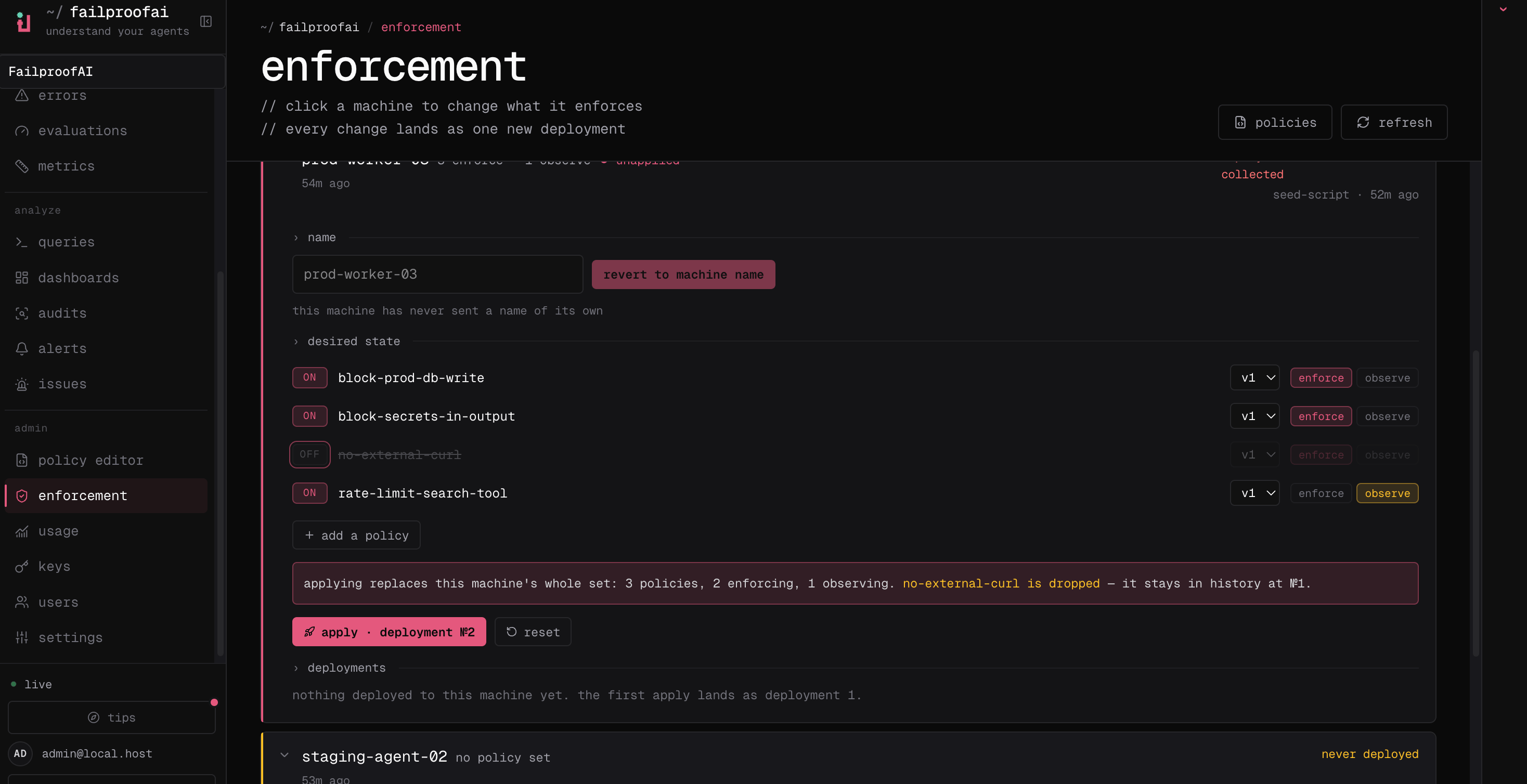
1. **Admin → enforcement** पर जाएं, machine को खोजें, और इसकी row को expand करें।
2. **edit** चुनें, समीक्षा की गई policy version जोड़ें, और **observe** या इसके enforcing effect को चुनें।
3. change को apply करें, फिर machine के अगले check-in का wait करें और deployment तथा coverage state को confirm करें।
4. **Observe → policy** पर जाएं live decisions को inspect करने के लिए।
 Cloud deployment endpoints intentionally सामान्य `fp` commands के रूप में expose नहीं किए गए हैं। Machine को locally check करें, फिर dashboard के माध्यम से deploy करें:
```bash theme={null}
failproofai config --status
```
Deployment के बाद activity को Cloud तक पहुंचने को verify करने के लिए `fp sessions --env production --since 24h` और `fp events --event-type hook_completed` का use करें।
एक समीक्षा की गई version को deploy करें, mutable draft को नहीं, एक non-production machine या छोटे cohort से शुरुआत करते हुए जिसके sessions को आप inspect कर सकें।
Matches, reasons, affected tools, और false positives को review करें बिना work को block किए।
Promote करें जब observed matches unsafe actions को valid ones से अलग करें, फिर confirm करें कि हर intended machine ने deployment को pull किया है और decisions को report कर रहा है।
Machines को `policies:pull` capability की जरूरत है। Event reporting को separately `events:add` से control किया जाता है; दोनों को verify करें जब आप Cloud analysis और enforcement की उम्मीद करते हैं।
Enforcement management एक administrative Cloud workflow है। Root-only enforcement routes को सामान्य customer `/v1` API endpoints के रूप में treat न करें।
Cloud deployment endpoints intentionally सामान्य `fp` commands के रूप में expose नहीं किए गए हैं। Machine को locally check करें, फिर dashboard के माध्यम से deploy करें:
```bash theme={null}
failproofai config --status
```
Deployment के बाद activity को Cloud तक पहुंचने को verify करने के लिए `fp sessions --env production --since 24h` और `fp events --event-type hook_completed` का use करें।
एक समीक्षा की गई version को deploy करें, mutable draft को नहीं, एक non-production machine या छोटे cohort से शुरुआत करते हुए जिसके sessions को आप inspect कर सकें।
Matches, reasons, affected tools, और false positives को review करें बिना work को block किए।
Promote करें जब observed matches unsafe actions को valid ones से अलग करें, फिर confirm करें कि हर intended machine ने deployment को pull किया है और decisions को report कर रहा है।
Machines को `policies:pull` capability की जरूरत है। Event reporting को separately `events:add` से control किया जाता है; दोनों को verify करें जब आप Cloud analysis और enforcement की उम्मीद करते हैं।
Enforcement management एक administrative Cloud workflow है। Root-only enforcement routes को सामान्य customer `/v1` API endpoints के रूप में treat न करें।