> ## Documentation Index
> Fetch the complete documentation index at: https://docs.befailproof.ai/llms.txt
> Use this file to discover all available pages before exploring further.
# 키와 권한
> 머신, 자동화, 운영자를 위한 범위가 지정된 API 키를 생성합니다.
API 키는 조직에 귀속되며 명시적인 권한을 가집니다. 에이전트 수집, 정책 배포, 평가자, CI 자동화, 관리 스크립트 각각에 별도의 키를 사용하세요.
## 키 생성 및 교체
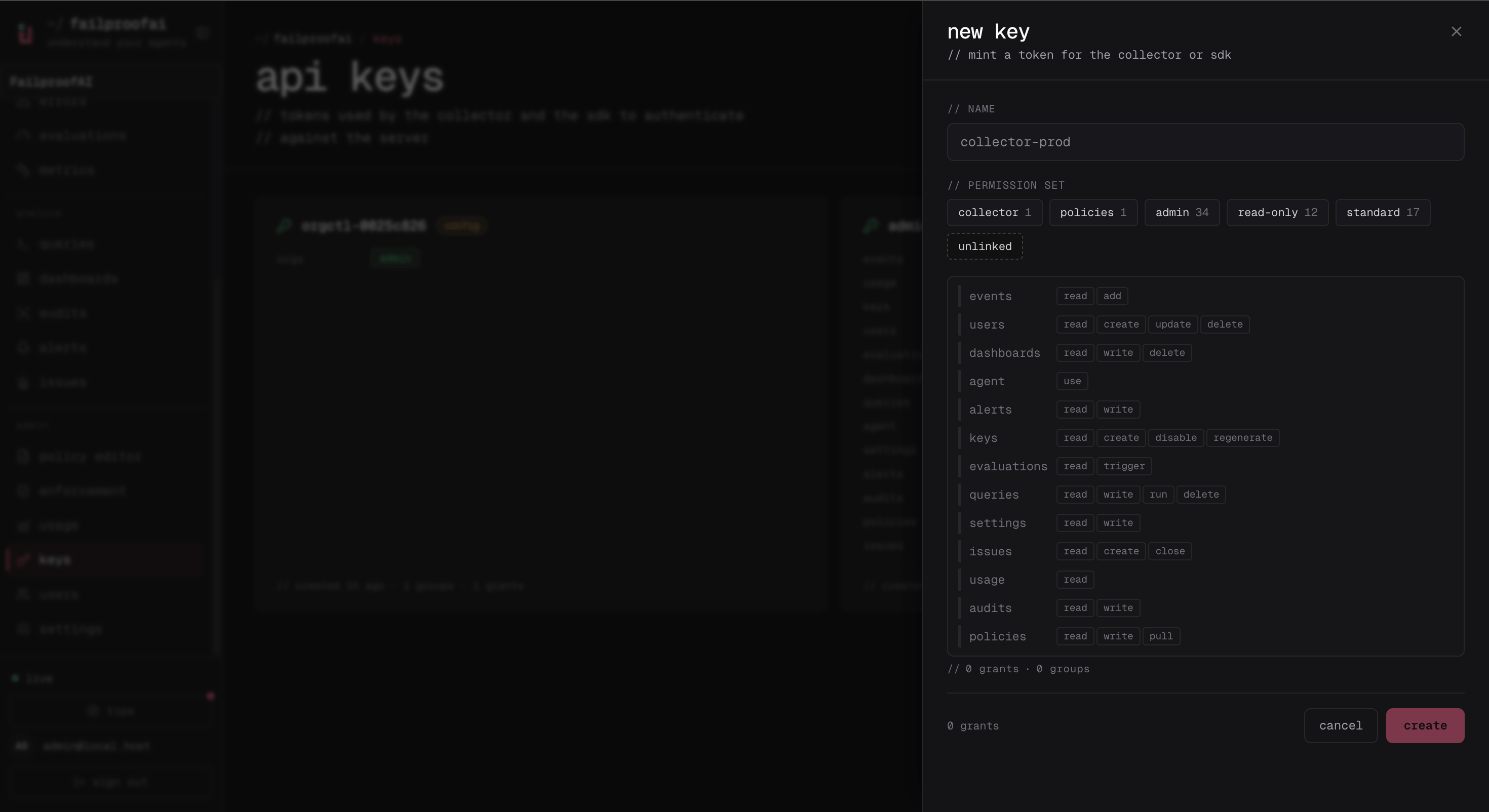
1. **Administration → Keys**로 이동하여 **new key**를 선택하고 워크로드 이름을 입력합니다.
2. 권한 세트를 선택하고, 프리셋이 충분하지 않을 때만 개별 권한을 조정합니다.
3. 키를 생성하고 일회성 시크릿을 즉시 복사합니다.
4. 나중에 키를 열어 권한을 업데이트하거나, 비활성화하거나, 시크릿을 재생성합니다.
생성 드로어에서 워크로드에 필요한 최소한의 권한을 선택합니다.
 생성 후 Keys 페이지에는 지속적인 메타데이터와 관리 작업이 표시됩니다. 일회성 시크릿은 다시 표시되지 않습니다.
 이 목록을 사용하여 권한을 정기적으로 검토하고, 활성 워크로드에 더 이상 매핑되지 않는 키는 비활성화하세요.
```bash theme={null}
fp keys create production-agents \
--add events:add \
--add policies:pull
fp keys show production-agents
fp keys update production-agents --add events:read
fp keys regenerate production-agents --yes
fp keys disable production-agents
```
생성/재생성 출력은 안전하게 리디렉션하거나 캡처하세요. 시크릿은 한 번만 반환됩니다.
연결된 Failproof AI 머신에 필요한 두 가지 권한은 독립적으로 동작합니다:
* `events:add`는 이벤트 및 세션 데이터를 전송합니다.
* `policies:pull`은 할당된 정책 배포를 가져옵니다.
키 시크릿은 생성 또는 재생성 시 표시됩니다. 시크릿 매니저에 저장하고, 운영자의 인터랙티브 자격증명을 재사용하지 않고 교체하세요.
## 권한 카탈로그
| 영역 | 권한 |
| ----------- | -------------------------------------------------------------------------------------- |
| Events | `events:add`, `events:read` |
| Keys | `keys:create`, `keys:read`, `keys:disable`, `keys:regenerate`; `keys:update`는 사람 세션 전용 |
| Users | `users:create`, `users:read`, `users:update`, `users:delete` |
| Evaluations | `evaluations:read`, `evaluations:trigger` |
| Dashboards | `dashboards:read`, `dashboards:write`, `dashboards:delete` |
| Queries | `queries:read`, `queries:write`, `queries:delete`, `queries:run` |
| Assistant | `agent:use` |
| Settings | `settings:read`, `settings:write` |
| Alerts | `alerts:read`, `alerts:write` |
| Issues | `issues:read`, `issues:create`, `issues:close` |
| Audits | `audits:read`, `audits:write` |
| Policies | `policies:read`, `policies:write`, `policies:pull` |
| Usage | `usage:read` |
`orgs:admin`은 인스턴스 운영자를 위해 예약되어 있으며 조직 키나 일반 멤버에게 부여할 수 없습니다. 더 이상 사용되지 않는 `incidents:*` 및 `alerts:ack` 토큰은 하위 호환성을 위해 수락되며 현재 `issues:*` 권한으로 정규화됩니다.
기본 제공 권한 세트는 `read-only`, `standard`, `admin`입니다. `standard`는 읽기 권한에 더해 평가 트리거, 쿼리 실행, 이슈 대응, 어시스턴트 사용을 추가합니다. 키 생성 시 권한 세트에 사람 전용 권한이 포함되어 있어도 해당 권한은 제거됩니다.
인스턴스 범위 키는 `X-AgentEye-Org` 헤더를 사용하여 조직을 선택할 수 있습니다. 멀티 조직 배포 환경에서는 명시적으로 설정하세요. 생략하면 기본 조직이 선택될 수 있습니다.
이 목록을 사용하여 권한을 정기적으로 검토하고, 활성 워크로드에 더 이상 매핑되지 않는 키는 비활성화하세요.
```bash theme={null}
fp keys create production-agents \
--add events:add \
--add policies:pull
fp keys show production-agents
fp keys update production-agents --add events:read
fp keys regenerate production-agents --yes
fp keys disable production-agents
```
생성/재생성 출력은 안전하게 리디렉션하거나 캡처하세요. 시크릿은 한 번만 반환됩니다.
연결된 Failproof AI 머신에 필요한 두 가지 권한은 독립적으로 동작합니다:
* `events:add`는 이벤트 및 세션 데이터를 전송합니다.
* `policies:pull`은 할당된 정책 배포를 가져옵니다.
키 시크릿은 생성 또는 재생성 시 표시됩니다. 시크릿 매니저에 저장하고, 운영자의 인터랙티브 자격증명을 재사용하지 않고 교체하세요.
## 권한 카탈로그
| 영역 | 권한 |
| ----------- | -------------------------------------------------------------------------------------- |
| Events | `events:add`, `events:read` |
| Keys | `keys:create`, `keys:read`, `keys:disable`, `keys:regenerate`; `keys:update`는 사람 세션 전용 |
| Users | `users:create`, `users:read`, `users:update`, `users:delete` |
| Evaluations | `evaluations:read`, `evaluations:trigger` |
| Dashboards | `dashboards:read`, `dashboards:write`, `dashboards:delete` |
| Queries | `queries:read`, `queries:write`, `queries:delete`, `queries:run` |
| Assistant | `agent:use` |
| Settings | `settings:read`, `settings:write` |
| Alerts | `alerts:read`, `alerts:write` |
| Issues | `issues:read`, `issues:create`, `issues:close` |
| Audits | `audits:read`, `audits:write` |
| Policies | `policies:read`, `policies:write`, `policies:pull` |
| Usage | `usage:read` |
`orgs:admin`은 인스턴스 운영자를 위해 예약되어 있으며 조직 키나 일반 멤버에게 부여할 수 없습니다. 더 이상 사용되지 않는 `incidents:*` 및 `alerts:ack` 토큰은 하위 호환성을 위해 수락되며 현재 `issues:*` 권한으로 정규화됩니다.
기본 제공 권한 세트는 `read-only`, `standard`, `admin`입니다. `standard`는 읽기 권한에 더해 평가 트리거, 쿼리 실행, 이슈 대응, 어시스턴트 사용을 추가합니다. 키 생성 시 권한 세트에 사람 전용 권한이 포함되어 있어도 해당 권한은 제거됩니다.
인스턴스 범위 키는 `X-AgentEye-Org` 헤더를 사용하여 조직을 선택할 수 있습니다. 멀티 조직 배포 환경에서는 명시적으로 설정하세요. 생략하면 기본 조직이 선택될 수 있습니다.