> ## Documentation Index
> Fetch the complete documentation index at: https://docs.befailproof.ai/llms.txt
> Use this file to discover all available pages before exploring further.
# Deploy policies
> Roll out a reviewed policy version to the intended machines.
A deployment connects one or more policy versions to a target set of enrolled machines.
## Apply a deployment
1. Go to **Admin → enforcement**, find the machine, and expand its row.
2. Select **edit**, add the reviewed policy version, and choose **observe** or its enforcing effect.
3. Apply the change, then wait for the machine's next check-in and confirm its deployment and coverage state.
4. Go to **Observe → policy** to inspect live decisions.
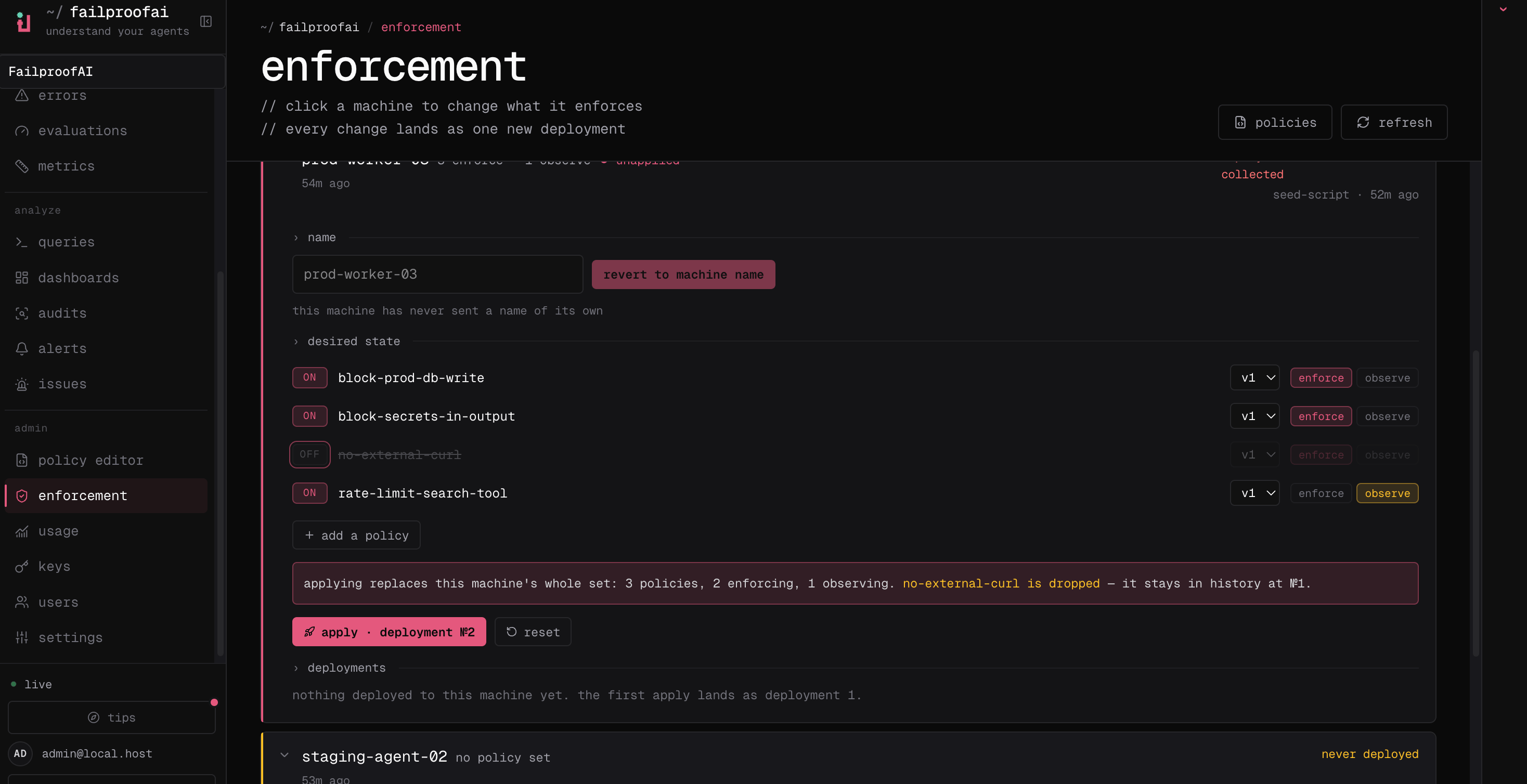 Cloud deployment endpoints are intentionally not exposed as ordinary `fp` commands. Check the machine locally, then deploy through the dashboard:
```bash theme={null}
failproofai config --status
```
Use `fp sessions --env production --since 24h` and `fp events --event-type hook_completed` after deployment to verify activity reaches Cloud.
Deploy a reviewed version, not a mutable draft, starting with a non-production machine or small cohort whose sessions you can inspect.
Review matches, reasons, affected tools, and false positives without blocking work.
Promote after observed matches separate unsafe actions from valid ones, then confirm every intended machine has pulled the deployment and is reporting decisions.
Machines need the `policies:pull` capability. Event reporting is separately controlled by `events:add`; verify both when you expect Cloud analysis and enforcement.
Enforcement management is an administrative Cloud workflow. Do not treat root-only enforcement routes as ordinary customer `/v1` API endpoints.
Cloud deployment endpoints are intentionally not exposed as ordinary `fp` commands. Check the machine locally, then deploy through the dashboard:
```bash theme={null}
failproofai config --status
```
Use `fp sessions --env production --since 24h` and `fp events --event-type hook_completed` after deployment to verify activity reaches Cloud.
Deploy a reviewed version, not a mutable draft, starting with a non-production machine or small cohort whose sessions you can inspect.
Review matches, reasons, affected tools, and false positives without blocking work.
Promote after observed matches separate unsafe actions from valid ones, then confirm every intended machine has pulled the deployment and is reporting decisions.
Machines need the `policies:pull` capability. Event reporting is separately controlled by `events:add`; verify both when you expect Cloud analysis and enforcement.
Enforcement management is an administrative Cloud workflow. Do not treat root-only enforcement routes as ordinary customer `/v1` API endpoints.