> ## Documentation Index
> Fetch the complete documentation index at: https://docs.befailproof.ai/llms.txt
> Use this file to discover all available pages before exploring further.
# Policy editor
> Create and revise versioned policies from a confirmed failure mode.
Use the policy editor to turn a finding or issue into a deployable rule. Keep authoring separate from deployment so a draft cannot silently change live behavior.
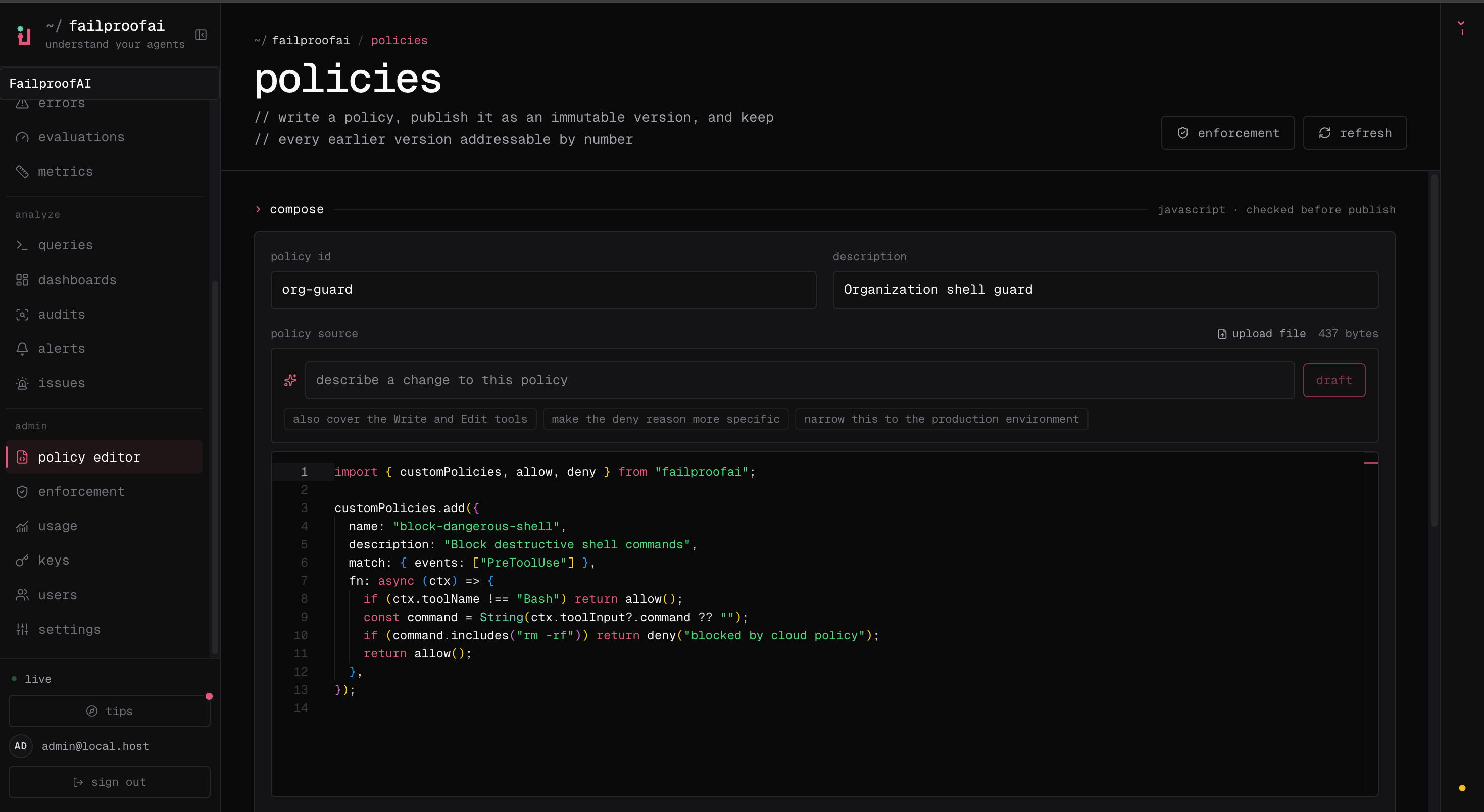
When an issue has a repeatable action pattern, open it under **Analyze → issues** and select **generate policy**. Failproof AI first explains whether a policy can express the problem, then carries the reviewed intent and finding context into the editor. The generated source remains a draft until you publish it.
## Publish a policy version
1. Go to **Admin → policy editor** and, in **compose**, describe the failure mode or paste the JavaScript policy source.
2. Validate the source and fix every reported error.
3. Enter the policy identity and publish it, then use **library** to compare or disable versions.
4. Select **enforcement** when the version is ready for a machine rollout.
 The Cloud CLI does not publish policy versions. Validate the source locally before copying it into the editor:
```bash theme={null}
failproofai policies --install --custom ./checkout.policies.ts \
--cli claude --scope project
```
Publish the reviewed version from **Admin → policy editor**.
## Authoring checklist
1. Name the failure mode in operational language.
2. Select the hook events and tools that contain enough evidence to decide.
3. Write the narrowest condition that matches unsafe behavior.
4. Return a reason that tells the agent or operator what to do next.
5. Add examples that should match and examples that must remain allowed.
6. Save a new version and request review.
Use `instruct` when the agent can safely correct course. Use `deny` when allowing the action would create unacceptable or irreversible risk.
Policy versions are immutable deployment inputs. Editing a draft creates a new version; it should not rewrite the version already assigned to machines.
The Cloud CLI does not publish policy versions. Validate the source locally before copying it into the editor:
```bash theme={null}
failproofai policies --install --custom ./checkout.policies.ts \
--cli claude --scope project
```
Publish the reviewed version from **Admin → policy editor**.
## Authoring checklist
1. Name the failure mode in operational language.
2. Select the hook events and tools that contain enough evidence to decide.
3. Write the narrowest condition that matches unsafe behavior.
4. Return a reason that tells the agent or operator what to do next.
5. Add examples that should match and examples that must remain allowed.
6. Save a new version and request review.
Use `instruct` when the agent can safely correct course. Use `deny` when allowing the action would create unacceptable or irreversible risk.
Policy versions are immutable deployment inputs. Editing a draft creates a new version; it should not rewrite the version already assigned to machines.