> ## Documentation Index
> Fetch the complete documentation index at: https://docs.befailproof.ai/llms.txt
> Use this file to discover all available pages before exploring further.
# Custom agents
> Configuration, the event catalog, correlation rules, and delivery for failproofai-sdk.
What every setting, method and field does. If you are instrumenting for the first time, start with the guide — this page is for looking things up.
Install, instrument, the event methods, a worked example, and common problems.
LangChain, CrewAI, LlamaIndex and Pydantic AI instrument themselves with one call.
Python 3.10 or newer. No runtime dependencies.
## Install
```bash theme={null}
pip install failproofai-sdk
```
The package is installed as `failproofai-sdk` and imported in Python as `failproofai_sdk`. Framework extras such as `failproofai-sdk[langgraph]` install the framework itself; the adapters always ship in the base wheel.
## Connect the Failproof daemon
1. Go to **Admin → Keys** and create a key with `events:add`.
2. [Connect the Failproof daemon to Cloud](/start/setup#connect-a-machine-to-cloud) on the agent machine.
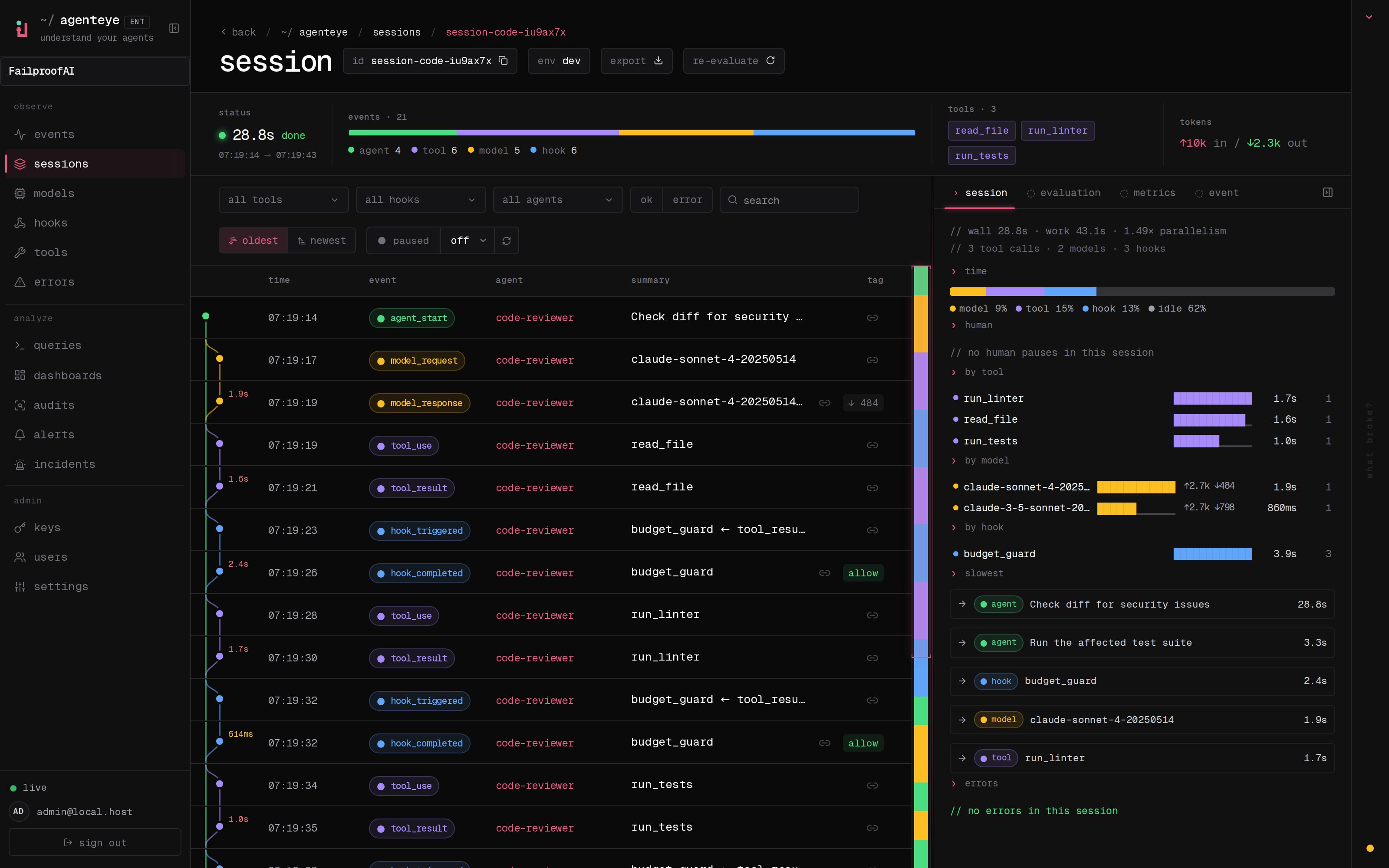
3. Run one instrumented session, then find its exact ID under **Observe → Events**.
4. Go to **Observe → Sessions**, select the same environment, and open the reconstructed trace.
 ```bash theme={null}
failproofai config \
--connect https://app.befailproof.ai \
--token
failproofai config --status
```
## Configuration
```python theme={null}
import failproofai_sdk
failproofai_sdk.configure(
base_dir=None,
flush_interval=0.5,
environment="production",
)
```
| Argument | What it does |
| ---------------- | ------------------------------------------------------------------------------------------------- |
| `environment` | The label on every event — `production`, `staging`, `prod-eu`. Defaults to `dev`. |
| `flush_interval` | How often the background thread writes to disk, in seconds. Defaults to `0.5`. |
| `base_dir` | Where to write. Defaults to the daemon's spool, which is what you want unless you know otherwise. |
Set by environment variable instead:
| Variable | What it does |
| ------------------------------------- | -------------------------------------------------------------------------------------------------------------------------------------------------- |
| `AGENTEYE_ENVIRONMENT` | Sets `environment` without a code change, for when the label belongs to the deployment rather than the app. A `configure()` argument wins over it. |
| `FAILPROOFAI_HOME` | Moves the Failproof AI root that holds the spool. |
| `FAILPROOFAI_SDK_STRICT` | `1` makes instrumentation errors raise instead of being logged. |
| `FAILPROOFAI_SDK_STRICT_INTEGRATIONS` | `1` makes a framework-compatibility problem raise instead of warning and carrying on. |
**No commas in `environment`.** Ingest splits that field on commas to build its filters, and skips any event whose label contains one — so a whole run silently vanishes. Write `prod-eu`, not `prod,eu`.
`configure(environment="prod,eu")` raises so you find out immediately. `AGENTEYE_ENVIRONMENT` cannot raise — nothing is calling you — so it warns once and falls back to `dev`.
Events are queued in memory and written in the background every `flush_interval` seconds, with a final flush at interpreter exit. A process killed outright loses whatever had not been written yet.
## Identity
Every event belongs to a session and an agent. **The scopes fill both in**, so you rarely pass them:
```python theme={null}
with failproofai_sdk.session():
with failproofai_sdk.agent("planner"):
failproofai_sdk.event.tool_use(tool_name="search", tool_call_id="c1")
```
Passing `session_id` or `agent_id` explicitly still works and wins. With neither bound nor passed, the call raises `TypeError` rather than emitting an event Cloud would quietly discard.
Identity rides on context variables. It follows `asyncio` tasks automatically, but **not** new threads — wrap a worker in `failproofai_sdk.propagate()` or its events land unattached.
## Event catalog
Fifteen methods. Most come in **pairs** — you call the opener, then the closer, and the SDK times the gap.
| | Opens | Closes |
| ---------- | ---------------- | ---------------- |
| **Agents** | `agent_start` | `agent_end` |
| | `agent_pause` | `agent_resume` |
| **Models** | `model_request` | `model_response` |
| **Tools** | `tool_use` | `tool_result` |
| **Hooks** | `hook_triggered` | `hook_completed` |
| **Humans** | `human_wait` | `human_input` |
Three stand alone: `error`, `human_pause`, `human_interrupt`.
Every method also takes `session_id` and `agent_id`, which the scopes fill in for you. Anything left as `None` is dropped rather than sent as JSON `null`, and every method returns `None`.
| Method | Required | Optional |
| ----------------- | --------------------------- | ------------------------------------------------------------------------------------------------------- |
| `agent_start` | — | `goal`, `parent_id` |
| `agent_end` | — | `outcome`, `summary` |
| `agent_pause` | `pause_id` | `reason`, `user_id` |
| `agent_resume` | `pause_id` | `reason`, `user_id` |
| `model_request` | — | `model`, `messages`, `system`, `tools`, `request_id` |
| `model_response` | — | `model`, `stop_reason`, `input_tokens`, `output_tokens`, `content`, `role`, `request_id`, `duration_ms` |
| `tool_use` | `tool_name`, `tool_call_id` | `input` |
| `tool_result` | `tool_name`, `tool_call_id` | `output`, `error` |
| `hook_triggered` | `hook_name`, `hook_id` | `trigger_event`, `input` |
| `hook_completed` | `hook_name`, `hook_id` | `outcome`, `output`, `error` |
| `error` | `error_type`, `message` | `traceback` |
| `human_wait` | `input_id` | `prompt`, `options`, `reason` |
| `human_input` | `input_id` | `response` |
| `human_pause` | — | `reason`, `user_id` |
| `human_interrupt` | — | `reason`, `user_id`, `at_step` |
To mark a run as failed, `outcome` must be one of `failed`, `error`, `timeout` or `rejected`. Anything else — including the near-miss `"failure"` — counts as a success.
## Pairing and duration
**One rule: give the closing event the same id as its opener.** That is what pairs them, and what lets the SDK time the gap.
| Pair | Matched on |
| ----------------------------------- | -------------- |
| `tool_use` → `tool_result` | `tool_call_id` |
| `hook_triggered` → `hook_completed` | `hook_id` |
| `agent_pause` → `agent_resume` | `pause_id` |
| `human_wait` → `human_input` | `input_id` |
| `model_request` → `model_response` | `request_id` |
**Do not pass `duration_ms` yourself.** The SDK measures it, and passing it raises `ValueError`.
The one exception is `model_response`, where only you know the real provider latency. Pass a whole number of milliseconds — a float raises, because the column is a 32-bit integer and would otherwise land empty.
* **Ids only need to be unique per kind, per session.** A tool call and a hook can share one; two sessions running at once can reuse the same ids without colliding.
* **They are not scoped to an agent.** A pair opened under one agent and closed under another still matches — which is the normal case in multi-agent code.
* **`request_id` is optional but recommended.** Without it, model events pair up in the order they arrive, so two concurrent calls in the same agent can mispair.
* **A pair split across processes** still matches in Cloud, but the SDK cannot time it — nothing in either process saw both halves.
* **At most 10,000 openers wait for a closer at once.** Past that the oldest is dropped, so a leak cannot grow without bound.
## Your own fields
Any extra keyword you pass is stored with the event:
```python theme={null}
failproofai_sdk.event.tool_use(
tool_name="search", tool_call_id="c1",
fw_tenant="acme", fw_region="eu-west-1", # your own
)
```
Prefer JSON types if you want to query them later. Anything else — a UUID, a datetime, a `Decimal`, a set, bytes, a model object — is stored as a string.
**Prefix your field names.** Extras are applied last, so a field called `model`, `tool_name` or `outcome` silently overwrites the real one. The framework adapters use `fw_`; do the same and nothing can collide.
This is also why a misspelled optional field never errors — it just becomes a new custom field. If a standard field is missing in Cloud, check the spelling first.
These five names are reserved and rejected outright: `timestamp`, `session_id`, `agent_id`, `type`, `environment`.
## Deliver and verify
In **Observe → Events**, verify `agent_start` exists first and `agent_end` exists last. Then open **Observe → Sessions** and confirm model, tool, human, hook, and error events appear in the intended order. Use the session ID as the primary troubleshooting key.
```bash theme={null}
failproofai flush --wait --timeout 60
failproofai config --status
fp sessions --since 1h --env production --session-id
fp events --since 1h --session-id --full
```
If Cloud is empty, inspect `$FAILPROOFAI_HOME/custom-agents/events`, otherwise `~/.failproofai/custom-agents/events`. JSONL files prove SDK emission; a growing spool points to daemon configuration or delivery, while an empty spool points to instrumentation or process lifetime.
Inspect the spool only when the daemon is stopped. While it runs, it collects and deletes each batch within milliseconds, so a directory listing races the collector and shows far fewer events than were emitted.
## Prevent failures in a custom runtime
Use audit findings and linked traces to define the unsafe action, required evidence, and intended response. A custom enforcement integration must expose the action before execution, pass its structured input to the policy engine, and apply the resulting allow, instruct, or deny decision.
[Contact Failproof AI](mailto:support@befailproof.ai) and we will help map your runtime's model, tool and lifecycle boundaries to policy hooks, then validate the integration with you.
```bash theme={null}
failproofai config \
--connect https://app.befailproof.ai \
--token
failproofai config --status
```
## Configuration
```python theme={null}
import failproofai_sdk
failproofai_sdk.configure(
base_dir=None,
flush_interval=0.5,
environment="production",
)
```
| Argument | What it does |
| ---------------- | ------------------------------------------------------------------------------------------------- |
| `environment` | The label on every event — `production`, `staging`, `prod-eu`. Defaults to `dev`. |
| `flush_interval` | How often the background thread writes to disk, in seconds. Defaults to `0.5`. |
| `base_dir` | Where to write. Defaults to the daemon's spool, which is what you want unless you know otherwise. |
Set by environment variable instead:
| Variable | What it does |
| ------------------------------------- | -------------------------------------------------------------------------------------------------------------------------------------------------- |
| `AGENTEYE_ENVIRONMENT` | Sets `environment` without a code change, for when the label belongs to the deployment rather than the app. A `configure()` argument wins over it. |
| `FAILPROOFAI_HOME` | Moves the Failproof AI root that holds the spool. |
| `FAILPROOFAI_SDK_STRICT` | `1` makes instrumentation errors raise instead of being logged. |
| `FAILPROOFAI_SDK_STRICT_INTEGRATIONS` | `1` makes a framework-compatibility problem raise instead of warning and carrying on. |
**No commas in `environment`.** Ingest splits that field on commas to build its filters, and skips any event whose label contains one — so a whole run silently vanishes. Write `prod-eu`, not `prod,eu`.
`configure(environment="prod,eu")` raises so you find out immediately. `AGENTEYE_ENVIRONMENT` cannot raise — nothing is calling you — so it warns once and falls back to `dev`.
Events are queued in memory and written in the background every `flush_interval` seconds, with a final flush at interpreter exit. A process killed outright loses whatever had not been written yet.
## Identity
Every event belongs to a session and an agent. **The scopes fill both in**, so you rarely pass them:
```python theme={null}
with failproofai_sdk.session():
with failproofai_sdk.agent("planner"):
failproofai_sdk.event.tool_use(tool_name="search", tool_call_id="c1")
```
Passing `session_id` or `agent_id` explicitly still works and wins. With neither bound nor passed, the call raises `TypeError` rather than emitting an event Cloud would quietly discard.
Identity rides on context variables. It follows `asyncio` tasks automatically, but **not** new threads — wrap a worker in `failproofai_sdk.propagate()` or its events land unattached.
## Event catalog
Fifteen methods. Most come in **pairs** — you call the opener, then the closer, and the SDK times the gap.
| | Opens | Closes |
| ---------- | ---------------- | ---------------- |
| **Agents** | `agent_start` | `agent_end` |
| | `agent_pause` | `agent_resume` |
| **Models** | `model_request` | `model_response` |
| **Tools** | `tool_use` | `tool_result` |
| **Hooks** | `hook_triggered` | `hook_completed` |
| **Humans** | `human_wait` | `human_input` |
Three stand alone: `error`, `human_pause`, `human_interrupt`.
Every method also takes `session_id` and `agent_id`, which the scopes fill in for you. Anything left as `None` is dropped rather than sent as JSON `null`, and every method returns `None`.
| Method | Required | Optional |
| ----------------- | --------------------------- | ------------------------------------------------------------------------------------------------------- |
| `agent_start` | — | `goal`, `parent_id` |
| `agent_end` | — | `outcome`, `summary` |
| `agent_pause` | `pause_id` | `reason`, `user_id` |
| `agent_resume` | `pause_id` | `reason`, `user_id` |
| `model_request` | — | `model`, `messages`, `system`, `tools`, `request_id` |
| `model_response` | — | `model`, `stop_reason`, `input_tokens`, `output_tokens`, `content`, `role`, `request_id`, `duration_ms` |
| `tool_use` | `tool_name`, `tool_call_id` | `input` |
| `tool_result` | `tool_name`, `tool_call_id` | `output`, `error` |
| `hook_triggered` | `hook_name`, `hook_id` | `trigger_event`, `input` |
| `hook_completed` | `hook_name`, `hook_id` | `outcome`, `output`, `error` |
| `error` | `error_type`, `message` | `traceback` |
| `human_wait` | `input_id` | `prompt`, `options`, `reason` |
| `human_input` | `input_id` | `response` |
| `human_pause` | — | `reason`, `user_id` |
| `human_interrupt` | — | `reason`, `user_id`, `at_step` |
To mark a run as failed, `outcome` must be one of `failed`, `error`, `timeout` or `rejected`. Anything else — including the near-miss `"failure"` — counts as a success.
## Pairing and duration
**One rule: give the closing event the same id as its opener.** That is what pairs them, and what lets the SDK time the gap.
| Pair | Matched on |
| ----------------------------------- | -------------- |
| `tool_use` → `tool_result` | `tool_call_id` |
| `hook_triggered` → `hook_completed` | `hook_id` |
| `agent_pause` → `agent_resume` | `pause_id` |
| `human_wait` → `human_input` | `input_id` |
| `model_request` → `model_response` | `request_id` |
**Do not pass `duration_ms` yourself.** The SDK measures it, and passing it raises `ValueError`.
The one exception is `model_response`, where only you know the real provider latency. Pass a whole number of milliseconds — a float raises, because the column is a 32-bit integer and would otherwise land empty.
* **Ids only need to be unique per kind, per session.** A tool call and a hook can share one; two sessions running at once can reuse the same ids without colliding.
* **They are not scoped to an agent.** A pair opened under one agent and closed under another still matches — which is the normal case in multi-agent code.
* **`request_id` is optional but recommended.** Without it, model events pair up in the order they arrive, so two concurrent calls in the same agent can mispair.
* **A pair split across processes** still matches in Cloud, but the SDK cannot time it — nothing in either process saw both halves.
* **At most 10,000 openers wait for a closer at once.** Past that the oldest is dropped, so a leak cannot grow without bound.
## Your own fields
Any extra keyword you pass is stored with the event:
```python theme={null}
failproofai_sdk.event.tool_use(
tool_name="search", tool_call_id="c1",
fw_tenant="acme", fw_region="eu-west-1", # your own
)
```
Prefer JSON types if you want to query them later. Anything else — a UUID, a datetime, a `Decimal`, a set, bytes, a model object — is stored as a string.
**Prefix your field names.** Extras are applied last, so a field called `model`, `tool_name` or `outcome` silently overwrites the real one. The framework adapters use `fw_`; do the same and nothing can collide.
This is also why a misspelled optional field never errors — it just becomes a new custom field. If a standard field is missing in Cloud, check the spelling first.
These five names are reserved and rejected outright: `timestamp`, `session_id`, `agent_id`, `type`, `environment`.
## Deliver and verify
In **Observe → Events**, verify `agent_start` exists first and `agent_end` exists last. Then open **Observe → Sessions** and confirm model, tool, human, hook, and error events appear in the intended order. Use the session ID as the primary troubleshooting key.
```bash theme={null}
failproofai flush --wait --timeout 60
failproofai config --status
fp sessions --since 1h --env production --session-id
fp events --since 1h --session-id --full
```
If Cloud is empty, inspect `$FAILPROOFAI_HOME/custom-agents/events`, otherwise `~/.failproofai/custom-agents/events`. JSONL files prove SDK emission; a growing spool points to daemon configuration or delivery, while an empty spool points to instrumentation or process lifetime.
Inspect the spool only when the daemon is stopped. While it runs, it collects and deletes each batch within milliseconds, so a directory listing races the collector and shows far fewer events than were emitted.
## Prevent failures in a custom runtime
Use audit findings and linked traces to define the unsafe action, required evidence, and intended response. A custom enforcement integration must expose the action before execution, pass its structured input to the policy engine, and apply the resulting allow, instruct, or deny decision.
[Contact Failproof AI](mailto:support@befailproof.ai) and we will help map your runtime's model, tool and lifecycle boundaries to policy hooks, then validate the integration with you.