> ## Documentation Index
> Fetch the complete documentation index at: https://docs.befailproof.ai/llms.txt
> Use this file to discover all available pages before exploring further.
# HTTP API
> Authenticate to the public Failproof AI Cloud `/v1` API and use the generated endpoint reference.
The public API is served under `/v1` on your Failproof AI dashboard origin.
## Create a key and make a request
1. Open **Administration → Keys**, select **Create key**, and choose the narrowest permission preset that covers the integration.
2. Add individual grants only when needed, create the key, and copy its one-time secret.
3. Make a test request to `/v1/sessions` and confirm the key remains active in the Keys page.
4. Rotate or disable the key from its action menu when the integration changes ownership.
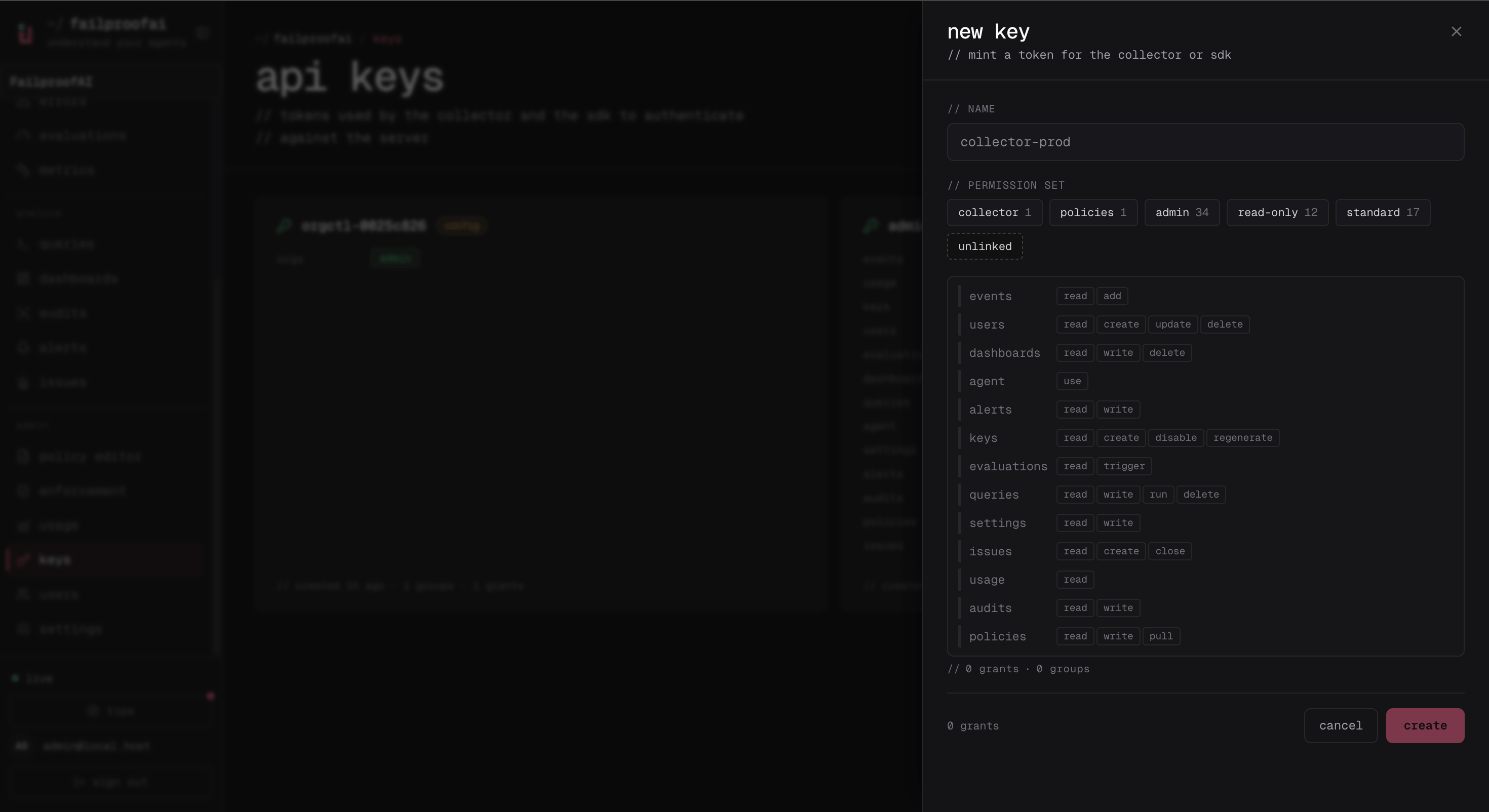 The creation drawer is shown above. The one-time secret appears only after you select **create**; copy it before closing that confirmation.
Create a read key and use it directly with either `fp` or `curl`:
```bash theme={null}
fp keys create reliability-reader \
--permission-set read-only
fp --api-key sessions --since 24h
```
```bash theme={null}
curl "https://app.befailproof.ai/v1/sessions?limit=20" \
-H "Authorization: Bearer $FAILPROOFAI_KEY"
```
Keys are scoped to an organization and permission set. A request without the endpoint's required permission returns `403` and identifies the missing permission.
## Organization selection
An organization key acts on its organization automatically. An instance-scoped key can select an organization per request:
Use the organization switcher in the dashboard header before opening **Administration → Keys**. Keys created there belong to the selected organization. Confirm the organization slug in the URL and key detail before copying the credential into automation.
Use `--org` before the command, or send the organization header for an instance-scoped API key.
```bash theme={null}
fp orgs list
fp --org reliability-team sessions --since 24h
```
```bash theme={null}
curl "https://app.befailproof.ai/v1/usage" \
-H "Authorization: Bearer $FAILPROOFAI_KEY" \
-H "X-AgentEye-Org: reliability-team"
```
Use the generated endpoint pages in this section for current paths, parameters, permission requirements, and status codes. The specification is generated from the server route annotations and checked against the `/v1` router.
The current specification has complete route, method, parameter, permission, and status-code coverage. Some response bodies remain intentionally untyped because the server still constructs them as dynamic JSON. Inspect a real response before generating a strongly typed client around an endpoint without a response schema.
Use `Content-Type: application/json` for JSON writes. Treat `401` as missing or invalid authentication, `403` as a valid identity without the required permission, `404` as a missing or organization-inaccessible resource, `409` as a state conflict, and `422` as an invalid field or permission value. Error responses include a human-readable message; permission failures also name the required grant.
Policy enforcement deployment is intentionally managed outside the ordinary public `/v1` surface. Use the supported Cloud deployment workflow.
The creation drawer is shown above. The one-time secret appears only after you select **create**; copy it before closing that confirmation.
Create a read key and use it directly with either `fp` or `curl`:
```bash theme={null}
fp keys create reliability-reader \
--permission-set read-only
fp --api-key sessions --since 24h
```
```bash theme={null}
curl "https://app.befailproof.ai/v1/sessions?limit=20" \
-H "Authorization: Bearer $FAILPROOFAI_KEY"
```
Keys are scoped to an organization and permission set. A request without the endpoint's required permission returns `403` and identifies the missing permission.
## Organization selection
An organization key acts on its organization automatically. An instance-scoped key can select an organization per request:
Use the organization switcher in the dashboard header before opening **Administration → Keys**. Keys created there belong to the selected organization. Confirm the organization slug in the URL and key detail before copying the credential into automation.
Use `--org` before the command, or send the organization header for an instance-scoped API key.
```bash theme={null}
fp orgs list
fp --org reliability-team sessions --since 24h
```
```bash theme={null}
curl "https://app.befailproof.ai/v1/usage" \
-H "Authorization: Bearer $FAILPROOFAI_KEY" \
-H "X-AgentEye-Org: reliability-team"
```
Use the generated endpoint pages in this section for current paths, parameters, permission requirements, and status codes. The specification is generated from the server route annotations and checked against the `/v1` router.
The current specification has complete route, method, parameter, permission, and status-code coverage. Some response bodies remain intentionally untyped because the server still constructs them as dynamic JSON. Inspect a real response before generating a strongly typed client around an endpoint without a response schema.
Use `Content-Type: application/json` for JSON writes. Treat `401` as missing or invalid authentication, `403` as a valid identity without the required permission, `404` as a missing or organization-inaccessible resource, `409` as a state conflict, and `422` as an invalid field or permission value. Error responses include a human-readable message; permission failures also name the required grant.
Policy enforcement deployment is intentionally managed outside the ordinary public `/v1` surface. Use the supported Cloud deployment workflow.