> ## Documentation Index
> Fetch the complete documentation index at: https://docs.befailproof.ai/llms.txt
> Use this file to discover all available pages before exploring further.
# Custom policies
> Author, test, and deploy JavaScript or TypeScript policies for failures specific to your agents.
Custom policies turn a failure pattern from your traces or audits into a decision that runs while an agent works. A policy can allow an action, give the agent guidance, or deny the action before it causes another incident.
Use a custom policy when the behavior depends on your tools, paths, commands, environments, or operating rules. Check the [built-in policy catalog](/policies/builtin-catalog) first so you do not recreate an existing control.
## Author a custom policy
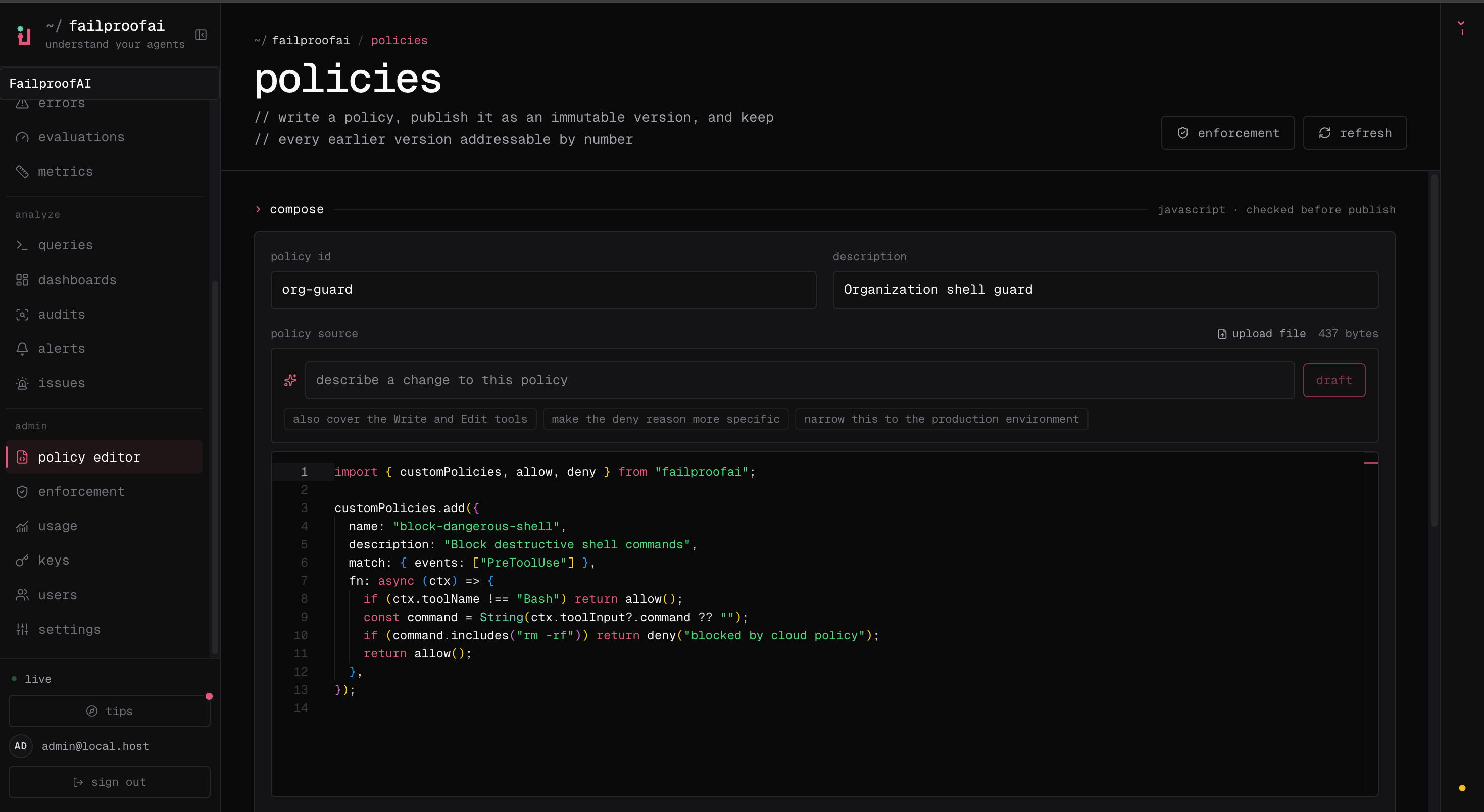
1. Go to **Admin → policy editor**, select **New policy**, and describe the failure you want to prevent.
2. Add the policy source, then test expected matches and safe non-matches in the editor. Resolve every validation error.
3. Save the draft and select **Publish version** to create an immutable version.
4. Go to **Admin → enforcement**, deploy the version to a test machine in **observe** mode, and verify its decisions under **Observe → policy** before enforcing it.
 1. Create `.failproofai/policies/checkout-policies.ts`. The filename must end in `policies.js`, `policies.mjs`, or `policies.ts`.
2. Register one or more policies with `customPolicies.add()`.
3. Validate and install the file with `failproofai policies --install --custom ./.failproofai/policies/checkout-policies.ts --scope project`.
4. Trigger one matching action and one safe action. Run `failproofai policies`, then inspect the attributed decisions under **Observe → policy**.
## Start with a narrow rule
This policy blocks destructive Kubernetes commands only when the command targets production. Everything outside that exact failure mode returns `allow()`.
```ts theme={null}
import { customPolicies, allow, deny } from "failproofai";
const DESTRUCTIVE_KUBECTL = /\bkubectl\s+(delete|replace)\b/i;
const PRODUCTION_TARGET = /(?:--context|--namespace|-n)\s+(prod|production)\b/i;
customPolicies.add({
name: "block-destructive-production-kubectl",
description: "Block destructive Kubernetes commands against production",
match: { events: ["PreToolUse"] },
fn: async ({ toolName, toolInput }) => {
if (toolName !== "Bash") return allow();
const command = String(toolInput?.command ?? "");
if (!DESTRUCTIVE_KUBECTL.test(command)) return allow();
if (!PRODUCTION_TARGET.test(command)) return allow();
return deny(
"Destructive production Kubernetes commands require the approved deployment workflow.",
);
},
});
```
Good policies are narrow enough to explain in one sentence. Match the observable action—not the intent you hope the agent had—and return `allow()` as soon as the rule does not apply.
## Choose a decision
| Helper | Result | Use it when |
| ------------------ | --------------------------------------------------------------------- | ------------------------------------------------------------------------------------ |
| `allow(reason?)` | The operation continues. | The policy does not apply or the action is safe. |
| `instruct(reason)` | The operation continues with guidance where the harness supports it. | You want to steer the agent toward a better approach without enforcing an invariant. |
| `deny(reason)` | The operation is blocked when the event and harness support blocking. | The action must not proceed. |
Write the reason for the agent that must recover. Explain what was detected and what it should do instead.
Do not use `instruct()` for a safety boundary. Guidance delivery varies by agent harness. Use `deny()` when the action must be prevented.
## Policy object
```ts theme={null}
customPolicies.add({
name: "policy-name",
description: "What this policy prevents",
match: { events: ["PreToolUse"] },
fn: async (ctx) => allow(),
});
```
| Field | Required | Description |
| -------------- | -------- | ------------------------------------------------------------------------------------------- |
| `name` | Yes | Stable identifier for the policy. Keep names unique across files. |
| `description` | No | Human-readable purpose shown in policy listings and decisions. |
| `match.events` | No | Event types that invoke the policy. Omitting `match` invokes it for every available event. |
| `fn` | Yes | Synchronous or asynchronous function that returns an `allow`, `instruct`, or `deny` result. |
Filter tools inside `fn`. `match.toolNames` is not part of the public custom-policy type.
## Policy context
Every policy receives a `PolicyContext`.
| Field | Type | What it contains |
| ----------- | -------------------------------------- | ----------------------------------------------------------------------------------------------------- |
| `eventType` | `HookEventType` | Normalized event currently being evaluated. |
| `toolName` | `string \| undefined` | Canonical tool name such as `Bash`, `Read`, `Write`, or `Edit`. |
| `toolInput` | `Record \| undefined` | Canonical input for the current tool call. |
| `payload` | `Record` | Complete normalized event payload. |
| `session` | `SessionMetadata \| undefined` | Session ID, working directory, transcript path, permission mode, and harness metadata when available. |
| `cli` | `string \| undefined` | Source agent harness, such as `claude`, `codex`, or `cursor`. |
| `params` | `Record` | Built-in policy parameters. Custom policies currently receive an empty object. |
Treat every optional value as genuinely optional. Agent versions and event types do not all provide the same fields.
### Common tool inputs
Failproof AI normalizes common tools across supported harnesses so a policy can usually use one input shape.
| Tool | Common fields |
| ------- | --------------------------------------- |
| `Bash` | `command` |
| `Read` | `file_path` |
| `Write` | `file_path`, `content` |
| `Edit` | `file_path`, `old_string`, `new_string` |
| `Grep` | `pattern`, `path` |
Use defensive coercion because tool input values are typed as `unknown`:
```ts theme={null}
const command = String(ctx.toolInput?.command ?? "");
const filePath = String(ctx.toolInput?.file_path ?? "");
```
## Choose the event
| Event | When it runs | Typical use |
| ----------------------------- | ------------------------------------ | ---------------------------------------------------------------------------------------------------------------- |
| `PreToolUse` | Before a tool executes. | Block or guide commands, writes, reads, and external actions. |
| `PostToolUse` | After a tool returns. | Inspect results before they reach the agent. A deny blocks the whole result; it does not redact selected fields. |
| `PermissionRequest` | When the agent requests permission. | Apply organization-specific permission rules. |
| `UserPromptSubmit` | Before a submitted prompt continues. | Reject prohibited instructions or add workflow guidance. |
| `Stop` | When the agent attempts to finish. | Require a reachable completion condition, such as a local verification step. |
| `SubagentStop` | When a subagent attempts to finish. | Gate delegated work before it returns to the parent. |
| `SessionStart` / `SessionEnd` | At session boundaries. | Record or check session-level state. |
Event availability and blocking behavior depend on the agent harness. See [Agent harnesses](/reference/harnesses) before relying on an event across a mixed fleet.
`SessionStart`, `SessionEnd`, `UserPromptSubmit`, `PreToolUse`, `PermissionRequest`, `PermissionDenied`, `PostToolUse`, `PostToolUseFailure`, `Notification`, `SubagentStart`, `SubagentStop`, `TaskCreated`, `TaskCompleted`, `Stop`, `StopFailure`, `TeammateIdle`, `InstructionsLoaded`, `ConfigChange`, `CwdChanged`, `FileChanged`, `WorktreeCreate`, `WorktreeRemove`, `PreCompact`, `PostCompact`, `Elicitation`, `ElicitationResult`, `UserPromptExpansion`, `PostToolBatch`, and `Setup`.
## Author common policy patterns
### Block writes to protected paths
```ts theme={null}
import { customPolicies, allow, deny } from "failproofai";
customPolicies.add({
name: "block-generated-file-edits",
description: "Require generated files to be changed through their generator",
match: { events: ["PreToolUse"] },
fn: async (ctx) => {
if (!["Write", "Edit"].includes(ctx.toolName ?? "")) return allow();
const filePath = String(ctx.toolInput?.file_path ?? "");
if (!/(^|\/)(dist|generated)\//.test(filePath)) return allow();
return deny("Edit the source and run the generator instead of changing generated output.");
},
});
```
### Give non-blocking guidance
```ts theme={null}
import { customPolicies, allow, instruct } from "failproofai";
customPolicies.add({
name: "prefer-reviewed-deploy-command",
description: "Guide agents toward the reviewed deployment wrapper",
match: { events: ["PreToolUse"] },
fn: async (ctx) => {
if (ctx.toolName !== "Bash") return allow();
const command = String(ctx.toolInput?.command ?? "");
if (!/^kubectl\s+apply\b/.test(command.trim())) return allow();
return instruct("Use ./scripts/deploy-reviewed instead of invoking kubectl directly.");
},
});
```
### Gate session completion
```ts theme={null}
import { execFileSync } from "node:child_process";
import { customPolicies, allow, deny } from "failproofai";
customPolicies.add({
name: "require-clean-typecheck",
description: "Require the project typecheck to pass before the agent finishes",
match: { events: ["Stop"] },
fn: async (ctx) => {
const cwd = ctx.session?.cwd;
if (!cwd) return allow();
try {
execFileSync("bunx", ["tsc", "--noEmit"], {
cwd,
stdio: "ignore",
timeout: 8_000,
});
return allow();
} catch {
return deny("Fix the typecheck errors before finishing the task.");
}
},
});
```
A denied `Stop` event can make the agent retry. Only gate on a condition the agent can satisfy in the current environment, and bound every subprocess or network call.
## Load policy files
### Convention files
Convention files load automatically:
```text theme={null}
/.failproofai/policies/security-policies.ts
~/.failproofai/policies/personal-policies.mjs
```
* Project and user policy directories are both loaded.
* Files load alphabetically within each directory.
* A file must end in `policies.js`, `policies.mjs`, or `policies.ts`.
* Multiple `customPolicies.add()` calls in one file are supported.
* Relative imports from local modules are supported.
* Project policies can be committed so the same rules follow the repository.
### Explicit files
Use explicit paths when validation or configuration should name the entry file directly:
```bash theme={null}
failproofai policies --install \
--custom ./security.policies.ts \
--custom ./workflow.policies.ts \
--scope project
```
Explicit files load first, followed by project convention files and then user convention files. A file discovered through both paths is loaded once.
## Validate and test
Validation executes the module through the production loader and confirms that it registers at least one policy.
```bash theme={null}
failproofai policies --install \
--custom ./.failproofai/policies/checkout-policies.ts \
--scope project
failproofai policies
```
Validation catches missing files, syntax errors, unresolved imports, top-level exceptions, and module-load timeouts. It does not prove that your match logic is correct.
Test at least these cases:
* One action that must match and produce the intended policy reason.
* One nearby but safe action that must return `allow()`.
* Missing or malformed tool fields.
* Alternate command syntax, paths, quoting, casing, and whitespace.
* An unavailable subprocess or network dependency.
Attribute the result to your custom policy under **Observe → policy**. A blocked test is not sufficient if a different built-in policy made the decision.
## Runtime behavior
* Built-in policies evaluate before custom policies.
* The first `deny` stops further policy evaluation.
* Multiple `instruct` results can be combined when no policy denies the event.
* A policy function has a 10-second execution deadline.
* A thrown exception or timeout is logged and treated as `allow()`.
* A convention file that fails to load is skipped; other custom files and built-in policies continue.
* Top-level module loading also has a 10-second deadline.
* Cloud observe mode runs the policy but records a non-allow decision without enforcing it.
Keep policy modules deterministic and quick. Avoid top-level network calls or server startup. Bound work inside `fn`, catch dependency failures, and choose deliberately whether that failure should allow or deny the operation.
## API exports
| Export | Purpose |
| ---------------------------- | ---------------------------------------------------------------- |
| `customPolicies.add(policy)` | Register a custom policy when the module loads. |
| `allow(reason?)` | Permit the operation. |
| `instruct(reason)` | Permit the operation and provide guidance where supported. |
| `deny(reason)` | Block the operation where supported. |
| `getCustomHooks()` | Return the policies currently registered in the module registry. |
| `clearCustomHooks()` | Clear that registry, primarily for tests and loaders. |
TypeScript exports `PolicyContext`, `PolicyResult`, `CustomHook`, `PolicyDecision`, and `PolicyFunction`.
Publish a version, deploy it in observe mode, verify decisions, and move to enforcement.
1. Create `.failproofai/policies/checkout-policies.ts`. The filename must end in `policies.js`, `policies.mjs`, or `policies.ts`.
2. Register one or more policies with `customPolicies.add()`.
3. Validate and install the file with `failproofai policies --install --custom ./.failproofai/policies/checkout-policies.ts --scope project`.
4. Trigger one matching action and one safe action. Run `failproofai policies`, then inspect the attributed decisions under **Observe → policy**.
## Start with a narrow rule
This policy blocks destructive Kubernetes commands only when the command targets production. Everything outside that exact failure mode returns `allow()`.
```ts theme={null}
import { customPolicies, allow, deny } from "failproofai";
const DESTRUCTIVE_KUBECTL = /\bkubectl\s+(delete|replace)\b/i;
const PRODUCTION_TARGET = /(?:--context|--namespace|-n)\s+(prod|production)\b/i;
customPolicies.add({
name: "block-destructive-production-kubectl",
description: "Block destructive Kubernetes commands against production",
match: { events: ["PreToolUse"] },
fn: async ({ toolName, toolInput }) => {
if (toolName !== "Bash") return allow();
const command = String(toolInput?.command ?? "");
if (!DESTRUCTIVE_KUBECTL.test(command)) return allow();
if (!PRODUCTION_TARGET.test(command)) return allow();
return deny(
"Destructive production Kubernetes commands require the approved deployment workflow.",
);
},
});
```
Good policies are narrow enough to explain in one sentence. Match the observable action—not the intent you hope the agent had—and return `allow()` as soon as the rule does not apply.
## Choose a decision
| Helper | Result | Use it when |
| ------------------ | --------------------------------------------------------------------- | ------------------------------------------------------------------------------------ |
| `allow(reason?)` | The operation continues. | The policy does not apply or the action is safe. |
| `instruct(reason)` | The operation continues with guidance where the harness supports it. | You want to steer the agent toward a better approach without enforcing an invariant. |
| `deny(reason)` | The operation is blocked when the event and harness support blocking. | The action must not proceed. |
Write the reason for the agent that must recover. Explain what was detected and what it should do instead.
Do not use `instruct()` for a safety boundary. Guidance delivery varies by agent harness. Use `deny()` when the action must be prevented.
## Policy object
```ts theme={null}
customPolicies.add({
name: "policy-name",
description: "What this policy prevents",
match: { events: ["PreToolUse"] },
fn: async (ctx) => allow(),
});
```
| Field | Required | Description |
| -------------- | -------- | ------------------------------------------------------------------------------------------- |
| `name` | Yes | Stable identifier for the policy. Keep names unique across files. |
| `description` | No | Human-readable purpose shown in policy listings and decisions. |
| `match.events` | No | Event types that invoke the policy. Omitting `match` invokes it for every available event. |
| `fn` | Yes | Synchronous or asynchronous function that returns an `allow`, `instruct`, or `deny` result. |
Filter tools inside `fn`. `match.toolNames` is not part of the public custom-policy type.
## Policy context
Every policy receives a `PolicyContext`.
| Field | Type | What it contains |
| ----------- | -------------------------------------- | ----------------------------------------------------------------------------------------------------- |
| `eventType` | `HookEventType` | Normalized event currently being evaluated. |
| `toolName` | `string \| undefined` | Canonical tool name such as `Bash`, `Read`, `Write`, or `Edit`. |
| `toolInput` | `Record \| undefined` | Canonical input for the current tool call. |
| `payload` | `Record` | Complete normalized event payload. |
| `session` | `SessionMetadata \| undefined` | Session ID, working directory, transcript path, permission mode, and harness metadata when available. |
| `cli` | `string \| undefined` | Source agent harness, such as `claude`, `codex`, or `cursor`. |
| `params` | `Record` | Built-in policy parameters. Custom policies currently receive an empty object. |
Treat every optional value as genuinely optional. Agent versions and event types do not all provide the same fields.
### Common tool inputs
Failproof AI normalizes common tools across supported harnesses so a policy can usually use one input shape.
| Tool | Common fields |
| ------- | --------------------------------------- |
| `Bash` | `command` |
| `Read` | `file_path` |
| `Write` | `file_path`, `content` |
| `Edit` | `file_path`, `old_string`, `new_string` |
| `Grep` | `pattern`, `path` |
Use defensive coercion because tool input values are typed as `unknown`:
```ts theme={null}
const command = String(ctx.toolInput?.command ?? "");
const filePath = String(ctx.toolInput?.file_path ?? "");
```
## Choose the event
| Event | When it runs | Typical use |
| ----------------------------- | ------------------------------------ | ---------------------------------------------------------------------------------------------------------------- |
| `PreToolUse` | Before a tool executes. | Block or guide commands, writes, reads, and external actions. |
| `PostToolUse` | After a tool returns. | Inspect results before they reach the agent. A deny blocks the whole result; it does not redact selected fields. |
| `PermissionRequest` | When the agent requests permission. | Apply organization-specific permission rules. |
| `UserPromptSubmit` | Before a submitted prompt continues. | Reject prohibited instructions or add workflow guidance. |
| `Stop` | When the agent attempts to finish. | Require a reachable completion condition, such as a local verification step. |
| `SubagentStop` | When a subagent attempts to finish. | Gate delegated work before it returns to the parent. |
| `SessionStart` / `SessionEnd` | At session boundaries. | Record or check session-level state. |
Event availability and blocking behavior depend on the agent harness. See [Agent harnesses](/reference/harnesses) before relying on an event across a mixed fleet.
`SessionStart`, `SessionEnd`, `UserPromptSubmit`, `PreToolUse`, `PermissionRequest`, `PermissionDenied`, `PostToolUse`, `PostToolUseFailure`, `Notification`, `SubagentStart`, `SubagentStop`, `TaskCreated`, `TaskCompleted`, `Stop`, `StopFailure`, `TeammateIdle`, `InstructionsLoaded`, `ConfigChange`, `CwdChanged`, `FileChanged`, `WorktreeCreate`, `WorktreeRemove`, `PreCompact`, `PostCompact`, `Elicitation`, `ElicitationResult`, `UserPromptExpansion`, `PostToolBatch`, and `Setup`.
## Author common policy patterns
### Block writes to protected paths
```ts theme={null}
import { customPolicies, allow, deny } from "failproofai";
customPolicies.add({
name: "block-generated-file-edits",
description: "Require generated files to be changed through their generator",
match: { events: ["PreToolUse"] },
fn: async (ctx) => {
if (!["Write", "Edit"].includes(ctx.toolName ?? "")) return allow();
const filePath = String(ctx.toolInput?.file_path ?? "");
if (!/(^|\/)(dist|generated)\//.test(filePath)) return allow();
return deny("Edit the source and run the generator instead of changing generated output.");
},
});
```
### Give non-blocking guidance
```ts theme={null}
import { customPolicies, allow, instruct } from "failproofai";
customPolicies.add({
name: "prefer-reviewed-deploy-command",
description: "Guide agents toward the reviewed deployment wrapper",
match: { events: ["PreToolUse"] },
fn: async (ctx) => {
if (ctx.toolName !== "Bash") return allow();
const command = String(ctx.toolInput?.command ?? "");
if (!/^kubectl\s+apply\b/.test(command.trim())) return allow();
return instruct("Use ./scripts/deploy-reviewed instead of invoking kubectl directly.");
},
});
```
### Gate session completion
```ts theme={null}
import { execFileSync } from "node:child_process";
import { customPolicies, allow, deny } from "failproofai";
customPolicies.add({
name: "require-clean-typecheck",
description: "Require the project typecheck to pass before the agent finishes",
match: { events: ["Stop"] },
fn: async (ctx) => {
const cwd = ctx.session?.cwd;
if (!cwd) return allow();
try {
execFileSync("bunx", ["tsc", "--noEmit"], {
cwd,
stdio: "ignore",
timeout: 8_000,
});
return allow();
} catch {
return deny("Fix the typecheck errors before finishing the task.");
}
},
});
```
A denied `Stop` event can make the agent retry. Only gate on a condition the agent can satisfy in the current environment, and bound every subprocess or network call.
## Load policy files
### Convention files
Convention files load automatically:
```text theme={null}
/.failproofai/policies/security-policies.ts
~/.failproofai/policies/personal-policies.mjs
```
* Project and user policy directories are both loaded.
* Files load alphabetically within each directory.
* A file must end in `policies.js`, `policies.mjs`, or `policies.ts`.
* Multiple `customPolicies.add()` calls in one file are supported.
* Relative imports from local modules are supported.
* Project policies can be committed so the same rules follow the repository.
### Explicit files
Use explicit paths when validation or configuration should name the entry file directly:
```bash theme={null}
failproofai policies --install \
--custom ./security.policies.ts \
--custom ./workflow.policies.ts \
--scope project
```
Explicit files load first, followed by project convention files and then user convention files. A file discovered through both paths is loaded once.
## Validate and test
Validation executes the module through the production loader and confirms that it registers at least one policy.
```bash theme={null}
failproofai policies --install \
--custom ./.failproofai/policies/checkout-policies.ts \
--scope project
failproofai policies
```
Validation catches missing files, syntax errors, unresolved imports, top-level exceptions, and module-load timeouts. It does not prove that your match logic is correct.
Test at least these cases:
* One action that must match and produce the intended policy reason.
* One nearby but safe action that must return `allow()`.
* Missing or malformed tool fields.
* Alternate command syntax, paths, quoting, casing, and whitespace.
* An unavailable subprocess or network dependency.
Attribute the result to your custom policy under **Observe → policy**. A blocked test is not sufficient if a different built-in policy made the decision.
## Runtime behavior
* Built-in policies evaluate before custom policies.
* The first `deny` stops further policy evaluation.
* Multiple `instruct` results can be combined when no policy denies the event.
* A policy function has a 10-second execution deadline.
* A thrown exception or timeout is logged and treated as `allow()`.
* A convention file that fails to load is skipped; other custom files and built-in policies continue.
* Top-level module loading also has a 10-second deadline.
* Cloud observe mode runs the policy but records a non-allow decision without enforcing it.
Keep policy modules deterministic and quick. Avoid top-level network calls or server startup. Bound work inside `fn`, catch dependency failures, and choose deliberately whether that failure should allow or deny the operation.
## API exports
| Export | Purpose |
| ---------------------------- | ---------------------------------------------------------------- |
| `customPolicies.add(policy)` | Register a custom policy when the module loads. |
| `allow(reason?)` | Permit the operation. |
| `instruct(reason)` | Permit the operation and provide guidance where supported. |
| `deny(reason)` | Block the operation where supported. |
| `getCustomHooks()` | Return the policies currently registered in the module registry. |
| `clearCustomHooks()` | Clear that registry, primarily for tests and loaders. |
TypeScript exports `PolicyContext`, `PolicyResult`, `CustomHook`, `PolicyDecision`, and `PolicyFunction`.
Publish a version, deploy it in observe mode, verify decisions, and move to enforcement.