> ## Documentation Index
> Fetch the complete documentation index at: https://docs.befailproof.ai/llms.txt
> Use this file to discover all available pages before exploring further.
# 自定义策略
> 为 Agent 的特定故障模式编写、测试和部署 JavaScript 或 TypeScript 策略。
自定义策略将来自追踪记录或审计中发现的故障模式,转化为 Agent 运行期间实时生效的决策。策略可以允许某个操作、向 Agent 提供指导,或在操作引发新的问题之前将其拒绝。
当行为取决于你的工具、路径、命令、环境或运营规则时,请使用自定义策略。在动手编写之前,请先查阅[内置策略目录](/zh/policies/builtin-catalog),避免重复实现已有的控制逻辑。
## 编写自定义策略
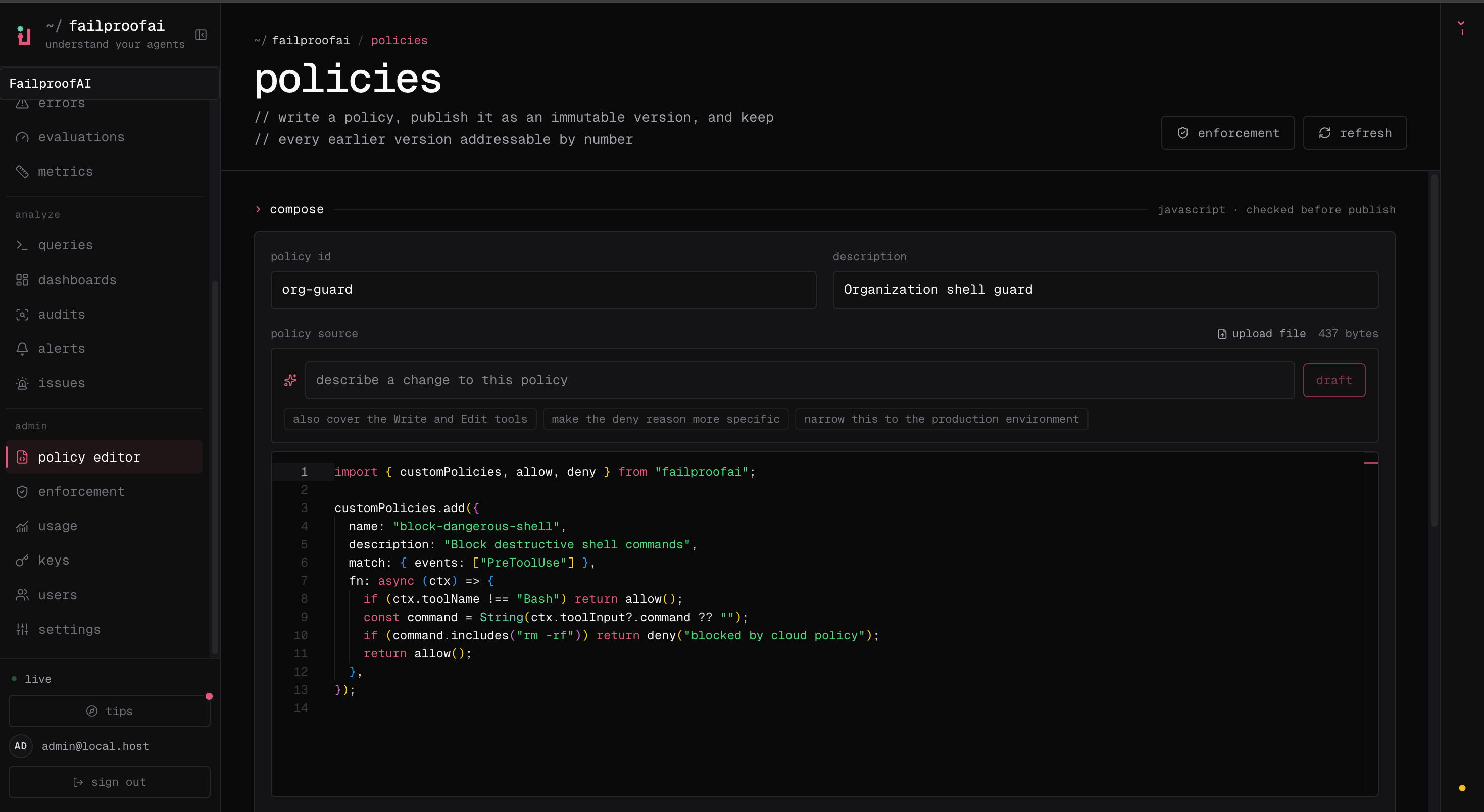
1. 前往 **Admin → policy editor**,选择 **New policy**,并描述你想要防止的故障。
2. 添加策略源码,然后在编辑器中测试预期匹配项和安全的非匹配项。解决所有验证错误。
3. 保存草稿,并选择 **Publish version** 创建不可变版本。
4. 前往 **Admin → enforcement**,以 **observe** 模式将版本部署到测试机器,并在 **Observe → policy** 下验证其决策,然后再正式执行。
 1. 创建 `.failproofai/policies/checkout-policies.ts`。文件名必须以 `policies.js`、`policies.mjs` 或 `policies.ts` 结尾。
2. 使用 `customPolicies.add()` 注册一个或多个策略。
3. 使用 `failproofai policies --install --custom ./.failproofai/policies/checkout-policies.ts --scope project` 验证并安装该文件。
4. 触发一个匹配的操作和一个安全的操作。运行 `failproofai policies`,然后在 **Observe → policy** 下检查归因决策。
## 从精确的规则开始
以下策略仅在命令目标为生产环境时,才会阻止破坏性的 Kubernetes 命令。不在该故障模式范围内的情况一律返回 `allow()`。
```ts theme={null}
import { customPolicies, allow, deny } from "failproofai";
const DESTRUCTIVE_KUBECTL = /\bkubectl\s+(delete|replace)\b/i;
const PRODUCTION_TARGET = /(?:--context|--namespace|-n)\s+(prod|production)\b/i;
customPolicies.add({
name: "block-destructive-production-kubectl",
description: "Block destructive Kubernetes commands against production",
match: { events: ["PreToolUse"] },
fn: async ({ toolName, toolInput }) => {
if (toolName !== "Bash") return allow();
const command = String(toolInput?.command ?? "");
if (!DESTRUCTIVE_KUBECTL.test(command)) return allow();
if (!PRODUCTION_TARGET.test(command)) return allow();
return deny(
"Destructive production Kubernetes commands require the approved deployment workflow.",
);
},
});
```
好的策略应该精确到能用一句话解释清楚。匹配可观察到的操作——而非你推测 Agent 的意图——并在规则不适用时尽早返回 `allow()`。
## 选择决策类型
| 函数 | 结果 | 适用场景 |
| ------------------ | ----------------------------------- | ------------------------------ |
| `allow(reason?)` | 操作继续执行。 | 策略不适用,或该操作是安全的。 |
| `instruct(reason)` | 操作继续执行,并在支持的 harness 中向 Agent 提供指导。 | 希望引导 Agent 采取更好的方式,而不强制执行约束条件。 |
| `deny(reason)` | 在事件和 harness 支持阻断的情况下,操作被阻止。 | 该操作不得执行。 |
编写原因时,面向需要进行恢复的 Agent。说明检测到了什么,以及它应该怎么做。
不要将 `instruct()` 用于安全边界。指导的传递方式因 Agent harness 而异。当操作必须被阻止时,请使用 `deny()`。
## 策略对象
```ts theme={null}
customPolicies.add({
name: "policy-name",
description: "What this policy prevents",
match: { events: ["PreToolUse"] },
fn: async (ctx) => allow(),
});
```
| 字段 | 是否必填 | 说明 |
| -------------- | ---- | ------------------------------------------ |
| `name` | 是 | 策略的稳定标识符。跨文件保持名称唯一。 |
| `description` | 否 | 可读的用途说明,显示在策略列表和决策记录中。 |
| `match.events` | 否 | 触发该策略的事件类型。省略 `match` 则对所有可用事件生效。 |
| `fn` | 是 | 同步或异步函数,返回 `allow`、`instruct` 或 `deny` 结果。 |
在 `fn` 内部过滤工具。`match.toolNames` 不属于公开的自定义策略类型。
## 策略上下文
每个策略都会接收一个 `PolicyContext`。
| 字段 | 类型 | 内容 |
| ----------- | -------------------------------------- | ------------------------------------------------ |
| `eventType` | `HookEventType` | 当前正在评估的规范化事件类型。 |
| `toolName` | `string \| undefined` | 规范化工具名称,例如 `Bash`、`Read`、`Write` 或 `Edit`。 |
| `toolInput` | `Record \| undefined` | 当前工具调用的规范化输入。 |
| `payload` | `Record` | 完整的规范化事件负载。 |
| `session` | `SessionMetadata \| undefined` | 会话 ID、工作目录、记录路径、权限模式,以及可用时的 harness 元数据。 |
| `cli` | `string \| undefined` | 来源 Agent harness,例如 `claude`、`codex` 或 `cursor`。 |
| `params` | `Record` | 内置策略参数。自定义策略当前接收空对象。 |
将所有可选值视为真正可选的。不同的 Agent 版本和事件类型并不都提供相同的字段。
### 常见工具输入
Failproof AI 对支持的 harness 中的常用工具进行了规范化处理,因此策略通常可以使用统一的输入结构。
| 工具 | 常见字段 |
| ------- | --------------------------------------- |
| `Bash` | `command` |
| `Read` | `file_path` |
| `Write` | `file_path`, `content` |
| `Edit` | `file_path`, `old_string`, `new_string` |
| `Grep` | `pattern`, `path` |
由于工具输入值的类型为 `unknown`,请使用防御性类型转换:
```ts theme={null}
const command = String(ctx.toolInput?.command ?? "");
const filePath = String(ctx.toolInput?.file_path ?? "");
```
## 选择事件类型
| 事件 | 触发时机 | 典型用途 |
| ----------------------------- | -------------- | ------------------------------------------- |
| `PreToolUse` | 工具执行前。 | 阻断或引导命令、写入、读取和外部操作。 |
| `PostToolUse` | 工具返回后。 | 在结果传递给 Agent 之前进行检查。deny 会阻断整个结果,而不是脱敏特定字段。 |
| `PermissionRequest` | Agent 请求权限时。 | 应用组织级别的权限规则。 |
| `UserPromptSubmit` | 提交的提示词继续执行前。 | 拒绝禁止的指令或添加工作流指导。 |
| `Stop` | Agent 尝试结束时。 | 要求满足可达的完成条件,例如本地验证步骤。 |
| `SubagentStop` | 子 Agent 尝试结束时。 | 在委托工作返回父 Agent 之前进行审查。 |
| `SessionStart` / `SessionEnd` | 会话边界处。 | 记录或检查会话级别的状态。 |
事件的可用性和阻断行为取决于 Agent harness。在混合部署环境中依赖某个事件前,请先参阅 [Agent harnesses](/zh/reference/harnesses)。
`SessionStart`、`SessionEnd`、`UserPromptSubmit`、`PreToolUse`、`PermissionRequest`、`PermissionDenied`、`PostToolUse`、`PostToolUseFailure`、`Notification`、`SubagentStart`、`SubagentStop`、`TaskCreated`、`TaskCompleted`、`Stop`、`StopFailure`、`TeammateIdle`、`InstructionsLoaded`、`ConfigChange`、`CwdChanged`、`FileChanged`、`WorktreeCreate`、`WorktreeRemove`、`PreCompact`、`PostCompact`、`Elicitation`、`ElicitationResult`、`UserPromptExpansion`、`PostToolBatch` 和 `Setup`。
## 常见策略模式编写示例
### 阻止对受保护路径的写入
```ts theme={null}
import { customPolicies, allow, deny } from "failproofai";
customPolicies.add({
name: "block-generated-file-edits",
description: "Require generated files to be changed through their generator",
match: { events: ["PreToolUse"] },
fn: async (ctx) => {
if (!["Write", "Edit"].includes(ctx.toolName ?? "")) return allow();
const filePath = String(ctx.toolInput?.file_path ?? "");
if (!/(^|\/)(dist|generated)\//.test(filePath)) return allow();
return deny("Edit the source and run the generator instead of changing generated output.");
},
});
```
### 提供非阻断性指导
```ts theme={null}
import { customPolicies, allow, instruct } from "failproofai";
customPolicies.add({
name: "prefer-reviewed-deploy-command",
description: "Guide agents toward the reviewed deployment wrapper",
match: { events: ["PreToolUse"] },
fn: async (ctx) => {
if (ctx.toolName !== "Bash") return allow();
const command = String(ctx.toolInput?.command ?? "");
if (!/^kubectl\s+apply\b/.test(command.trim())) return allow();
return instruct("Use ./scripts/deploy-reviewed instead of invoking kubectl directly.");
},
});
```
### 限制会话完成条件
```ts theme={null}
import { execFileSync } from "node:child_process";
import { customPolicies, allow, deny } from "failproofai";
customPolicies.add({
name: "require-clean-typecheck",
description: "Require the project typecheck to pass before the agent finishes",
match: { events: ["Stop"] },
fn: async (ctx) => {
const cwd = ctx.session?.cwd;
if (!cwd) return allow();
try {
execFileSync("bunx", ["tsc", "--noEmit"], {
cwd,
stdio: "ignore",
timeout: 8_000,
});
return allow();
} catch {
return deny("Fix the typecheck errors before finishing the task.");
}
},
});
```
被拒绝的 `Stop` 事件可能导致 Agent 重试。只在 Agent 在当前环境中能够满足的条件上设置门控,并为每个子进程或网络调用设置超时限制。
## 加载策略文件
### 约定文件
约定文件会自动加载:
```text theme={null}
/.failproofai/policies/security-policies.ts
~/.failproofai/policies/personal-policies.mjs
```
* 项目和用户策略目录均会被加载。
* 同一目录内的文件按字母顺序加载。
* 文件必须以 `policies.js`、`policies.mjs` 或 `policies.ts` 结尾。
* 一个文件中支持多次调用 `customPolicies.add()`。
* 支持从本地模块进行相对路径导入。
* 项目策略可以提交到版本库,使相同的规则随仓库一起传播。
### 显式文件
当验证或配置需要直接指定入口文件时,使用显式路径:
```bash theme={null}
failproofai policies --install \
--custom ./security.policies.ts \
--custom ./workflow.policies.ts \
--scope project
```
显式文件优先加载,其次是项目约定文件,最后是用户约定文件。通过两种路径都发现的文件只会加载一次。
## 验证与测试
验证过程通过生产加载器执行该模块,并确认它至少注册了一个策略。
```bash theme={null}
failproofai policies --install \
--custom ./.failproofai/policies/checkout-policies.ts \
--scope project
failproofai policies
```
验证可以发现文件缺失、语法错误、未解析的导入、顶层异常和模块加载超时等问题。但它无法证明你的匹配逻辑是否正确。
至少测试以下场景:
* 一个必须匹配并产生预期策略原因的操作。
* 一个相近但安全、必须返回 `allow()` 的操作。
* 缺失或格式错误的工具字段。
* 不同的命令语法、路径、引号、大小写和空白字符。
* 子进程或网络依赖不可用的情况。
在 **Observe → policy** 下将结果归因到你的自定义策略。如果是其他内置策略做出了决策,则仅有阻断测试通过并不足以说明问题。
## 运行时行为
* 内置策略在自定义策略之前评估。
* 第一个 `deny` 会停止后续策略的评估。
* 在没有策略拒绝事件的情况下,多个 `instruct` 结果可以合并。
* 策略函数有 10 秒的执行时限。
* 抛出的异常或超时会被记录日志,并视为 `allow()`。
* 加载失败的约定文件会被跳过;其他自定义文件和内置策略继续运行。
* 顶层模块加载同样有 10 秒的时限。
* 云端观察模式下,策略会运行,但会记录非允许决策而不实际执行。
保持策略模块的确定性和高效性。避免顶层网络调用或服务器启动。在 `fn` 内部限制工作范围,捕获依赖故障,并有意识地决定故障时应允许还是拒绝该操作。
## API 导出
| 导出 | 用途 |
| ---------------------------- | ------------------ |
| `customPolicies.add(policy)` | 在模块加载时注册自定义策略。 |
| `allow(reason?)` | 允许操作。 |
| `instruct(reason)` | 允许操作,并在支持的环境中提供指导。 |
| `deny(reason)` | 在支持的环境中阻断操作。 |
| `getCustomHooks()` | 返回当前在模块注册表中已注册的策略。 |
| `clearCustomHooks()` | 清除该注册表,主要用于测试和加载器。 |
TypeScript 导出 `PolicyContext`、`PolicyResult`、`CustomHook`、`PolicyDecision` 和 `PolicyFunction`。
发布版本、以观察模式部署、验证决策,并推进到正式执行阶段。
1. 创建 `.failproofai/policies/checkout-policies.ts`。文件名必须以 `policies.js`、`policies.mjs` 或 `policies.ts` 结尾。
2. 使用 `customPolicies.add()` 注册一个或多个策略。
3. 使用 `failproofai policies --install --custom ./.failproofai/policies/checkout-policies.ts --scope project` 验证并安装该文件。
4. 触发一个匹配的操作和一个安全的操作。运行 `failproofai policies`,然后在 **Observe → policy** 下检查归因决策。
## 从精确的规则开始
以下策略仅在命令目标为生产环境时,才会阻止破坏性的 Kubernetes 命令。不在该故障模式范围内的情况一律返回 `allow()`。
```ts theme={null}
import { customPolicies, allow, deny } from "failproofai";
const DESTRUCTIVE_KUBECTL = /\bkubectl\s+(delete|replace)\b/i;
const PRODUCTION_TARGET = /(?:--context|--namespace|-n)\s+(prod|production)\b/i;
customPolicies.add({
name: "block-destructive-production-kubectl",
description: "Block destructive Kubernetes commands against production",
match: { events: ["PreToolUse"] },
fn: async ({ toolName, toolInput }) => {
if (toolName !== "Bash") return allow();
const command = String(toolInput?.command ?? "");
if (!DESTRUCTIVE_KUBECTL.test(command)) return allow();
if (!PRODUCTION_TARGET.test(command)) return allow();
return deny(
"Destructive production Kubernetes commands require the approved deployment workflow.",
);
},
});
```
好的策略应该精确到能用一句话解释清楚。匹配可观察到的操作——而非你推测 Agent 的意图——并在规则不适用时尽早返回 `allow()`。
## 选择决策类型
| 函数 | 结果 | 适用场景 |
| ------------------ | ----------------------------------- | ------------------------------ |
| `allow(reason?)` | 操作继续执行。 | 策略不适用,或该操作是安全的。 |
| `instruct(reason)` | 操作继续执行,并在支持的 harness 中向 Agent 提供指导。 | 希望引导 Agent 采取更好的方式,而不强制执行约束条件。 |
| `deny(reason)` | 在事件和 harness 支持阻断的情况下,操作被阻止。 | 该操作不得执行。 |
编写原因时,面向需要进行恢复的 Agent。说明检测到了什么,以及它应该怎么做。
不要将 `instruct()` 用于安全边界。指导的传递方式因 Agent harness 而异。当操作必须被阻止时,请使用 `deny()`。
## 策略对象
```ts theme={null}
customPolicies.add({
name: "policy-name",
description: "What this policy prevents",
match: { events: ["PreToolUse"] },
fn: async (ctx) => allow(),
});
```
| 字段 | 是否必填 | 说明 |
| -------------- | ---- | ------------------------------------------ |
| `name` | 是 | 策略的稳定标识符。跨文件保持名称唯一。 |
| `description` | 否 | 可读的用途说明,显示在策略列表和决策记录中。 |
| `match.events` | 否 | 触发该策略的事件类型。省略 `match` 则对所有可用事件生效。 |
| `fn` | 是 | 同步或异步函数,返回 `allow`、`instruct` 或 `deny` 结果。 |
在 `fn` 内部过滤工具。`match.toolNames` 不属于公开的自定义策略类型。
## 策略上下文
每个策略都会接收一个 `PolicyContext`。
| 字段 | 类型 | 内容 |
| ----------- | -------------------------------------- | ------------------------------------------------ |
| `eventType` | `HookEventType` | 当前正在评估的规范化事件类型。 |
| `toolName` | `string \| undefined` | 规范化工具名称,例如 `Bash`、`Read`、`Write` 或 `Edit`。 |
| `toolInput` | `Record \| undefined` | 当前工具调用的规范化输入。 |
| `payload` | `Record` | 完整的规范化事件负载。 |
| `session` | `SessionMetadata \| undefined` | 会话 ID、工作目录、记录路径、权限模式,以及可用时的 harness 元数据。 |
| `cli` | `string \| undefined` | 来源 Agent harness,例如 `claude`、`codex` 或 `cursor`。 |
| `params` | `Record` | 内置策略参数。自定义策略当前接收空对象。 |
将所有可选值视为真正可选的。不同的 Agent 版本和事件类型并不都提供相同的字段。
### 常见工具输入
Failproof AI 对支持的 harness 中的常用工具进行了规范化处理,因此策略通常可以使用统一的输入结构。
| 工具 | 常见字段 |
| ------- | --------------------------------------- |
| `Bash` | `command` |
| `Read` | `file_path` |
| `Write` | `file_path`, `content` |
| `Edit` | `file_path`, `old_string`, `new_string` |
| `Grep` | `pattern`, `path` |
由于工具输入值的类型为 `unknown`,请使用防御性类型转换:
```ts theme={null}
const command = String(ctx.toolInput?.command ?? "");
const filePath = String(ctx.toolInput?.file_path ?? "");
```
## 选择事件类型
| 事件 | 触发时机 | 典型用途 |
| ----------------------------- | -------------- | ------------------------------------------- |
| `PreToolUse` | 工具执行前。 | 阻断或引导命令、写入、读取和外部操作。 |
| `PostToolUse` | 工具返回后。 | 在结果传递给 Agent 之前进行检查。deny 会阻断整个结果,而不是脱敏特定字段。 |
| `PermissionRequest` | Agent 请求权限时。 | 应用组织级别的权限规则。 |
| `UserPromptSubmit` | 提交的提示词继续执行前。 | 拒绝禁止的指令或添加工作流指导。 |
| `Stop` | Agent 尝试结束时。 | 要求满足可达的完成条件,例如本地验证步骤。 |
| `SubagentStop` | 子 Agent 尝试结束时。 | 在委托工作返回父 Agent 之前进行审查。 |
| `SessionStart` / `SessionEnd` | 会话边界处。 | 记录或检查会话级别的状态。 |
事件的可用性和阻断行为取决于 Agent harness。在混合部署环境中依赖某个事件前,请先参阅 [Agent harnesses](/zh/reference/harnesses)。
`SessionStart`、`SessionEnd`、`UserPromptSubmit`、`PreToolUse`、`PermissionRequest`、`PermissionDenied`、`PostToolUse`、`PostToolUseFailure`、`Notification`、`SubagentStart`、`SubagentStop`、`TaskCreated`、`TaskCompleted`、`Stop`、`StopFailure`、`TeammateIdle`、`InstructionsLoaded`、`ConfigChange`、`CwdChanged`、`FileChanged`、`WorktreeCreate`、`WorktreeRemove`、`PreCompact`、`PostCompact`、`Elicitation`、`ElicitationResult`、`UserPromptExpansion`、`PostToolBatch` 和 `Setup`。
## 常见策略模式编写示例
### 阻止对受保护路径的写入
```ts theme={null}
import { customPolicies, allow, deny } from "failproofai";
customPolicies.add({
name: "block-generated-file-edits",
description: "Require generated files to be changed through their generator",
match: { events: ["PreToolUse"] },
fn: async (ctx) => {
if (!["Write", "Edit"].includes(ctx.toolName ?? "")) return allow();
const filePath = String(ctx.toolInput?.file_path ?? "");
if (!/(^|\/)(dist|generated)\//.test(filePath)) return allow();
return deny("Edit the source and run the generator instead of changing generated output.");
},
});
```
### 提供非阻断性指导
```ts theme={null}
import { customPolicies, allow, instruct } from "failproofai";
customPolicies.add({
name: "prefer-reviewed-deploy-command",
description: "Guide agents toward the reviewed deployment wrapper",
match: { events: ["PreToolUse"] },
fn: async (ctx) => {
if (ctx.toolName !== "Bash") return allow();
const command = String(ctx.toolInput?.command ?? "");
if (!/^kubectl\s+apply\b/.test(command.trim())) return allow();
return instruct("Use ./scripts/deploy-reviewed instead of invoking kubectl directly.");
},
});
```
### 限制会话完成条件
```ts theme={null}
import { execFileSync } from "node:child_process";
import { customPolicies, allow, deny } from "failproofai";
customPolicies.add({
name: "require-clean-typecheck",
description: "Require the project typecheck to pass before the agent finishes",
match: { events: ["Stop"] },
fn: async (ctx) => {
const cwd = ctx.session?.cwd;
if (!cwd) return allow();
try {
execFileSync("bunx", ["tsc", "--noEmit"], {
cwd,
stdio: "ignore",
timeout: 8_000,
});
return allow();
} catch {
return deny("Fix the typecheck errors before finishing the task.");
}
},
});
```
被拒绝的 `Stop` 事件可能导致 Agent 重试。只在 Agent 在当前环境中能够满足的条件上设置门控,并为每个子进程或网络调用设置超时限制。
## 加载策略文件
### 约定文件
约定文件会自动加载:
```text theme={null}
/.failproofai/policies/security-policies.ts
~/.failproofai/policies/personal-policies.mjs
```
* 项目和用户策略目录均会被加载。
* 同一目录内的文件按字母顺序加载。
* 文件必须以 `policies.js`、`policies.mjs` 或 `policies.ts` 结尾。
* 一个文件中支持多次调用 `customPolicies.add()`。
* 支持从本地模块进行相对路径导入。
* 项目策略可以提交到版本库,使相同的规则随仓库一起传播。
### 显式文件
当验证或配置需要直接指定入口文件时,使用显式路径:
```bash theme={null}
failproofai policies --install \
--custom ./security.policies.ts \
--custom ./workflow.policies.ts \
--scope project
```
显式文件优先加载,其次是项目约定文件,最后是用户约定文件。通过两种路径都发现的文件只会加载一次。
## 验证与测试
验证过程通过生产加载器执行该模块,并确认它至少注册了一个策略。
```bash theme={null}
failproofai policies --install \
--custom ./.failproofai/policies/checkout-policies.ts \
--scope project
failproofai policies
```
验证可以发现文件缺失、语法错误、未解析的导入、顶层异常和模块加载超时等问题。但它无法证明你的匹配逻辑是否正确。
至少测试以下场景:
* 一个必须匹配并产生预期策略原因的操作。
* 一个相近但安全、必须返回 `allow()` 的操作。
* 缺失或格式错误的工具字段。
* 不同的命令语法、路径、引号、大小写和空白字符。
* 子进程或网络依赖不可用的情况。
在 **Observe → policy** 下将结果归因到你的自定义策略。如果是其他内置策略做出了决策,则仅有阻断测试通过并不足以说明问题。
## 运行时行为
* 内置策略在自定义策略之前评估。
* 第一个 `deny` 会停止后续策略的评估。
* 在没有策略拒绝事件的情况下,多个 `instruct` 结果可以合并。
* 策略函数有 10 秒的执行时限。
* 抛出的异常或超时会被记录日志,并视为 `allow()`。
* 加载失败的约定文件会被跳过;其他自定义文件和内置策略继续运行。
* 顶层模块加载同样有 10 秒的时限。
* 云端观察模式下,策略会运行,但会记录非允许决策而不实际执行。
保持策略模块的确定性和高效性。避免顶层网络调用或服务器启动。在 `fn` 内部限制工作范围,捕获依赖故障,并有意识地决定故障时应允许还是拒绝该操作。
## API 导出
| 导出 | 用途 |
| ---------------------------- | ------------------ |
| `customPolicies.add(policy)` | 在模块加载时注册自定义策略。 |
| `allow(reason?)` | 允许操作。 |
| `instruct(reason)` | 允许操作,并在支持的环境中提供指导。 |
| `deny(reason)` | 在支持的环境中阻断操作。 |
| `getCustomHooks()` | 返回当前在模块注册表中已注册的策略。 |
| `clearCustomHooks()` | 清除该注册表,主要用于测试和加载器。 |
TypeScript 导出 `PolicyContext`、`PolicyResult`、`CustomHook`、`PolicyDecision` 和 `PolicyFunction`。
发布版本、以观察模式部署、验证决策,并推进到正式执行阶段。