> ## Documentation Index
> Fetch the complete documentation index at: https://docs.befailproof.ai/llms.txt
> Use this file to discover all available pages before exploring further.
# 自定义 Agent
> 为自定义 Agent 植入追踪能力,使 Failproof AI 能够重建运行记录并发现故障。
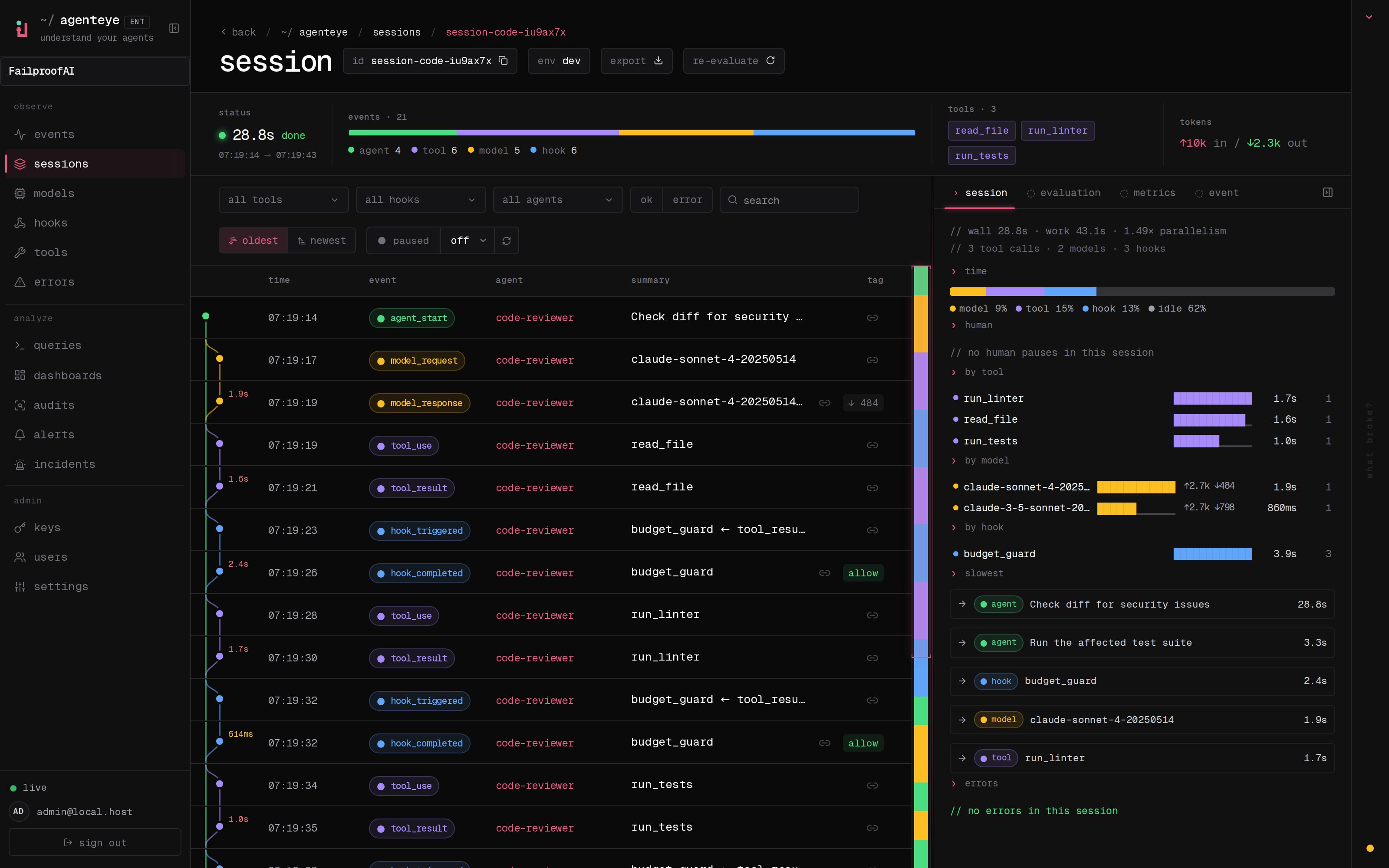
使用 `failproofai-sdk` 为自定义 Agent 植入追踪能力,让 Failproof AI 能够重建每次运行过程、审计其行为,并找到有据可查的故障。SDK 会写入结构化事件,由 Failproof 守护进程传递至云端。该 SDK 需要 Python 3.10 或更高版本。
追踪使自定义 Agent 具备可观测性和可审计性。若要在执行前阻止不安全的操作,还需要在运行时中添加执行钩子。
如需在自定义 Agent 环境中执行策略,请[联系 Failproof AI](mailto:support@befailproof.ai)。我们将帮助您将运行时的模型、工具和生命周期边界映射到策略钩子。
## 安装 `failproofai-sdk`
该 SDK 目前以私有 wheel 包形式分发。请向您的 Failproof AI 联系人索取当前版本及下载权限。
```bash theme={null}
VERSION=
pip install "./failproofai_sdk-${VERSION}-py3-none-any.whl"
python -c "import failproofai; print(failproofai.__version__)"
```
如使用 `uv`,请先下载 wheel 包,然后运行 `uv add ./failproofai_sdk-${VERSION}-py3-none-any.whl`。建议将 wheel 包固定在私有制品仓库或依赖锁文件中。
该包以 `failproofai-sdk` 安装,在 Python 中以 `failproofai` 导入。
## 连接 Failproof 守护进程
1. 前往 **Admin → Keys**,创建一个具有 `events:add` 权限的密钥。
2. 在 Agent 所在机器上[将 Failproof 守护进程连接到云端](/zh/start/setup#connect-a-machine-to-cloud)。
3. 运行一次已植入追踪的会话,然后在 **Observe → Events** 下找到其确切 ID。
4. 前往 **Observe → Sessions**,选择相同环境,打开重建后的追踪记录。
 ```bash theme={null}
failproofai config \
--connect https://app.befailproof.ai \
--token
failproofai config --status
```
## 对完整运行进行埋点
在进程启动时调用一次 `configure()`。每个事件调用均为仅关键字参数形式,需要提供稳定的 `session_id` 和 `agent_id`。
```python theme={null}
import traceback
import uuid
import failproofai
failproofai.configure(environment="production")
session_id = uuid.uuid4().hex
agent_id = "checkout-agent"
failproofai.event.agent_start(
session_id=session_id,
agent_id=agent_id,
goal="Resolve a failed checkout",
)
try:
tool_call_id = uuid.uuid4().hex
failproofai.event.tool_use(
session_id=session_id,
agent_id=agent_id,
tool_name="lookup_order",
tool_call_id=tool_call_id,
input={"order_id": "ord_8421"},
)
result = {"status": "payment_failed"}
failproofai.event.tool_result(
session_id=session_id,
agent_id=agent_id,
tool_name="lookup_order",
tool_call_id=tool_call_id,
output=result,
)
except Exception as exc:
failproofai.event.error(
session_id=session_id,
agent_id=agent_id,
error_type=type(exc).__name__,
message=str(exc),
traceback=traceback.format_exc(),
)
failproofai.event.agent_end(
session_id=session_id,
agent_id=agent_id,
outcome="failed",
)
raise
else:
failproofai.event.agent_end(
session_id=session_id,
agent_id=agent_id,
outcome="success",
summary="Escalated the failed payment",
)
```
每个执行主体发送一次 `agent_start`。对于子 Agent,复用父级的 `session_id`,为每个执行主体指定唯一的 `agent_id`,并将 `parent_id` 设置为父级的 **agent ID**,而非 session ID。
## 配置参考
```python theme={null}
failproofai.configure(
base_dir=None,
flush_interval=0.5,
environment="production",
)
```
| 配置项 | 行为说明 |
| ------------------ | ---------------------------------------------- |
| `base_dir` | 显式指定 spool 根目录,优先于所有环境变量。 |
| `flush_interval` | 后台从内存写入 JSONL 的时间间隔(秒)。默认值:`0.5`。 |
| `environment` | 每个事件上的部署标签,默认为 `dev`。 |
| `FAILPROOFAI_HOME` | 更改包含 `custom-agents` spool 的 Failproof AI 根目录。 |
设置了显式 `base_dir` 时,SDK 会写入该目录。否则,SDK 将使用 Failproof 守护进程在 `FAILPROOFAI_HOME` 或 `~/.failproofai` 下的 `custom-agents` spool。
SDK 将调用排队至内存,并通过后台线程批量写入。它还会通过 Python 的 `atexit` 机制尝试最终刷新。对于短生命周期的 worker,应允许解释器正常关闭;强制终止进程可能导致内存中的事件丢失。
## 事件目录
所有方法均返回 `None`。值为 `None` 的字段会被省略,而不是写为 JSON `null`。
| 方法 | 除标识字段外的必填字段 | 可选字段 |
| ----------------- | --------------------------- | -------------------------------------------------------------------------- |
| `agent_start` | — | `goal`, `parent_id` |
| `agent_end` | — | `outcome`, `summary` |
| `agent_pause` | `pause_id` | `reason`, `user_id` |
| `agent_resume` | `pause_id` | `reason`, `user_id` |
| `model_request` | — | `model`, `messages`, `system`, `tools` |
| `model_response` | — | `model`, `stop_reason`, `input_tokens`, `output_tokens`, `content`, `role` |
| `tool_use` | `tool_name`, `tool_call_id` | `input` |
| `tool_result` | `tool_name`, `tool_call_id` | `output`, `error` |
| `hook_triggered` | `hook_name`, `hook_id` | `trigger_event`, `input` |
| `hook_completed` | `hook_name`, `hook_id` | `outcome`, `output`, `error` |
| `error` | `error_type`, `message` | `traceback` |
| `human_wait` | `input_id` | `prompt`, `options`, `reason` |
| `human_input` | `input_id` | `response` |
| `human_pause` | — | `reason`, `user_id` |
| `human_interrupt` | — | `reason`, `user_id`, `at_step` |
当某次完成应计为失败时,使用 `outcome="failed"`、`"error"`、`"timeout"` 或 `"rejected"`。其他值(包括 `"failure"`)不会被当前后端识别为失败。
## 关联与时长规则
* 对匹配的完成事件复用相同的 `tool_call_id`、`hook_id`、`pause_id` 或 `input_id`。
* SDK 会自动计算 `tool_result`、`hook_completed`、`agent_resume` 和 `human_input` 的 `duration_ms`。如果手动传入这些方法的该字段,将抛出 `ValueError`。
* 工具 ID 和钩子 ID 共用同一个进程级的待处理映射表。请确保它们在并发会话之间以及两个命名空间内全局唯一;建议使用提供商 ID 或 UUID。
* 跨进程分割的事件对仍可在下游关联,但 SDK 无法计算其进程内时长。
* 待处理映射表最多保存 10,000 条起始记录,满时会淘汰最旧的条目。
## 自定义字段与载荷
每个事件均接受额外的关键字字段。当下游查询需要结构化数据时,请使用与 JSON 兼容的值。SDK 写入时会将不支持的叶子类型(如 UUID、datetime、Decimal、set、bytes 及模型对象)自动转换为字符串。
保留的自定义字段名称为 `timestamp`、`session_id`、`agent_id`、`type` 和 `environment`。可选字段的拼写错误会被当作新的自定义字段接受,因此当某个标准字段未出现在云端时,请检查实际写出的 JSON。
## 传递与验证
在 **Observe → Events** 中,验证 `agent_start` 是否位于首位,`agent_end` 是否位于末位。然后打开 **Observe → Sessions**,确认模型、工具、人工、钩子和错误事件按预期顺序出现。将 session ID 作为排查问题的主要依据。
```bash theme={null}
failproofai flush --wait --timeout 60
failproofai config --status
fp sessions --since 1h --env production --session-id
fp events --since 1h --session-id --full
```
如果云端为空,请检查 `$FAILPROOFAI_HOME/custom-agents/events`,否则检查 `~/.failproofai/custom-agents/events`。JSONL 文件证明 SDK 已成功写入事件;spool 持续增长说明问题在于守护进程配置或事件传递,spool 为空则说明问题在于埋点或进程生命周期。
## 在自定义运行时中阻止故障
利用审计发现和关联追踪来定义不安全操作、所需依据及预期响应。自定义执行集成必须在操作执行前将其暴露出来,将其结构化输入传递给策略引擎,并应用 allow、instruct 或 deny 的决策结果。
请发送邮件至 [support@befailproof.ai](mailto:support@befailproof.ai),以便针对您的运行时设计并验证该集成方案。
```bash theme={null}
failproofai config \
--connect https://app.befailproof.ai \
--token
failproofai config --status
```
## 对完整运行进行埋点
在进程启动时调用一次 `configure()`。每个事件调用均为仅关键字参数形式,需要提供稳定的 `session_id` 和 `agent_id`。
```python theme={null}
import traceback
import uuid
import failproofai
failproofai.configure(environment="production")
session_id = uuid.uuid4().hex
agent_id = "checkout-agent"
failproofai.event.agent_start(
session_id=session_id,
agent_id=agent_id,
goal="Resolve a failed checkout",
)
try:
tool_call_id = uuid.uuid4().hex
failproofai.event.tool_use(
session_id=session_id,
agent_id=agent_id,
tool_name="lookup_order",
tool_call_id=tool_call_id,
input={"order_id": "ord_8421"},
)
result = {"status": "payment_failed"}
failproofai.event.tool_result(
session_id=session_id,
agent_id=agent_id,
tool_name="lookup_order",
tool_call_id=tool_call_id,
output=result,
)
except Exception as exc:
failproofai.event.error(
session_id=session_id,
agent_id=agent_id,
error_type=type(exc).__name__,
message=str(exc),
traceback=traceback.format_exc(),
)
failproofai.event.agent_end(
session_id=session_id,
agent_id=agent_id,
outcome="failed",
)
raise
else:
failproofai.event.agent_end(
session_id=session_id,
agent_id=agent_id,
outcome="success",
summary="Escalated the failed payment",
)
```
每个执行主体发送一次 `agent_start`。对于子 Agent,复用父级的 `session_id`,为每个执行主体指定唯一的 `agent_id`,并将 `parent_id` 设置为父级的 **agent ID**,而非 session ID。
## 配置参考
```python theme={null}
failproofai.configure(
base_dir=None,
flush_interval=0.5,
environment="production",
)
```
| 配置项 | 行为说明 |
| ------------------ | ---------------------------------------------- |
| `base_dir` | 显式指定 spool 根目录,优先于所有环境变量。 |
| `flush_interval` | 后台从内存写入 JSONL 的时间间隔(秒)。默认值:`0.5`。 |
| `environment` | 每个事件上的部署标签,默认为 `dev`。 |
| `FAILPROOFAI_HOME` | 更改包含 `custom-agents` spool 的 Failproof AI 根目录。 |
设置了显式 `base_dir` 时,SDK 会写入该目录。否则,SDK 将使用 Failproof 守护进程在 `FAILPROOFAI_HOME` 或 `~/.failproofai` 下的 `custom-agents` spool。
SDK 将调用排队至内存,并通过后台线程批量写入。它还会通过 Python 的 `atexit` 机制尝试最终刷新。对于短生命周期的 worker,应允许解释器正常关闭;强制终止进程可能导致内存中的事件丢失。
## 事件目录
所有方法均返回 `None`。值为 `None` 的字段会被省略,而不是写为 JSON `null`。
| 方法 | 除标识字段外的必填字段 | 可选字段 |
| ----------------- | --------------------------- | -------------------------------------------------------------------------- |
| `agent_start` | — | `goal`, `parent_id` |
| `agent_end` | — | `outcome`, `summary` |
| `agent_pause` | `pause_id` | `reason`, `user_id` |
| `agent_resume` | `pause_id` | `reason`, `user_id` |
| `model_request` | — | `model`, `messages`, `system`, `tools` |
| `model_response` | — | `model`, `stop_reason`, `input_tokens`, `output_tokens`, `content`, `role` |
| `tool_use` | `tool_name`, `tool_call_id` | `input` |
| `tool_result` | `tool_name`, `tool_call_id` | `output`, `error` |
| `hook_triggered` | `hook_name`, `hook_id` | `trigger_event`, `input` |
| `hook_completed` | `hook_name`, `hook_id` | `outcome`, `output`, `error` |
| `error` | `error_type`, `message` | `traceback` |
| `human_wait` | `input_id` | `prompt`, `options`, `reason` |
| `human_input` | `input_id` | `response` |
| `human_pause` | — | `reason`, `user_id` |
| `human_interrupt` | — | `reason`, `user_id`, `at_step` |
当某次完成应计为失败时,使用 `outcome="failed"`、`"error"`、`"timeout"` 或 `"rejected"`。其他值(包括 `"failure"`)不会被当前后端识别为失败。
## 关联与时长规则
* 对匹配的完成事件复用相同的 `tool_call_id`、`hook_id`、`pause_id` 或 `input_id`。
* SDK 会自动计算 `tool_result`、`hook_completed`、`agent_resume` 和 `human_input` 的 `duration_ms`。如果手动传入这些方法的该字段,将抛出 `ValueError`。
* 工具 ID 和钩子 ID 共用同一个进程级的待处理映射表。请确保它们在并发会话之间以及两个命名空间内全局唯一;建议使用提供商 ID 或 UUID。
* 跨进程分割的事件对仍可在下游关联,但 SDK 无法计算其进程内时长。
* 待处理映射表最多保存 10,000 条起始记录,满时会淘汰最旧的条目。
## 自定义字段与载荷
每个事件均接受额外的关键字字段。当下游查询需要结构化数据时,请使用与 JSON 兼容的值。SDK 写入时会将不支持的叶子类型(如 UUID、datetime、Decimal、set、bytes 及模型对象)自动转换为字符串。
保留的自定义字段名称为 `timestamp`、`session_id`、`agent_id`、`type` 和 `environment`。可选字段的拼写错误会被当作新的自定义字段接受,因此当某个标准字段未出现在云端时,请检查实际写出的 JSON。
## 传递与验证
在 **Observe → Events** 中,验证 `agent_start` 是否位于首位,`agent_end` 是否位于末位。然后打开 **Observe → Sessions**,确认模型、工具、人工、钩子和错误事件按预期顺序出现。将 session ID 作为排查问题的主要依据。
```bash theme={null}
failproofai flush --wait --timeout 60
failproofai config --status
fp sessions --since 1h --env production --session-id
fp events --since 1h --session-id --full
```
如果云端为空,请检查 `$FAILPROOFAI_HOME/custom-agents/events`,否则检查 `~/.failproofai/custom-agents/events`。JSONL 文件证明 SDK 已成功写入事件;spool 持续增长说明问题在于守护进程配置或事件传递,spool 为空则说明问题在于埋点或进程生命周期。
## 在自定义运行时中阻止故障
利用审计发现和关联追踪来定义不安全操作、所需依据及预期响应。自定义执行集成必须在操作执行前将其暴露出来,将其结构化输入传递给策略引擎,并应用 allow、instruct 或 deny 的决策结果。
请发送邮件至 [support@befailproof.ai](mailto:support@befailproof.ai),以便针对您的运行时设计并验证该集成方案。