

कस्टम policy को author करें
- Dashboard
- CLI
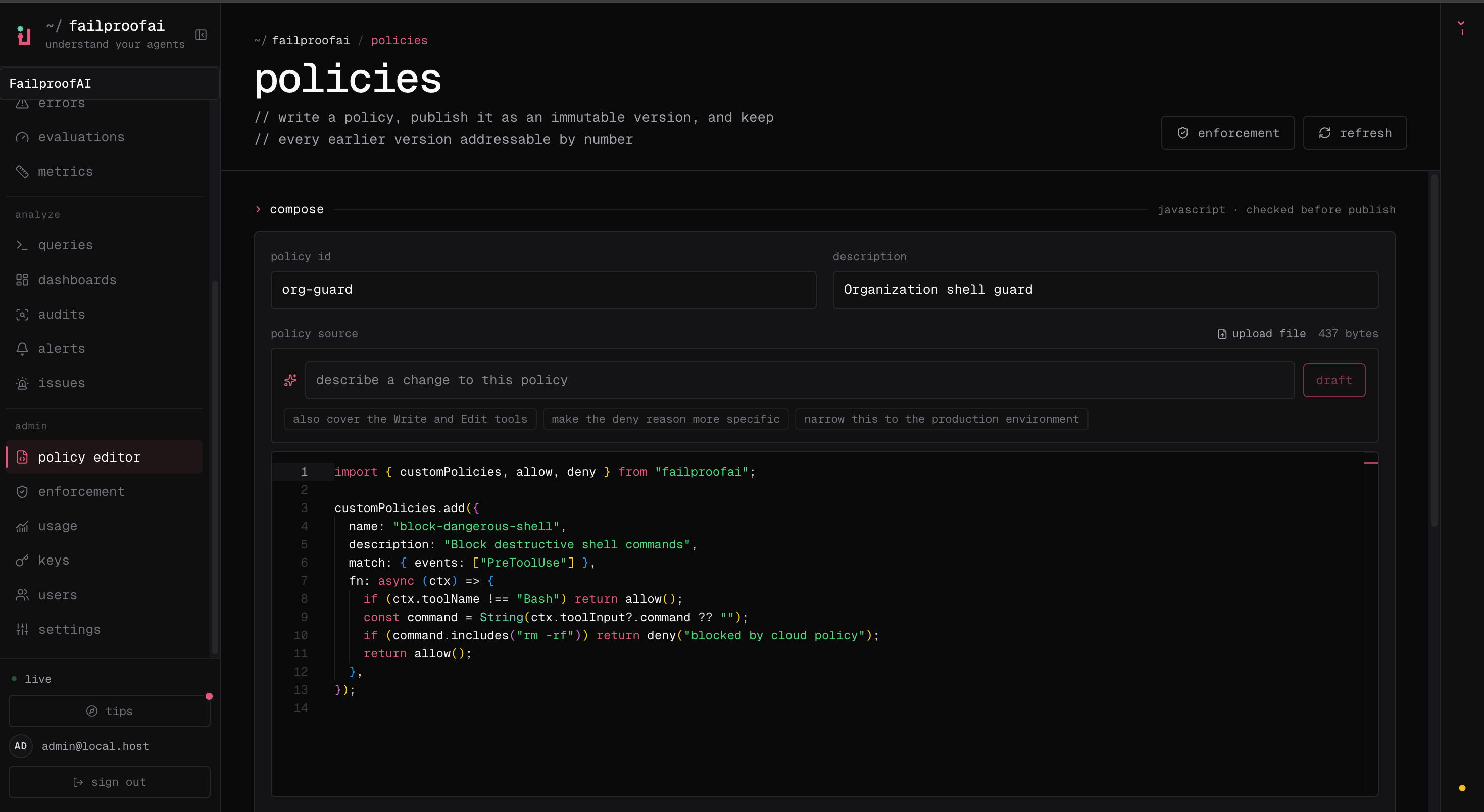
- Admin → policy editor पर जाएं, New policy चुनें, और failure को describe करें जिसे आप prevent करना चाहते हैं।
- policy source को add करें, फिर editor में expected matches और safe non-matches को test करें। हर validation error को resolve करें।
- draft को save करें और Publish version को चुनकर एक immutable version बनाएं।
-
Admin → enforcement पर जाएं, version को एक test machine में observe mode में deploy करें, और Observe → policy के अंतर्गत इसके decisions को verify करें इससे पहले कि आप इसे enforce करें।
एक narrow rule के साथ शुरू करें
यह policy destructive Kubernetes commands को केवल तभी block करता है जब command production को target करता है। उस exact failure mode के बाहर सब कुछallow() return करता है।
allow() को return करें जैसे ही rule apply न हो।
एक decision चुनें
Agent के लिए reason लिखें जिसे recover करना होगा। Explain करें कि क्या detect किया गया और उसे इसके बजाय क्या करना चाहिए।
Policy object
Tools को
fn के अंदर filter करें। match.toolNames public custom-policy type का हिस्सा नहीं है।
Policy context
हर policy को एकPolicyContext मिलता है।
हर optional value को genuinely optional मानें। Agent versions और event types सभी fields provide नहीं करते हैं।
Common tool inputs
Failproof AI common tools को supported harnesses के across normalize करता है ताकि एक policy आमतौर पर एक input shape use कर सके।
Defensive coercion का use करें क्योंकि tool input values
unknown के रूप में typed होती हैं:
Event को choose करें
Event availability और blocking behavior agent harness पर depend करते हैं। Mixed fleet के across एक event पर rely करने से पहले Agent harnesses को देखें।
सभी policy event names
सभी policy event names
SessionStart, SessionEnd, UserPromptSubmit, PreToolUse, PermissionRequest, PermissionDenied, PostToolUse, PostToolUseFailure, Notification, SubagentStart, SubagentStop, TaskCreated, TaskCompleted, Stop, StopFailure, TeammateIdle, InstructionsLoaded, ConfigChange, CwdChanged, FileChanged, WorktreeCreate, WorktreeRemove, PreCompact, PostCompact, Elicitation, ElicitationResult, UserPromptExpansion, PostToolBatch, और Setup।Common policy patterns को author करें
Protected paths में writes को block करें
Non-blocking guidance दें
Session completion को gate करें
Policy files को load करें
Convention files
Convention files automatically load होती हैं:- Project और user policy directories दोनों को load किया जाता है।
- Files प्रत्येक directory के अंदर alphabetically load होती हैं।
- एक file को
policies.js,policies.mjs, याpolicies.tsमें end होना चाहिए। - एक file में multiple
customPolicies.add()calls supported हैं। - Local modules से relative imports supported हैं।
- Project policies को commit किया जा सकता है ताकि same rules repository को follow करें।
Explicit files
Explicit paths का use करें जब validation या configuration को entry file को directly name करना चाहिए:Validate और test करें
Validation module को production loader के through execute करता है और confirm करता है कि यह कम से कम एक policy को register करता है।- एक action जो match करना चाहिए और intended policy reason produce करना चाहिए।
- एक nearby लेकिन safe action जो
allow()return करना चाहिए। - Missing या malformed tool fields।
- Alternate command syntax, paths, quoting, casing, और whitespace।
- एक unavailable subprocess या network dependency।
Runtime behavior
- Built-in policies custom policies से पहले evaluate होती हैं।
- पहला
denyfurther policy evaluation को stop करता है। - Multiple
instructresults को combine किया जा सकता है जब कोई भी policy event को deny नहीं करता है। - एक policy function के पास 10-second execution deadline होता है।
- एक thrown exception या timeout को log किया जाता है और
allow()के रूप में treat किया जाता है। - एक convention file जो load होने में fail होती है, को skip किया जाता है; अन्य custom files और built-in policies continue होती हैं।
- Top-level module loading के पास भी 10-second deadline होता है।
- Cloud observe mode policy को run करता है लेकिन एक non-allow decision को record करता है बिना इसे enforce किए।
fn के अंदर work को bound करें, dependency failures को catch करें, और deliberately choose करें कि वह failure operation को allow या deny करना चाहिए।
API exports
TypeScript
PolicyContext, PolicyResult, CustomHook, PolicyDecision, और PolicyFunction को export करता है।
कस्टम policies को deploy करें
एक version को publish करें, इसे observe mode में deploy करें, decisions को verify करें, और enforcement की ओर move करें।