

Permissions
The server enforces a fixed catalogue of permissions; each one gates specific HTTP routes. An admin key holds all of them; a scoped key holds the subset you grant on creation. Unknown permission strings are rejected when a key is created.Not assignable to keys. Two valid permissions are human/dashboard-only and cannot be granted to an API key:orgs:admin(instance administration, which is operator-only) andkeys:update. A request toPOST /keysorPATCH /keys/:idthat tries to grant either one is rejected with HTTP 422. See thekeys:updaterow below for why a bearer key may create keys but never edit them.
Events ingest & query
| Permission | HTTP routes | What it allows |
|---|---|---|
events:add | POST /events | Ingest batches of events from a collector. The only permission a collector needs. |
events:read | GET /events, GET /events/latency_aggregate, GET /events/environments, GET /events/models, GET /sessions/:session_id/export | Query events, list the known environments, list the model identifiers seen in the data (used by the Models view and model filters), compute the latency aggregate that powers the heat-map / percentile band, and export a session as JSONL. The shared filter-bar facet endpoints GET /events/environments and GET /events/models are reachable with either events:read or evaluations:read, so the sessions page (gated evaluations:read) reuses the same per-org facet. |
Sessions & evaluations
| Permission | HTTP routes | What it allows |
|---|---|---|
evaluations:read | GET /sessions, GET /evaluations, GET /evaluations/aggregate, GET /evaluations/environments, GET /evaluation-jobs | List sessions, read evaluation results, the rolled-up eval health used by dashboards, and the evaluation-job worker queue state. |
evaluations:trigger | POST /sessions/:session_id/re-evaluate | Manually enqueue a re-evaluation for a finished session. |
Dashboards
| Permission | HTTP routes | What it allows |
|---|---|---|
dashboards:read | GET /dashboards, GET /dashboards/:id, GET /dashboards/:id/tiles | List dashboards, load one, and read its tiles. |
dashboards:write | POST /dashboards, PUT /dashboards/:id, POST /dashboards/:id/tiles, PUT /dashboards/:id/tiles/:tile_id, DELETE /dashboards/:id/tiles/:tile_id, PUT /dashboards/:id/tiles/layout | Create and edit dashboards, add / edit / remove tiles, and reorder the tile grid. |
dashboards:delete | DELETE /dashboards/:id | Delete an entire dashboard (tile-level deletion lives under dashboards:write). |
Saved queries (SQL composer)
| Permission | HTTP routes | What it allows |
|---|---|---|
queries:read | GET /queries, GET /queries/:id, GET /queries/schema | List saved queries, load one, and inspect the read-only ClickHouse schema the composer targets. |
queries:write | POST /queries, PUT /queries/:id | Create and edit saved queries. SQL is still routed through the same read-only role and sql_guard checks as a queries:run call. |
queries:delete | DELETE /queries/:id | Delete a saved query. |
queries:run | POST /queries/run | Execute saved or ad-hoc SQL against the read-only role used by the composer. |
AI assistant
| Permission | HTTP routes | What it allows |
|---|---|---|
agent:use | GET /agent/conversations, POST /agent/conversations, GET /agent/conversations/:id, PATCH /agent/conversations/:id, DELETE /agent/conversations/:id, PUT /agent/conversations/:id/messages | Talk to the dashboard AI assistant and manage your own (private) conversations. Required on the user to see the assistant dock; the assistant’s own key is dashboard-assistant and is seeded separately (see below). |
API keys
| Permission | HTTP routes | What it allows |
|---|---|---|
keys:create | POST /keys | Create a new scoped API key. Does not grant editing an existing key’s permissions (that is keys:update). |
keys:read | GET /keys | List existing keys. Secrets are never returned by this endpoint. |
keys:update | PATCH /keys/:id | Edit an existing key’s permissions. A human/dashboard-only permission; it cannot be assigned to an API key (a bearer key may create keys but never edit them). |
keys:disable | POST /keys/:id/disable | Revoke a key. Protected keys (admin, dashboard-assistant) can’t be disabled; rotate them via env var + restart. |
keys:regenerate | POST /keys/:id/regenerate | Rotate a key’s secret. Protected keys can’t be regenerated through this route. |
Dashboard users
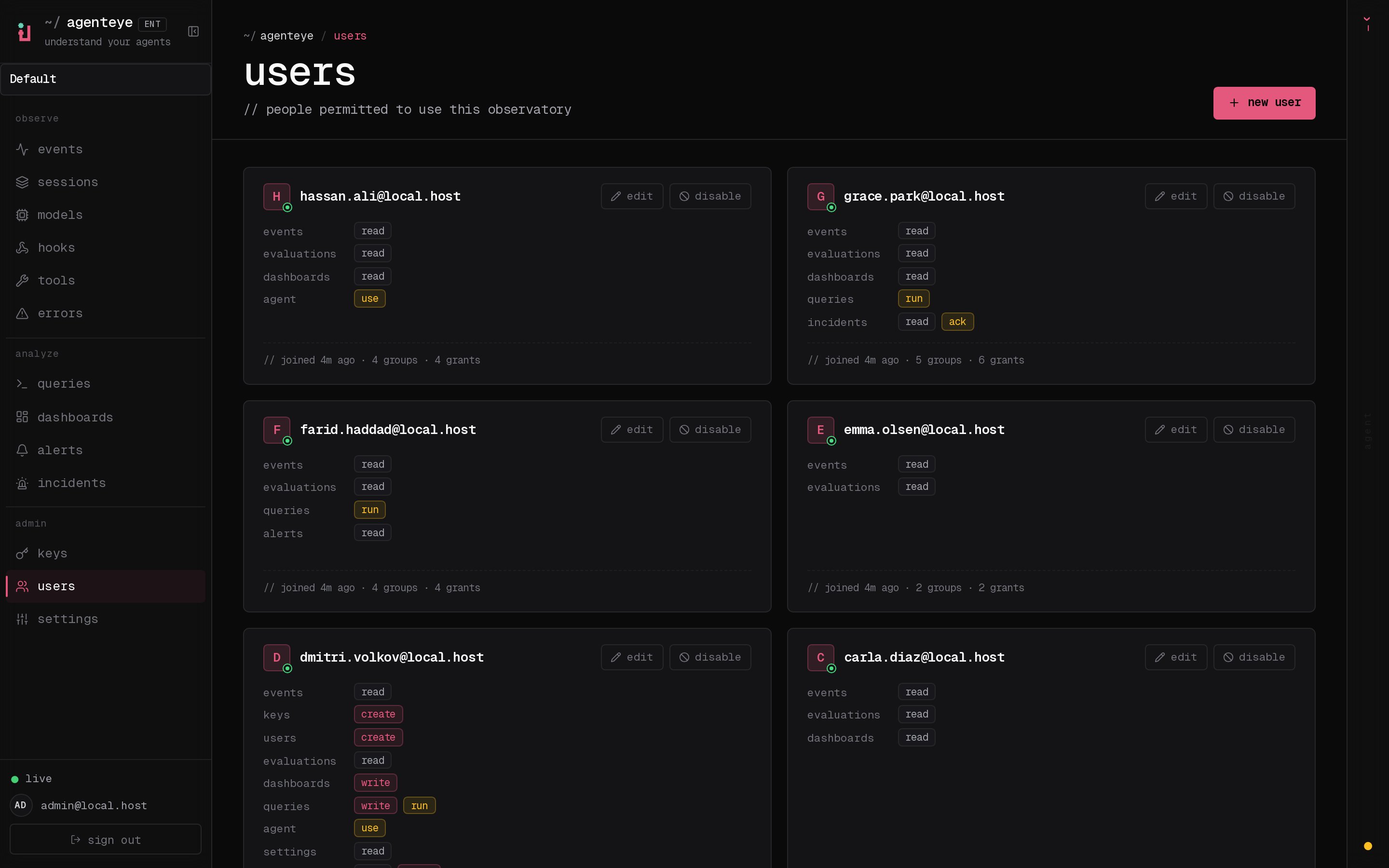
| Permission | HTTP routes | What it allows |
|---|---|---|
users:create | POST /users, GET /users/defaults | Invite a new dashboard user (issues an email + OTP login) and read the dashboard-configured default permission set used to seed the invite form. |
users:read | GET /users, GET /users/:id | List users and load a single user record. |
users:update | PUT /users/:id | Edit a user’s permissions. Updates dispatch a permission-change email to the affected user and take effect on their next request; no relogin required. |
users:delete | DELETE /users/:id, POST /users/:id/enable | Disable a user (revokes their sessions immediately) and re-enable a previously disabled user. |
Operational settings
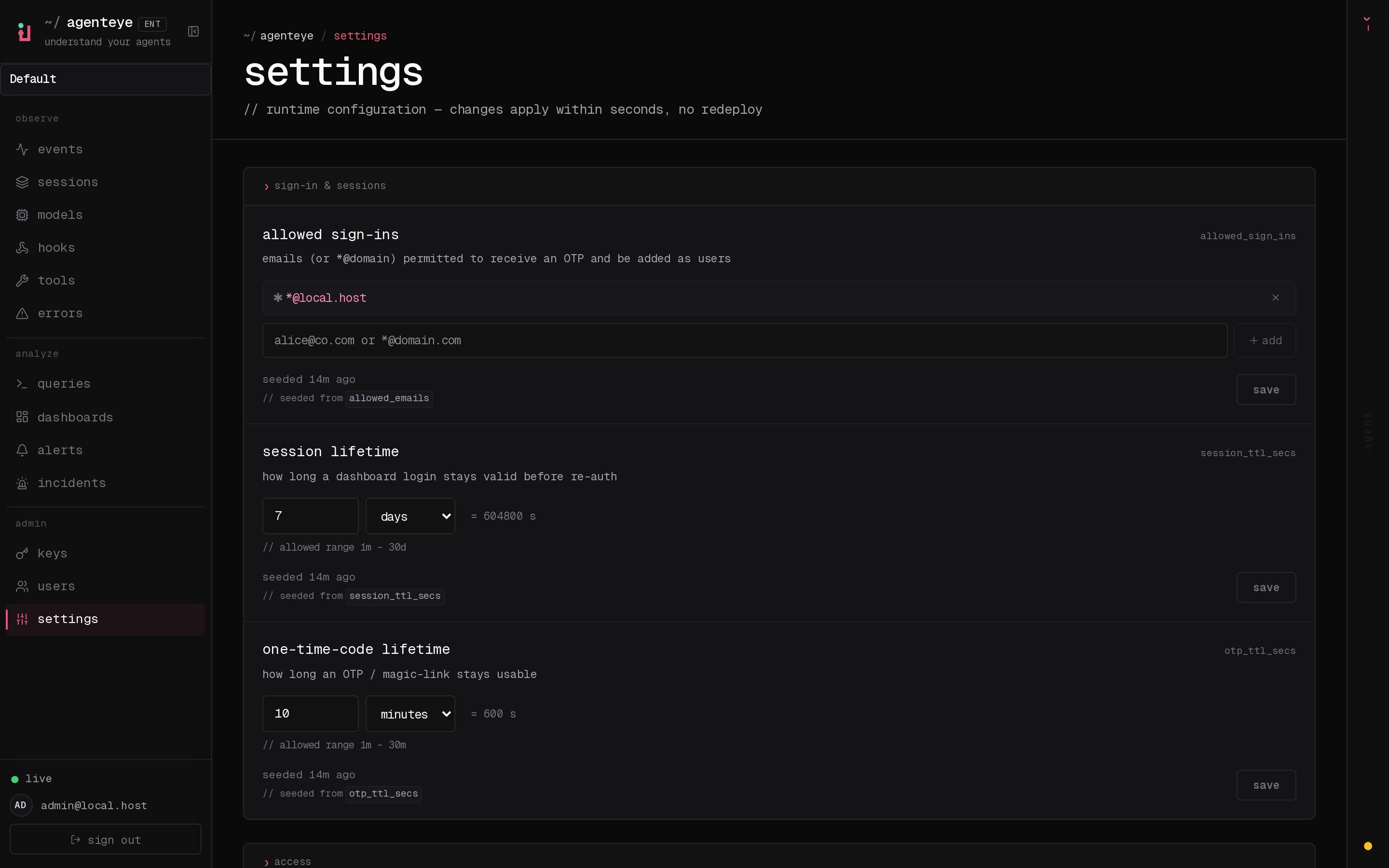
| Permission | HTTP routes | What it allows |
|---|---|---|
settings:read | GET /settings, GET /settings/schema, GET /settings/model-context-windows, GET /settings/model-context-windows/resolve | View dashboard-managed operational settings and their metadata; list per-model context-window overrides; and resolve the effective window for a model. |
settings:write | PUT /settings/:key, PUT /settings/model-context-windows, DELETE /settings/model-context-windows | Edit operational settings and add, change, or remove per-model context-window overrides. Changes affect new events without restarting the server. |
Alerts & incidents
| Permission | HTTP routes | What it allows |
|---|---|---|
alerts:read | GET /alerts, GET /alerts/:id | View configured alert definitions. |
alerts:write | POST /alerts, PUT /alerts/:id, DELETE /alerts/:id, POST /alerts/:id/test | Create, edit, delete, and test-fire alert definitions. |
incidents:read | GET /alerts/incidents, GET /alerts/incidents/:iid, GET /alerts/incidents/:iid/comments, GET /alerts/incidents/:iid/subscribers | View incidents and their triage trail. |
incidents:write | POST /alerts/:id/incidents | Open an incident manually against an existing alert. |
incidents:ack | POST /alerts/incidents/:iid/ack, POST /alerts/incidents/:iid/assign, POST /alerts/incidents/:iid/resolve, POST /alerts/incidents/:iid/comments, POST /alerts/incidents/:iid/subscribe, POST /alerts/incidents/:iid/unsubscribe | Acknowledge, assign, resolve, and comment on incidents. |
Audits
| Permission | HTTP routes | What it allows |
|---|---|---|
audits:read | GET /audits, GET /audits/:id, GET /audits/:id/runs, GET /audits/findings, GET /audits/findings/:fid | View audit definitions, run history, and findings. |
audits:write | POST /audits, PUT /audits/:id, DELETE /audits/:id, POST /audits/:id/run, POST /audits/findings/:fid/status | Create, edit, delete, and run audits; triage findings (acknowledge / mute / dismiss / resolve / reopen / assign). |
When Audits shipped, existing grantees were widened along the same role shapes as alerts: every user and permission set holdingalerts:readgainedaudits:read, and every holder ofalerts:writegainedaudits:write. Existing API keys were not widened — grantaudits:*to a key explicitly if it needs the audit surface.
Stored grants of the legacyalerts:acktoken are parsed asincidents:ackso on-callers retain access without rekeying. The token is no longer assignable from the dashboard’s user editor; the matrix offersincidents:ackinstead.
The recipient-picker endpointGET /alerts/recipients(which lists the member emails an alert editor can notify) is reachable by a holder of eitheralerts:readoralerts:write, so alert editors can populate the picker without being grantedusers:read.
A dashboards viewer needs bothdashboards:read(to load the saved views) andevaluations:read(the health metrics are computed from evaluation data). Grantdashboards:writeto let a user create or edit dashboards, anddashboards:deleteto remove them.
/healthand/auth/*(OTP request, OTP verify, session check, logout) are unauthenticated by design; they’re the login flow and liveness probe.GET /access-grantersrequires a valid key but no specific permission, so any logged-in user can see which admins to contact about access changes.
Permission Sets
Permission sets let you apply a named role instead of hand-picking individual tokens every time. Rather than selecting a dozen permissions one by one for each new dashboard user or API key, you choose a set, and everyone assigned to it carries a consistent, reviewable grant. Editing a custom set re-applies the new grant to every user already assigned to it, so a role change is one edit rather than a sweep through every member. Every organization is seeded with three built-in sets:| Set | Permissions | Intended for |
|---|---|---|
read-only | events:read, keys:read, users:read, evaluations:read, dashboards:read, queries:read, settings:read, alerts:read, audits:read, incidents:read | View-only access across every operational surface. |
standard | everything in read-only, plus evaluations:trigger, queries:run, incidents:ack, agent:use | Read-only plus the everyday on-caller actions: run queries, re-evaluate sessions, acknowledge incidents, and use the AI assistant. |
admin | every assignable permission | Full control of the org. |
read-only, standard, and admin are safe to reference in policy and onboarding. An operator can create additional custom sets to model roles specific to your organization (for example, a “dashboard author” role or a “collector-only” role).
Sets are surfaced in the dashboard and managed over the API at GET /permission-sets (list, gated by users:read) and POST /permission-sets / PUT /permission-sets/:name / DELETE /permission-sets/:name (create, edit, delete a custom set, gated by settings:write). Deleting or editing a built-in set is refused.
Set membership is what backs two other features:
DEFAULT_USER_PERMISSIONS(the grant preselected when an admin opens + new user) defaults to thestandardset. See Deployment.- The
--setflag onagenteye-orgctl(operator member management) starts a member from a named set, which you then fine-tune with--add/--remove. See Tenant Management.
When a set includes a permission that is not key-assignable (for example a custom set carrying keys:update), seeding a key from that set drops the non-assignable tokens; the server would otherwise reject the key with HTTP 422. Dashboard users are not subject to that restriction.
Bootstrap Admin Key
The admin key is the single root credential that lets an operator bring up access from nothing: with it you can mint every other scoped key, invite the first dashboard users, and configure the instance before any other key exists. It is the one key you do not create through the keys API; it is provisioned from the environment so the server is reachable on first boot. Set theADMIN_KEY environment variable on the server. On every startup the server upserts this value as an admin key with all permissions.
To rotate: change ADMIN_KEY to a new secret and restart the server.
Organization scoping
Organizations themselves are created and managed out-of-band by an operator, not through this keys API. Org and member lifecycle (create / rename / delete / purge an org; add / update / remove a member) is done with theagenteye-orgctl CLI that runs inside the server pod; there is no HTTP API or dashboard button for it. See Tenant Management. What is unchanged: per-org API keys are still minted in the dashboard (or via this keys API) by org members.
In a multi-org deployment, every key an org member creates (through this keys API or the dashboard Keys page) belongs to one organization and can only ever read or write that org’s data; the org is stamped on the key at creation and enforced on every request. The two bootstrap keys are the only exception: the admin key (seeded from ADMIN_KEY) and the dashboard-assistant key (seeded from AGENT_API_KEY) are instance-scoped (they carry no org). The dashboard container authenticates with the admin key so it can proxy per-org requests on behalf of signed-in members. Single-tenant deployments need not think about this; all keys belong to the built-in default org.
Creating Keys
Use the admin key (or any key withkeys:create permission) to create additional scoped keys.
Collector key (ingest only)
Dashboard key (read only)
key value yourself; choose a strong secret and store it securely. (The dashboard works the other way: it generates a strong secret for you and shows it once at creation; see Key Management in the Dashboard.) The response confirms the key was created:
Listing Keys
Disabling a Key
Disabling revokes access immediately without deleting the key record.Regenerating a Key
Generates a new secret for an existing key. The old secret is invalidated immediately.Key Management in the Dashboard
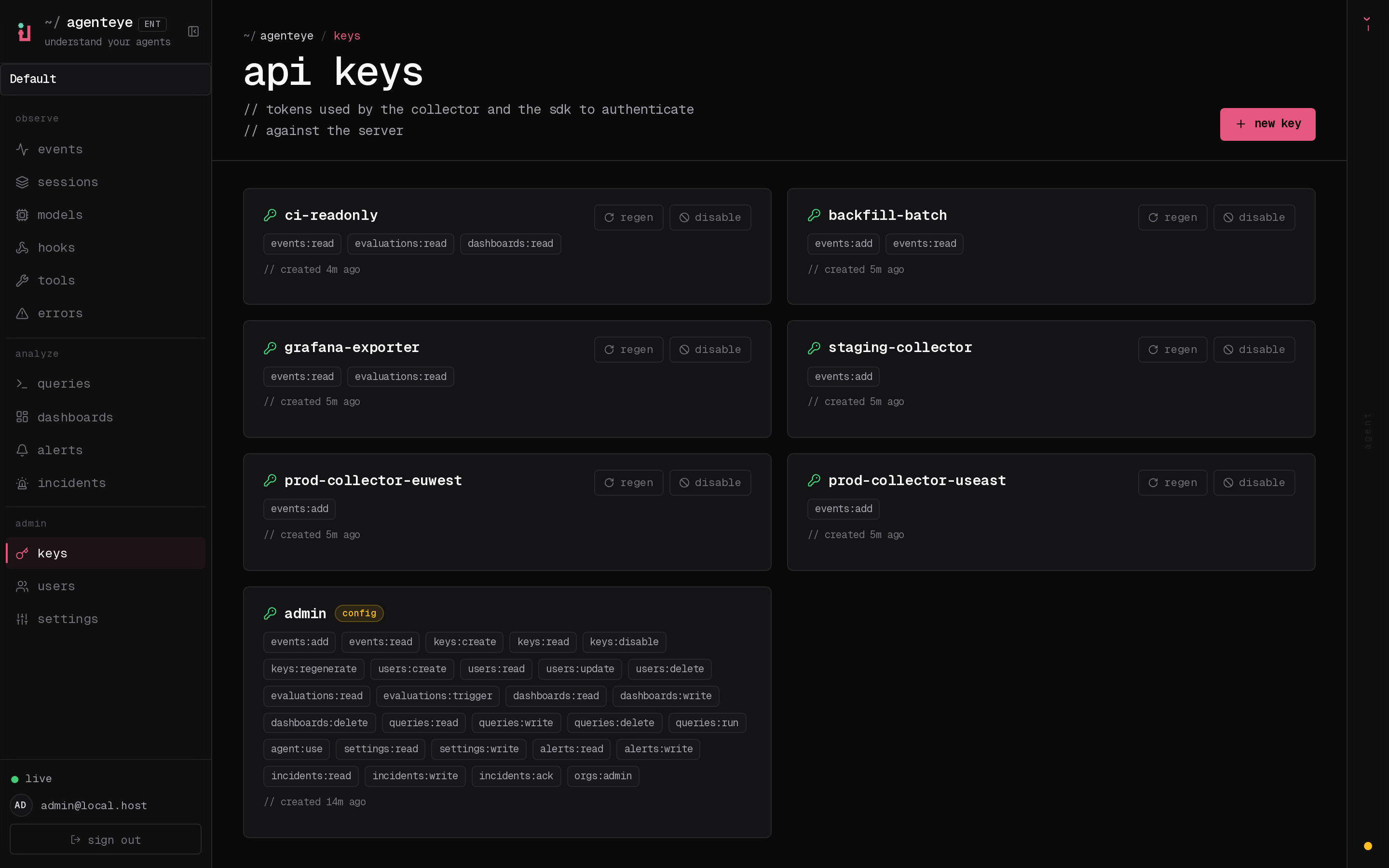
The Keys page in the dashboard provides a UI for all of the above operations. You need a key withkeys:read permission to view the list, and keys:create / keys:update / keys:disable / keys:regenerate for the create / edit / disable / regenerate actions respectively. Editing a key’s permissions (keys:update) is separate from creating one (keys:create), so you can grant an operator the ability to mint keys without the ability to re-scope existing ones, or vice versa. The admin key covers all of these.
When you create a key from the dashboard you do not supply the secret; the dashboard generates a strong secret for you and displays it once at creation. Copy it immediately and store it securely; it is never shown again, exactly as with a regenerate. You can still pick the key’s permissions directly, or seed them from a permission set (see below).
Recommended Key Layout
| Key | Permissions | Used by |
|---|---|---|
admin (bootstrap via ADMIN_KEY env var) | all | Ops/setup, and the dashboard container (authenticates with ADMIN_KEY, proxies user requests with permission checks) |
| Per-host collector key | events:add | Collector on each agent machine |
dashboard-assistant (bootstrap via AGENT_API_KEY env var) | events:read, evaluations:read, dashboards:read, dashboards:write, queries:read, queries:write, queries:run | AI assistant container, seeded automatically, protected; can’t be edited through the API |
| Assistant telemetry key (optional) | events:add | AI assistant self-instrumentation, if enabled |
Assistant key. The assistant’s key is seeded automatically by the server from theAGENT_API_KEYenv var (the same secret the agent presents asAGENTEYE_API_KEY); there is no manual key-minting step and no admin key involved. Its permissions are fixed in source code so scope can’t be widened by misconfiguration: read across events / evaluations / dashboards, plus dashboards-write and queries-read / write / run for the “Ask AI to write a query” authoring flow. All SQL still goes through the same read-only role andsql_guardchecks as a user-written query, so this widens the authoring surface, not the data surface; destructive operations (queries:delete,dashboards:delete) deliberately stay off the assistant key. Like theadminkey, it is protected: it can’t be disabled or regenerated through the keys API, only rotated by changingAGENT_API_KEYand restarting. Dashboard users additionally need theagent:usepermission to see and use the assistant. If you enable self-instrumentation, give the assistant a separateevents:add-only key.