

Author a custom policy
- Dashboard
- CLI
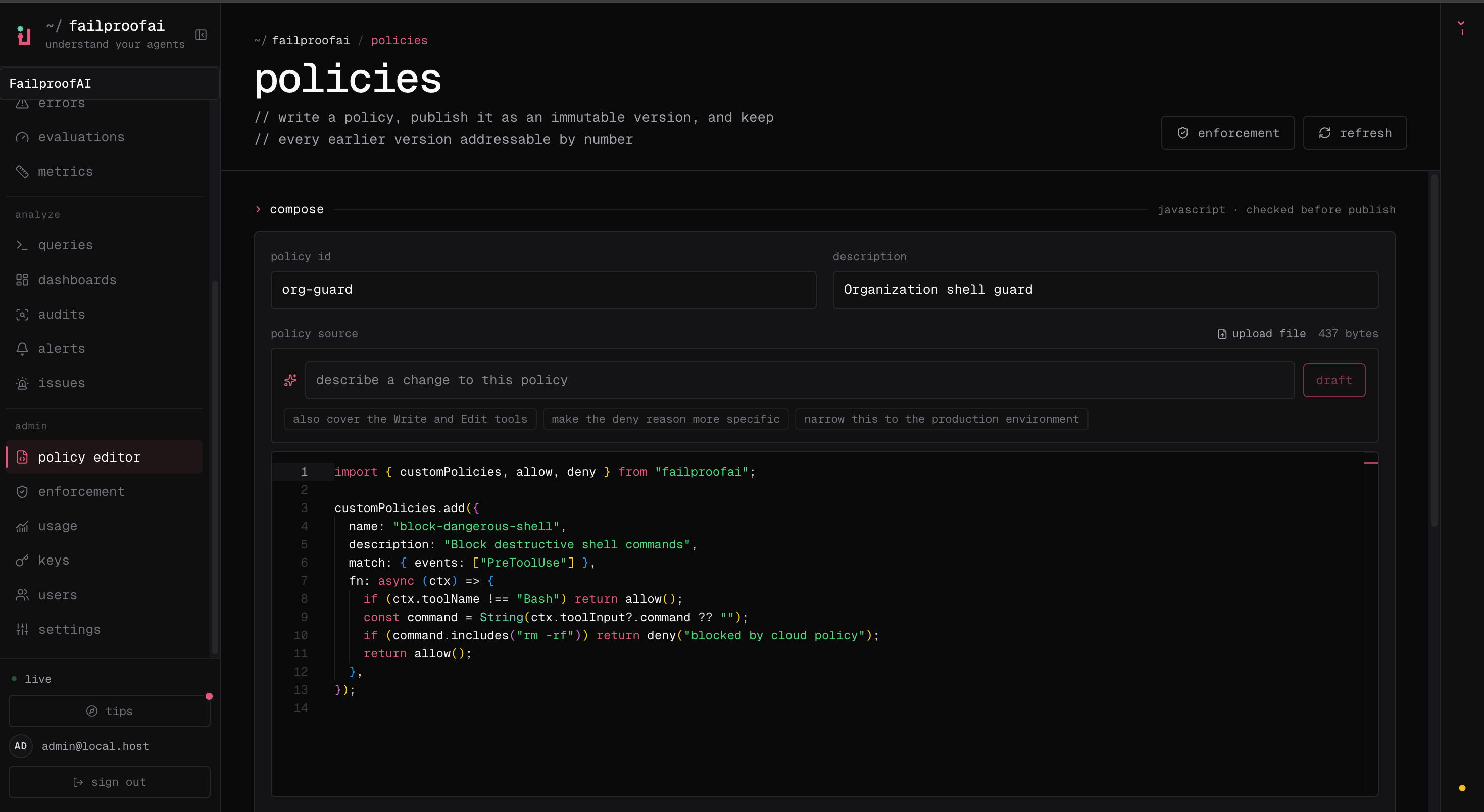
- Go to Admin → policy editor, select New policy, and describe the failure you want to prevent.
- Add the policy source, then test expected matches and safe non-matches in the editor. Resolve every validation error.
- Save the draft and select Publish version to create an immutable version.
-
Go to Admin → enforcement, deploy the version to a test machine in observe mode, and verify its decisions under Observe → policy before enforcing it.
Start with a narrow rule
This policy blocks destructive Kubernetes commands only when the command targets production. Everything outside that exact failure mode returnsallow().
allow() as soon as the rule does not apply.
Choose a decision
Write the reason for the agent that must recover. Explain what was detected and what it should do instead.
Policy object
Filter tools inside
fn. match.toolNames is not part of the public custom-policy type.
Policy context
Every policy receives aPolicyContext.
Treat every optional value as genuinely optional. Agent versions and event types do not all provide the same fields.
Common tool inputs
Failproof AI normalizes common tools across supported harnesses so a policy can usually use one input shape.
Use defensive coercion because tool input values are typed as
unknown:
Choose the event
Event availability and blocking behavior depend on the agent harness. See Agent harnesses before relying on an event across a mixed fleet.
All policy event names
All policy event names
SessionStart, SessionEnd, UserPromptSubmit, PreToolUse, PermissionRequest, PermissionDenied, PostToolUse, PostToolUseFailure, Notification, SubagentStart, SubagentStop, TaskCreated, TaskCompleted, Stop, StopFailure, TeammateIdle, InstructionsLoaded, ConfigChange, CwdChanged, FileChanged, WorktreeCreate, WorktreeRemove, PreCompact, PostCompact, Elicitation, ElicitationResult, UserPromptExpansion, PostToolBatch, and Setup.Author common policy patterns
Block writes to protected paths
Give non-blocking guidance
Gate session completion
Load policy files
Convention files
Convention files load automatically:- Project and user policy directories are both loaded.
- Files load alphabetically within each directory.
- A file must end in
policies.js,policies.mjs, orpolicies.ts. - Multiple
customPolicies.add()calls in one file are supported. - Relative imports from local modules are supported.
- Project policies can be committed so the same rules follow the repository.
Explicit files
Use explicit paths when validation or configuration should name the entry file directly:Validate and test
Validation executes the module through the production loader and confirms that it registers at least one policy.- One action that must match and produce the intended policy reason.
- One nearby but safe action that must return
allow(). - Missing or malformed tool fields.
- Alternate command syntax, paths, quoting, casing, and whitespace.
- An unavailable subprocess or network dependency.
Runtime behavior
- Built-in policies evaluate before custom policies.
- The first
denystops further policy evaluation. - Multiple
instructresults can be combined when no policy denies the event. - A policy function has a 10-second execution deadline.
- A thrown exception or timeout is logged and treated as
allow(). - A convention file that fails to load is skipped; other custom files and built-in policies continue.
- Top-level module loading also has a 10-second deadline.
- Cloud observe mode runs the policy but records a non-allow decision without enforcing it.
fn, catch dependency failures, and choose deliberately whether that failure should allow or deny the operation.
Jev checks
A custom policy decides with code. A Jev check is a set of yes/no questions the Jev semantic evaluator answers about a tool call instead. Areviewable policy names checks in reviewedBy, and Jev may clear its verdict only through them — see Policy authority. Declare one with semanticPolicies.add():
A precondition is a name, never code: a manifest cannot carry a function, and a downloaded pack must not decide what runs on every tool call.
API exports
TypeScript exports
PolicyContext, PolicyResult, CustomHook, PolicyDecision, PolicyFunction, PolicyAuthority, SemanticPolicyDeclaration, SemanticProbeDeclaration, and SemanticToolClass.
Deploy custom policies
Publish a version, deploy it in observe mode, verify decisions, and move to enforcement.