

Jev reads a tool call against what the person asked the agent to do. Use it when a string-matching policy blocks valid work or misses a risky action that needs context. It answers alongside your policies at the PreToolUse or PermissionRequest gate. For a score after a session ends, use Jev evaluations.

Start in observe mode

Install Failproof AI and attach hooks to a supported harness. Use failproofai 1.0.8-beta.0 or later. Failproof AI ships no Jev checks. Install them as a pack, or Jev has nothing to ask and is never called:
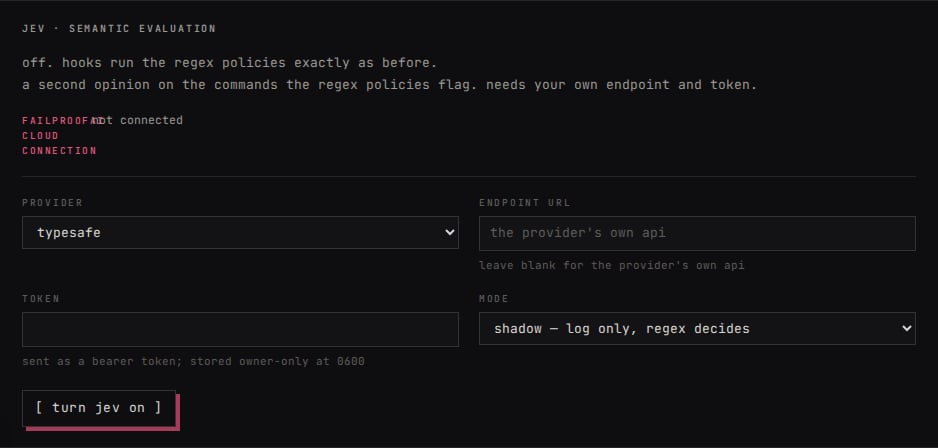
Then choose how requests reach Jev: The local dashboard's Jev settings: provider, endpoint, token, and observe mode before turning Jev on.
test checks the endpoint. To check the hook path, ask a hooked agent to use its file-reading tool on README.md. Confirm that tool call appears in the session, then inspect Policies → Activity in the local dashboard. The Jev count in status should increase. Observe mode records what Jev would have decided while your existing policy result still applies.

Decide when to enforce

A hard policy always has the final say. Jev may clear a deny only from a policy explicitly marked reviewable and only when it checked that policy’s named concern. See policy authority before relying on a clearance. Jev can also warn or deny on its own. If it cannot answer, the policy result decides that call. Once the observe results look right, switch to enforce mode in Settings → Jev or run:
For provider URLs, Cloud keys, configuration, fallbacks, and data sent with each request, see the Jev integration reference.