

A Jev evaluation reads a finished session and gives a score from 0 to 1. Use it when the answer is known in advance, such as “Did the customer express urgency?” or “How frustrated was the customer?” It helps you find patterns across runs; it does not stop a tool call. For decisions made before a tool runs, use Jev policies.

Create one in the dashboard

  1. Open Analyze → eval authoring and select new eval.
  2. Describe one question and its possible answers. For example: “Did the agent promise a refund before checking the refund policy? Answer yes or no.” Select draft and review that the result is a classifier score.
  3. Test it on recent sessions, then deploy it. New completed sessions are scored; backfill if you also need history.
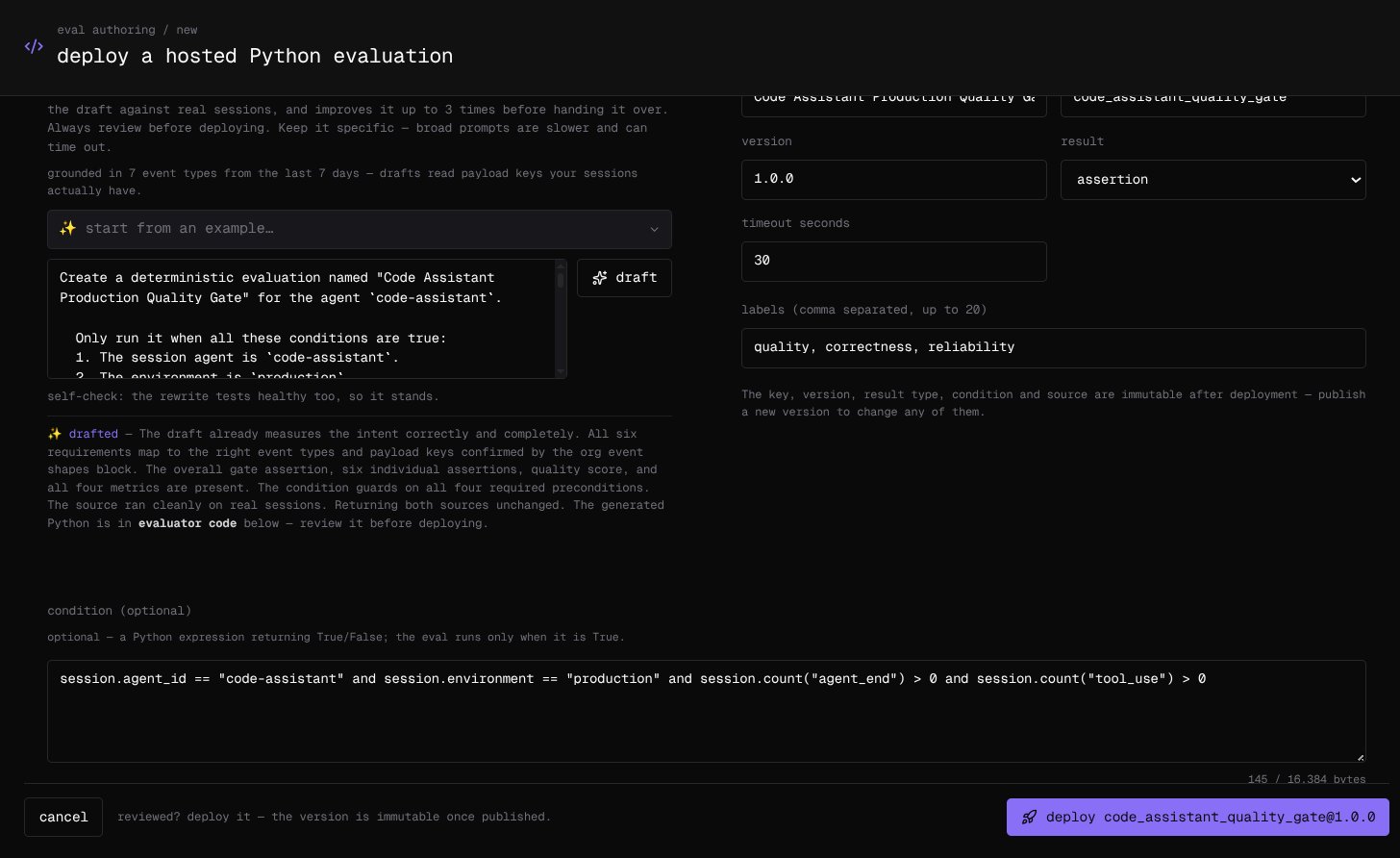
The shared eval authoring form, where you describe a fixed-answer question, review the draft, and deploy after testing. The example shown is a code evaluation; a Jev question uses the same authoring flow. The assistant can choose between code, Jev classification, and a judge. Check its choice before deploying. Jev gives a score without prose reasoning; choose a judge when you need an explanation. See the Jev evaluation reference for question types and score limits.

Read the scores

Open Observe → Evaluations to chart the result by agent and time. From a terminal, the Cloud CLI can read the same results:
The Cloud CLI reads results; authoring and deployment happen in the dashboard. See the Cloud CLI reference for filters.