

Deploy it

Select deploy <key>@<version> at the bottom of the authoring page. The version is immutable once published: from then on, every session that finishes, and that its condition applies to, is scored by it.

See what is live

Analyze → eval authoring lists your organization’s hosted definitions, the evaluations the managed evaluator runs for it. Each row shows:
  • its name, key, version, and result type
  • its source checksum, which tells deployed revisions apart without opening the code
  • whether it is conditional or runs on all completed sessions — the condition is what scopes an evaluation to particular agents or environments
  • its timeout, its labels, and when it last changed
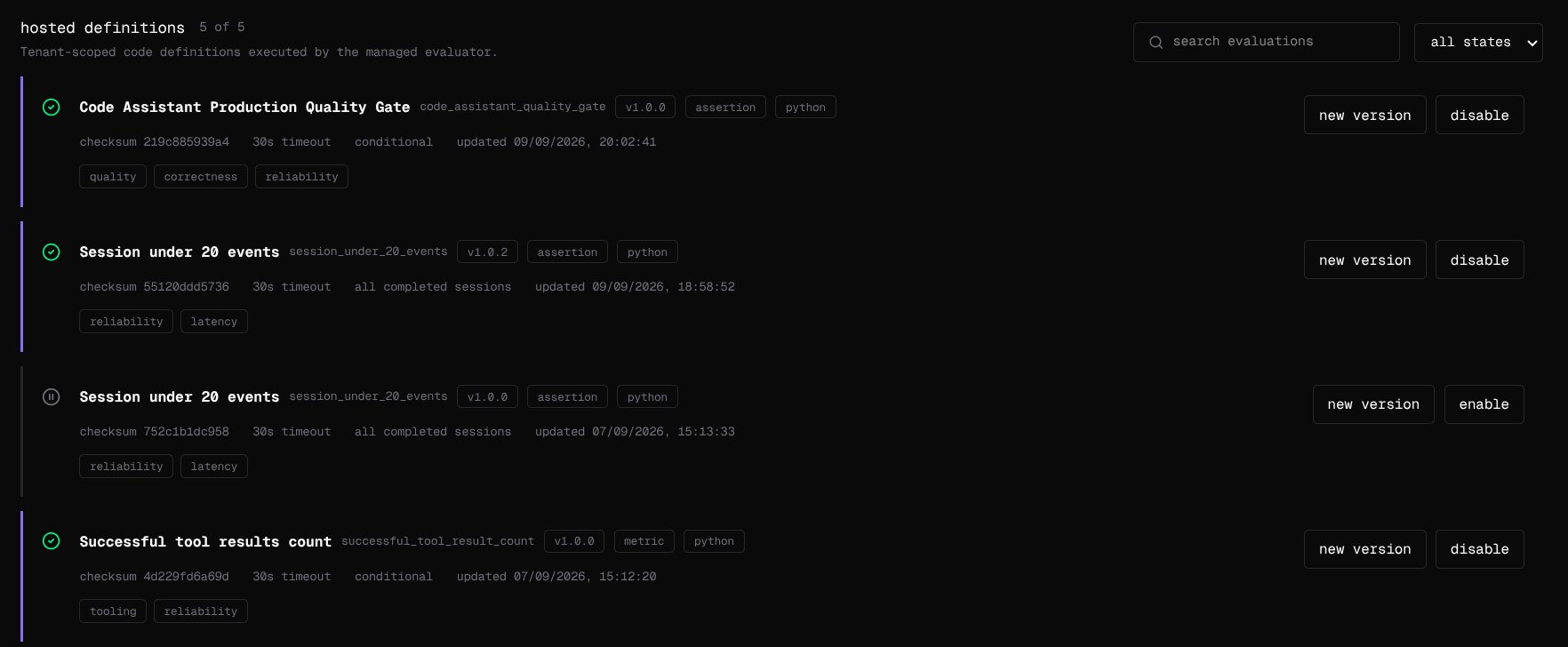
The hosted definitions list: each evaluation's name, key, version, result type, checksum, timeout, and scope, with new version and enable or disable. Search the list, or filter it by state. Evaluations your own worker registers are not listed here; their results carry a customer tag on the evaluations page, and hosted ones carry managed. An organization can have up to 100 different hosted evaluations enabled at once.

Publish a new version

Select new version on a row. The authoring page opens with that version’s code; change it, test it, and deploy it. Its key and result type carry over and cannot change. Publishing a successor disables its predecessor and keeps it on the list. Results keep the version that produced them, so a chart shows exactly when the new logic took over.

Roll back

Select disable on the current version and enable on the one you want back. Nothing is deleted, and every result stays as it was.

Stop an evaluation

Select disable. With no enabled version, it stops running on new sessions. To stop an evaluation your own worker runs, stop registering it: remove it from the worker, or stop the worker.

Score sessions you already have

Evaluation runs forward: a version deployed now never scores a session that ended before it. To score history, open score sessions you already have on the eval authoring page, choose a window of up to 90 days and, optionally, a single evaluation, and count before you run. The count is exactly what will run, and each session-and-evaluation pair in it is a billable evaluation. It fills gaps only. A session that already has a result for that evaluation keeps it, and running the same window twice scores nothing new. To score one session again — after a fix, or for a session that never ended cleanly — select re-evaluate on its page. The new result is added to the session’s history; earlier ones stay.

Permissions